Inspiring
December 18, 2014
Answered

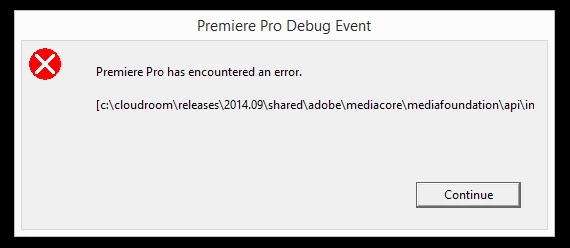
Premiere pro CC2014.2 crashes on launch: c:\cloudroom\releases\2014.09\shared\adobe\mediacore\mediafoundation\api\inc\Keyframe/Keyframe.h-146

  • December 18, 2014
  • 23 replies
  • 23072 views

Hi,

I just updated to cc 2014.2. The first time I opened an existing project, it woked fine. Then I created a new project and premiere crashed. Since this first crash, premiere crashed evey time I try to open a project.

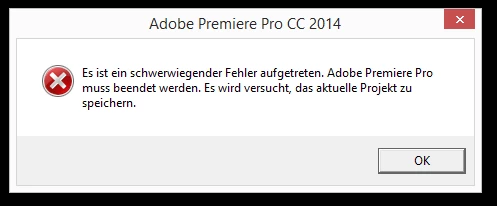
This means "a serious failure occurred..."

Nice update, this is a really handy feature 😉

Johannes

===============================================================

Title edited by moderator to include the specific error.

    This topic has been closed for replies.
    Correct answer Mark Mapes

    We are investigating this issue. What's causing Premiere to crash is that file where custom effects presets are saved is getting corrupted. What we have not yet isolated is how it's getting corrupted--that is, how to reproduce this issue.

    The workaround is to delete the the file: Effect Presets and Custom Items.prfpset, which is stored here:

    C:\Users\<username>\Documents\Adobe\Premiere Pro\8.0\Profile-<username>

    Any information you can provide about your custom presets could help us isolate how to reproduce this problem, which is key to fixing it correctly--and confirming that it's fixed.

    1. Did you create your own custom presets of get them from a 3rd party vendor
    2. Did you create new presets in 8.2, import third party presets directly into 8.2, or import your own or third party presets from an earlier version of Premiere Pro?
      1. If you imported them, how exactly did you do so? Via Premiere's Import Presets command or by manually copying the .prfpset file from an earlier version?
      2. Also, if you imported them from an earlier version, do you know exactly which version(s) the presets file passed through?
    3. If you created them in 8.2, was iCloud installed at the time?
    4. Were you able to launch Premiere successfully after creating or importing effect presets, or did it start crashing on the very next launch. If Premiere succeeded in launching even once after adding the custom presets, then any information you can provide about what you did within Premiere in the session immediately prior to the first crash could be tremendously valuable.

    If your custom presets originated from a third-party download (as opposed to being your own home-made ones), and if you originally imported them in an earlier version of Premiere, then you might be able to get them back into operation by importing them directly into 8.2. We suspect that a key to the bug is that the .prfpset file was “touched” by an earlier version.

    Our apologies for the inconvenience and stress, and our thanks for any info you can provide to help identify the cause and fix it.

    @ Jennifer: given that you're able to launch Premiere successfully and the crash doesn't occur until you scrub the Timeline or perform various editing operations, I'm pretty sure that you're hitting another issue altogether. I recommend starting a new thread.

    23 replies

    Participating Frequently
    December 18, 2014

    Having a similar crashing problem since the update to 2014.2 - My system crashes while scrubbing, alt clicking, adding an edit... I've tried the following; with no avail,

    Uninstalling Premiere and Reinstalling,

    Renaming the Adobe Folder within, My Documents, and then re-syncing my settings with the cloud.

    I thought it may be a driver issue with my K5000 however, I have updated to the latest driver (clean installation) and it still is having the same issue,...

    I am going to attempt to go back to 2014.1 with a direct install.

    Jennifer Stern

    HPZ820

    Windows 7 Ultimate,

    2.6 (Two Processors)

    128 Gig of Ram

    Mark Mapes
    Mark MapesCorrect answer
    Participating Frequently
    December 19, 2014

    We are investigating this issue. What's causing Premiere to crash is that file where custom effects presets are saved is getting corrupted. What we have not yet isolated is how it's getting corrupted--that is, how to reproduce this issue.

    The workaround is to delete the the file: Effect Presets and Custom Items.prfpset, which is stored here:

    C:\Users\<username>\Documents\Adobe\Premiere Pro\8.0\Profile-<username>

    Any information you can provide about your custom presets could help us isolate how to reproduce this problem, which is key to fixing it correctly--and confirming that it's fixed.

    1. Did you create your own custom presets of get them from a 3rd party vendor
    2. Did you create new presets in 8.2, import third party presets directly into 8.2, or import your own or third party presets from an earlier version of Premiere Pro?
      1. If you imported them, how exactly did you do so? Via Premiere's Import Presets command or by manually copying the .prfpset file from an earlier version?
      2. Also, if you imported them from an earlier version, do you know exactly which version(s) the presets file passed through?
    3. If you created them in 8.2, was iCloud installed at the time?
    4. Were you able to launch Premiere successfully after creating or importing effect presets, or did it start crashing on the very next launch. If Premiere succeeded in launching even once after adding the custom presets, then any information you can provide about what you did within Premiere in the session immediately prior to the first crash could be tremendously valuable.

    If your custom presets originated from a third-party download (as opposed to being your own home-made ones), and if you originally imported them in an earlier version of Premiere, then you might be able to get them back into operation by importing them directly into 8.2. We suspect that a key to the bug is that the .prfpset file was “touched” by an earlier version.

    Our apologies for the inconvenience and stress, and our thanks for any info you can provide to help identify the cause and fix it.

    @ Jennifer: given that you're able to launch Premiere successfully and the crash doesn't occur until you scrub the Timeline or perform various editing operations, I'm pretty sure that you're hitting another issue altogether. I recommend starting a new thread.
    Participant
    December 19, 2014

    Hi Mark,

    when I tried your workaround it didn't solve the problem. Maybe because I don't have any 3rd party presets and I did and do not have any effects presets? I just build some presets within Premiere, mainly workspace and keyboard presets. Are they also stored in the file you mentioned? Maybe not I guess.

    Anyway, I cut the "Effect Presets..."-File from the folder and pasted it on my desktop. I just didn't want to delete it completely. Premiere still showed the error.

    Then I tried Chrisanthi Pels suggestion which worked fine. But as you can imagine all my presets were lost. So I thought what if I put the old "Effect Presets..."-File back? Do my workspace presets come back or will there be the error again? But when I put the old file back in the new folder just nothing happend. No old presets but also no error. Premiere is running again.

    So I restored my lost presets with the synch-feature and Premiere is still running.

    I just discovered that I have one effect preset that I build within Premiere for a very old project, maybe a year ago. This preset still works fine.

    I hope I could help a little bit with my informations. Feel free to ask if you need more details.

    @ Chrisanthi Pel: Thank you very much for your quick fix!

    Best regards

    Fabian


    I cheered to soon. The error is up again after I installed the "Miraizon ProRes Codec" and restarted my system.

    Known Participant
    December 18, 2014

    hi,

    i have exactly the same problem. the only that is resolving this, is the "adobeold" trick. that means that everytime i need to open a new project or open a new one, i have to go to documents and rename the "Adobe" folder into "Adobeold" or smth like that, and then, open my project. the problem is that everytime, presets dissapear, and keyboard shortcuts too. meanning that everything goes back to default and i have to do it all over again from the begining. this sucks. i forgot to say, that, when i got "The support" from the adobe guys when i asked why this is happening, the just say : there is no specific reason...

    jojejoAuthor
    Inspiring
    December 18, 2014

    Hi Chrisanthi Pel,

    thank you so much! I was installing, unistalling, trying this and that... your trick is the solution!

    For your problem with the keyboard shortcuts; the next time you have setup your system with all your personal setting (inkluding sutom effect presets, render presets, etc) just syncronize it with the cloud. Then after doing our trick, you can sync back from the cloud. this takes 10 seconds and all your settings are back.

    Tanks again!

    Johannes

    Known Participant
    December 19, 2014

    hi jojejo, glad to help

    i ve tryied to sync with the cloud, but as soon as i synchronise, the error pops up.. so.. its not working for me. :S

    jojejoAuthor
    Inspiring
    December 18, 2014

    Sorry, I forgot my system specs.

    Win 8.1

    Intel i7 960x

    24gb ram

    GTX 680

    CC 2014.2

    Participant
    December 18, 2014

    Hi everyone,

    It seems like this might be a common error with the new update...

    I have the exact same problem, exact same error text. This shows up even if I try to create a new project.

    I thought it could be the result of an error during the installation routine, but when I uninstalled and installed new, the error still occurs.

    Has anybody found a solution for this problem yet?

    Regards

    Fabian