
This is Nolt
Participant
May 9, 2019
Answered

Premiere Pro Clips Freeze on Playback please help me

  • May 9, 2019
  • 3 replies
  • 7310 views

Okay, I'm very new to premiere pro. I have been working on a few gaming montages, getting my clips from xbox recordings (Mp4 h.264) most are 1080p and a few are 720p. I used to use iMovie and never had this issue once so needless to say, I have no idea what's going on here. To explain it best, I have short screen recording.

Premiere Pro Issue - YouTube

the first clip in the sequence is 1080p which the video freezes the last second. The last 2 are both 720p where the second clip freezes at the last second and the final clip is just... horrible.

sequence is set up for 1080p. I have used the media encoder to change the clips over to mpg2 and that didn't work. The audio plays fine but this is really annoying at this point. I'm hoping somebody here will have some direction to me. Thank you in advance to everyone!
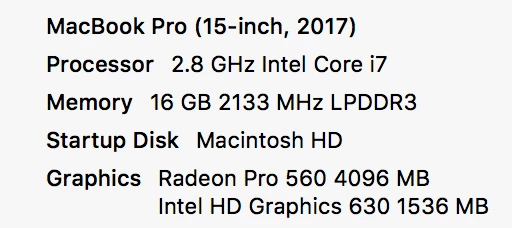
there's the computer specs. If more info is needed let me know!

    This topic has been closed for replies.
    Correct answer gerikp

    If Smooth Video Motion isn't working maybe try a test where you use Handbrake to convert your files to Constant Frame Rate.

    3 replies

    Community Manager
    May 10, 2019

    Hi there,

    Please check if the media files that you are using have Variable frame rate (VFR). If so, please try enabling the Smooth Video Motion under MPEG Source Settings and check if it helps.

    FAQ: How to work with Variable Frame Rate (VFR) media in Premiere Pro?

    Thanks,

    Sumeet

    This is Nolt
    Participant
    May 10, 2019

    This is one of the things I was curious about!

    yes they are on variable frame rate, I just changed the settings and it fixed the issue with the final clip being horrendous.

    However, this didn't solve the issue where the last second of the clips freeze before they are finished. The audio plays fine as usual.

    Even if I clip the video a little longer, it will still freeze the video for the last second while audio continues on.

    Thank you for solving the first issue!!

    After testing in premiere pro, the only issue I am left with is the final second of the original clip freezing before it finishes playing. The audio does not freeze, only the playback of the video. Funny thing is, even when I export the video and finish it, it will still have that same freeze right in the final version.

    I checked all the clips opening them up in VLC and in quicktime and they all playback fine.

    Edit: Problem not solved. After adding more videos and continuing on editing, the issue still occurs with other videos which don't even give me the option for "smooth motion" like the one clip did. The one thing I did notice, the video playback was fine, I added a clip to the end of one of the clips that had the "last second freeze" issue I mentioned earlier and now this clip is laggy just as the third one in the above video. I really don't understand this at all and it's becoming quite frustrating now.

    gerikp
    Community Expert
    gerikpCommunity ExpertCorrect answer
    Community Expert
    May 11, 2019

    If Smooth Video Motion isn't working maybe try a test where you use Handbrake to convert your files to Constant Frame Rate.

    Community Expert
    May 10, 2019

    try to export them or create proxies as Quick Time GoPro Cineform YUV 10 bit

    Peru Bob
    Community Expert
    Community Expert
    May 9, 2019

    What is your hard drive setup (how many, what kind, what is on each, and how full)?

    Delete the Media Cache and Media Cache files.

    If that doesn't work, Try resetting the preferences:

    FAQ: How to reset preferences in Premiere Pro?

    If that doesn't work, try resetting the Workspaces:

    Reset a workspace

    Reset the current workspace to return to its original, saved layout of panels.

    1. 1. Do one of the following:
      • Click the Workspace menu icon and select Reset to Saved Layout.
      • Choose Window > Workspace > Reset to Saved Layout.

    from here:

      https://helpx.adobe.com/premiere-pro/using/workspaces.html

    If that doesn't work, try using proxies:

    Work offline using proxy media |

    This is Nolt
    Participant
    May 10, 2019

    So ive tried both of these, including a fresh install without saved preferences and no luck.

    The hard drive I'm using is the built in flash storage. Off the top of my head I don't know the make, it's 512bg with 264bg used. including a bootcamp partition of 70gb.

    Edit: I have also tried to add the proxy, had no luck with that. I take it this is not typical?