
Participant
February 7, 2021
Question

Premiere Pro Composer Arabic Text Error

  • February 7, 2021
  • 1 reply
  • 2841 views

I have a problem in premiere pro composer for Arabic text it reads it left to right and mess up all the words I normally can type with the text tool in Arabic but when I use composer templates in premiere pro it mess it up all is there is any fix for this ? here is a picture to be more clear 
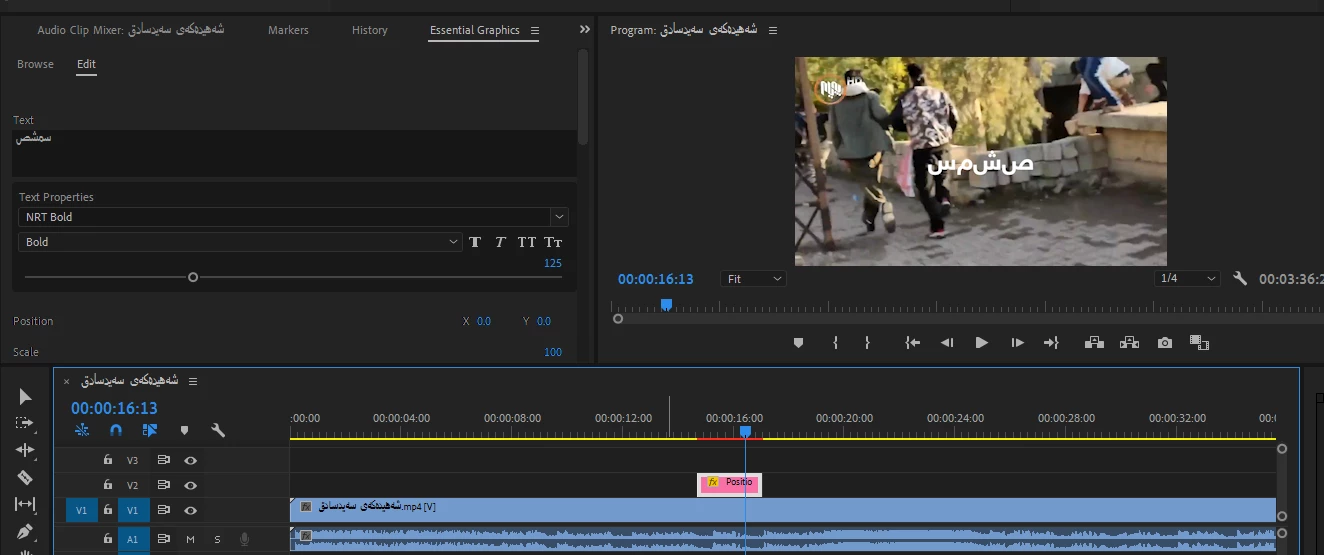
 
can anyone help me with this ?

This topic has been closed for replies.

1 reply

Community Manager
February 8, 2021

Hi Mhamad5E2F,


Sorry about the poor experience. Please ensure that the Text Engine is set to South Asian and Middle Eastern & the Default Paragraph Direction is set to Right to Left under Preferences > Graphics. Let us know if it helps.


Thanks,

Sumeet

Participant
February 9, 2021

Hello 
Thanks for the answer 
yes i set it to South Asian and Middle Eastern and the  Default Paragraph Direction is set to Right to Left

For normal texts it has no problem but for the Composer  it shows like that

TriRashed
Participating Frequently
March 9, 2021

I have gone through this problem many times. As long as your settings are fine you now need to chose a font that works with arabic. Try with Arial and let me know if it works.