
lindyj52398396
Participating Frequently
January 10, 2018
Question

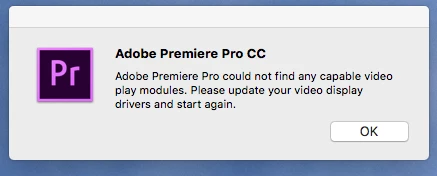
Premiere Pro could not find any capable video play modules (MAC OS HIGH SIERRA)
  • January 10, 2018
  • 1 reply
  • 1617 views

Hi, I just upgraded to Premiere Pro 2018 and it won't start due to the above error. I've checked permissions on the following folders:

Library/ Application Support

Library/ Preferences

Documents

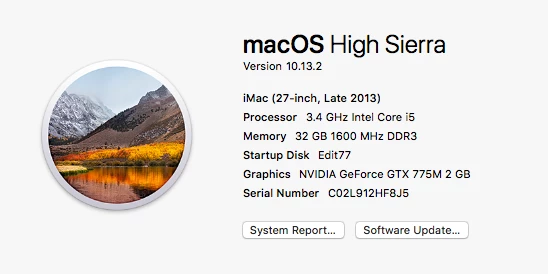
I also tried renaming the folders as well. Everything recommended has not worked. My system specs are the following. Is anyone else experiencing this issue with 2018?
This topic has been closed for replies.

1 reply

John T Smith
Community Expert
Community Expert
January 10, 2018

1 - do you have the latest driver from NVidia?

2 - Mac troublshooting steps https://forums.adobe.com/thread/1622987

lindyj52398396
Participating Frequently
January 11, 2018

Yes I do have the latest driver. Still no luck bypassing the error.

Kevin-Monahan
Community Manager
Community Manager
January 11, 2018

LindyJ,

Did you install this one? NVIDIA DRIVERS 9.0.214

Please check.

Thanks,
Kevin

Kevin Monahan - Sr. Community and Engagement Strategist – Adobe Pro Video and Audio