May 10, 2012
Answered

Premiere Pro could not find any capable video play modules

  • May 10, 2012
  • 39 replies
  • 194612 views

I downloaded the trial of Premeire Pro CS6 today, and after I launched the application, it said "premiere pro could not find any capable video play modules".

Tried again, no luck.

My graphics card is at the latest driver that HP has out.

What should I do before I give up?

HP DV7t Quad 17'' Laptop

i7 2720

AMD Radeon 6770HD (Switchable Graphics)

8GB Memory

    This topic has been closed for replies.
    Correct answer alexandrepitre

    Has any one found a solution? every other CS6 app works fine but PP yet my laptop (same as the one mentioned above, HP dv7) is well within the specs (2.5gb 1920/1080 /w OpenGL 2) it is however a Radeon dualed with an intell HD... could this be the issue (dual cards OR Radeon) as I have noticed Adobe plastering Nvidia all over the website and the laptop won't initeate the higher end card until the program launches (i have mannualy configed it but have noticed that games that set the graphics before loading (Skyrim, Witcher2) willnot detect the higher graphics card, nore will dxdiag) have included some screne shots to hopefully help.
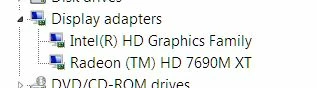
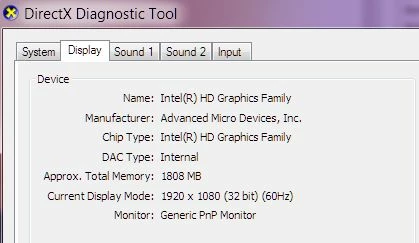
    I was able to resolve this problem on a laptop. In the AMD control panel, the main GPU selected was the Intel integrated video card that come with the processor instead of the more powerfull AMD video card.

    So, for those of you out there that have an Intel processor with the integrated GPU, make sure adobe premiere isn't using the Intel GPU to launch.

    39 replies

    Vincent Kovacs
    Participant
    October 17, 2014

    Hi,

    I think I found it solution for that. It made by your firewall blocking adobe premiere pro.exe file, GPUSniffer.exe and dynamicklinkmanager.exe. You have to just let those files through your firewall.

    That's all

    Participating Frequently
    October 19, 2014

    Swell... I founded a palliative solution... I converted all files to WAV audio 48000 16bit and is running very well. I exported all audios sequence before editing and completely replaces the audio track .

    solshinesolshine
    Participant
    October 12, 2014

    I'm trying to solve the same error on start up. "Adobe Premiere Pro could not find any capable video play modules. Please update your video display drivers and start again." I have a MacBook Pro.

    Processor: 2.9GHz Intel Core i7

    Memory: 8GB

    Graphics: Intel HD Grpahics 4000

    VRAM: 1024MB

    I've looked at: Error "Premiere Pro could not find any capable video play modules" | Startup

    Looked into #1, I think #2 and #3 don't pertain to me because of the Intel HD graphics, but let me know if I'm wrong, and would need more help to do #4.

    Is my system not set up for Premiere? What are solutions for Mac?

    Participant
    August 1, 2014

    Hello There,

    I faced the similar problem, here is my laptop config

    HP Pavilion 15 Notebook PC

    Core i7 Intel Chipset

    AMD Radeon 8600M 2GB

    16 GB DDR3 RAM

    I simply uninstalled the AMD Catalys Control Center and also other AMD related softwares from my system, downloaded the latest, AMD Control Center from : Download Drivers (you have to select your preferences first), and installed it fresh, Then I ran the the Premier Pro with Administrative Power (Right click and run as administrator).

    and it simply is running.

    Participant
    July 24, 2014

    Alright, I'm completely befuddled and frustrated. I'm getting this exact same error message ("Adobe Premiere Pro could not find any capable video play modules. Please update your video display drivers and start again.") despite setting Premiere Pro CS6 to Run As Administrator and Run With Graphics Processor: High Performance NVIDIA Processor. After Effects, Photoshop and Audition all open without a hitch. I have the most current GeForce driver available (that isn't in Beta, that is). I've tried running the compatibility troubleshooter and everything. Nothing fixes it.

    Here's the thing. Premiere will occasionally work. The problem is, I can't nail down what changes. I've tried a myriad of things but can't seem to figure out why it'll suddenly work, I'll be in there for a long time with no issue, I'll close out and put the laptop to sleep, come back later to work again and the error greets me once more. None of the above solve my problem.

    Here's my info: Asus Q550LF; Windows 8.1

    Processor: Intel(R) Core(TM) i7-4500U CPU @ 1.80GHz

    Installed Memory (RAM): 8GB

    System Type: 64-bit Operating System, x64-based processor

    GeForce GT 745M Driver Version: 337.88

    Participant
    July 24, 2014

    I've discovered something: if I have my laptop plugged in to a power source, Premiere powers up without a hitch. Unplugged, I get the aforementioned error message. However, if I plug it in, open Premiere and then unplug the power cord, Premiere functions fine. I've been through all the power options and cannot find anything that seems to be blocking Premiere or the graphics driver from being functional based on power connectivity. Any thoughts?

    Participating Frequently
    July 20, 2014

    You must set the GPUSNIFER.EXE as High performance in Catalist Control.

    Dr__Mattrix
    Participant
    August 26, 2013

    If you have Intel and Radeon cards installed in your PC, configured switchable graphics in Catalyst Control Center and set Premier Pro CS6 to run as admin without success, go to your BIOS and change your graphics mode there.

    April 3, 2014

    What about if you have a desktop PC...

    I have a Dell T3610 and it just started doing this today, no dual video cards at all.

    Dr__Mattrix
    Participant
    June 7, 2014

    Did you check your BIOS settings? What graphics card do you have?

    Participant
    June 1, 2013

    i in same situation can anybody please help me out "adobe premiere pro could not find any capable video play modules please update your video drivers and start again."

    ...?

    My Computer COnfiguration
    Dell Inspiron 15r

    Participant
    June 3, 2013

    Hi there,

    I believe, I can help you out. Please contact me on sunny@fullmealsstudio.com . Carrying on conversation here will only prolongate the thread unnecessarily.

    GLakie
    Participant
    August 25, 2013

    The solution is actually simple. I had the same problem with a new HP Envy Win8 OS. What I did was uninstall Premiere Pro. Then I used my internet security(Webroot in this case) and run the scan to clean my registry files. Then did a restart, turned off Webroot and the Windows Firewall. Then reinstalled Premiere Pro and launched the program, before turning back on security features. Now it works just fine. It IS funny how, out of all the other Adobe Apps, this one is the ONLY one to cause a problem, but anyway, this solution worked for me. This solution should probably be made sticky, but who am I?

    Participant
    September 28, 2012
    Participant
    December 14, 2014

    THANK YOU!!!! I have an HP Envy 3200 8GB RAM and intel i7 NOTHING worked until this.

    Known Participant
    September 21, 2012

    The solution I found was to uninstall Comcast Constand Guard. It worked for me when nothing else did. I kept norton, just uninstalled Constant Guard.

    Participant
    September 21, 2012

    Brilliant. I was looking for a good excuse to uninstall Constant Guard. And it solved the problem with Premier Pro. Starts up fine now. Not sure how you figured that out, but Thank You!

    Participant
    September 19, 2012

    SOLVED

    Hi there guys,

    I have THE BEST working solution right now.

    Go to the Switchable Graphics app and browse for the Premiere Pro 6 folder.

    There, select "Adobe Premiere Pro" file and set it to High Performance.

    Then go back to the same folder and select "GPUSniffer" and set it to High Performance.

    And EUREKA! Everything works!!!

    Participant
    September 19, 2012

    What and where is the switchable Graphics app?

    Participant
    September 20, 2012

    One of the problems that causes this particular error is the AMD switchable graphics module.
    You access it by right clicking on the desktop.

    Another method is to run Premiere Pro as Administrator.

    Another method is to update BIOS. But please, don't forget to backup your previous BIOS. To backup the BIOS, the method is given in the link provided below.
    http://www.hardwaresecrets.com/article/41