

Premiere Pro crashes when exporting
Premiere pro either crashes or gives me blue screen every time I try to to export anything. My project is a 300mb 5 minute video. I've read just about every thread on this issue and have not found a solution. These are all I've tried:
- changing the format to something less intensive like from h264 to .avi
- Tried different sequences
- Tried changing name of output file
- tried changing the video renderer from CUDA to software
- tried rolling back to previous versions of Premiere pro.
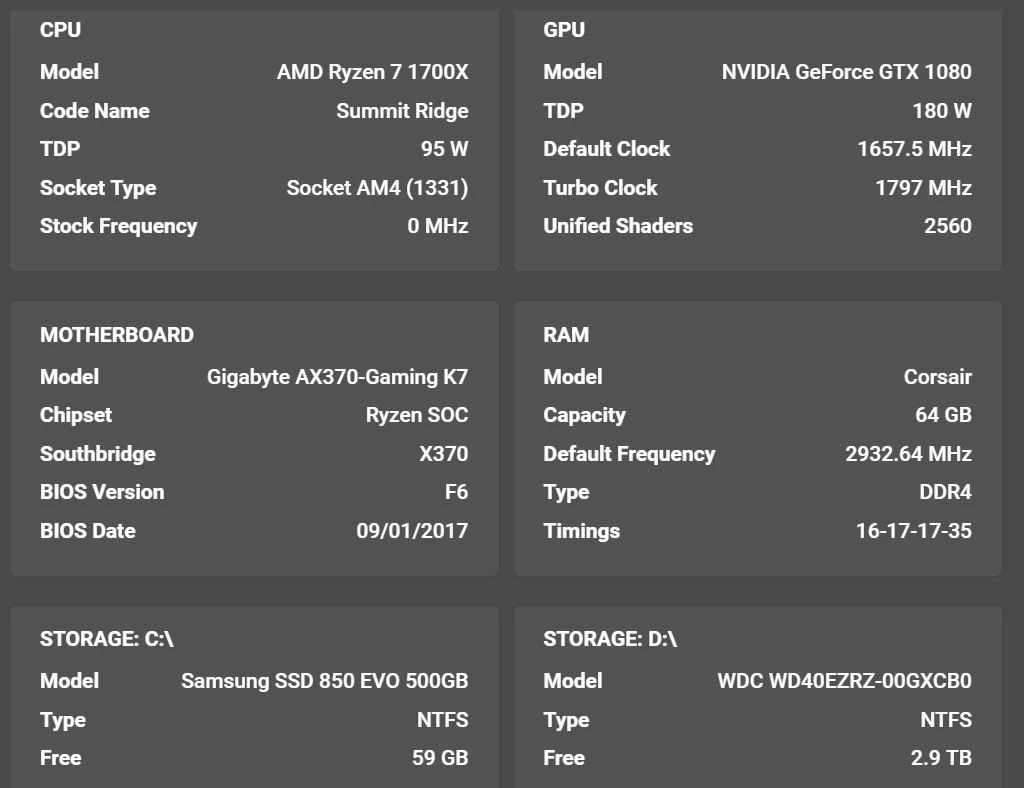
My friend pointed out that my fans go crazy when my computer shuts down which may be pointing at a psu issue so I've upgraded my psu from 750w to 1000w; still no fix. What is wrong?? AME crashes also, so is it my computer? I can't imagine so as I'm able to render the project just fine. The only thing I'm contemplating at this time would a be a clean install of windows but I'm not even entirely sure if that will work either.


 AdChoices