
kaseyradatti
Participant
March 31, 2019
Answered

Premiere Pro Creating Weird Zero KB TextEdit files

  • March 31, 2019
  • 11 replies
  • 5926 views

Hi all,

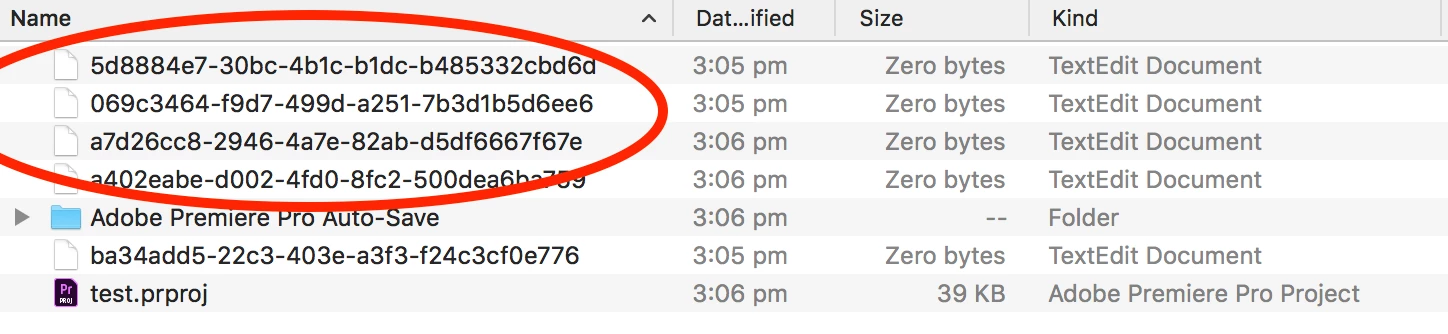
In the past week, I've noticed anytime I create a new Premiere Pro project or open an existing project it makes odd files (containing numbers and letters eg. 478d7f12-2c9b-4ad5-a3dc-20f0d40c63c3) in the same folder as the .prproj file.

The files are saying they are zero bytes and don't contain any data. They also stay there after closing the project and accumulate the longer I use the project.
I am also having issues seeing my audio waveforms in any project I create. The only way to see audio waveform is to zoom in.  Could these issues be related?

I was running Premiere Pro 2018 (v12.1.2) and have updated to Premiere Pro 2019 (v13.0.3) but the issue hasn't changed.

Please help!

Thank-you,

Kasey

This topic has been closed for replies.
Correct answer Chad Baker

These files are created by the Mac OS when the project file is saved to a remote drive when the user does not have full read/write/execute/delete permissions for the location. These files are usually created and deleted without the user ever knowing. However, because the user does not have full permissions, the file is created but not deleted and is left behind to become worrisome to the user and visually distracting. Giving the user full 777 ACLs to the destination folder will resolve this problem.

11 replies

Participating Frequently
August 12, 2020

Actually, not true.  Our end users have full 777 access to the remote SAN but the files still get created.

Kevin-Monahan
Community Manager
Community Manager
August 12, 2020

gi williams,

Thanks for the note. Can you let our devs know your findings? https://adobe-video.uservoice.com/forums/911233-premiere-pro


Thanks!
Kevin

Kevin Monahan - Sr. Community and Engagement Strategist – Adobe Pro Video and Audio
Inspiring
August 12, 2020

Actually, this isn't true because I have full access to my computers and peripherals. And this issue disappeared when Adobe updated the Premiere Pro app.

Chad Baker
Adobe Employee
Chad BakerCorrect answer
Adobe Employee
August 12, 2020

These files are created by the Mac OS when the project file is saved to a remote drive when the user does not have full read/write/execute/delete permissions for the location. These files are usually created and deleted without the user ever knowing. However, because the user does not have full permissions, the file is created but not deleted and is left behind to become worrisome to the user and visually distracting. Giving the user full 777 ACLs to the destination folder will resolve this problem.

Participant
January 20, 2022

Hi @Chad Baker @Kevin-Monahan , this is happening to me on my mac's local HD.  It began once I switched over the the new MacBook M1 Max. It's located in a Dropbox folder however, I've always used Dropbox and never encountered this issue before.
I'm on Premiere v22.0.


Participant
August 3, 2022

it must be a monterey issue because it started happening to me once i upgraded to it...?

Participating Frequently
June 18, 2020

We're still seeing this issue.  Unfortunately, we can't follow the troubleshooting steps the Adobe tech suggested through our support case because we are all working remotely.  I hope everyone is safe and well.

Participating Frequently
February 27, 2020

Hello All! 


I opened a case with Enterprise Support and I reeived a response today that they will try to get it assigned to the dev team for an upcoming release, but are not sure of the timeframe.  I realize this is vague, but at least it's an acknowledgement that Adobe is aware of the issue.  I will post updates here as I receive them.


I clicked on one of the files created during testing.  It generates a text log file:

logout

Saving session...

...copying shared history...

...saving history...truncating history files...

...completed.

Deleting expired sessions...1 completed.


My thinking is that these are benign, although annoying, but if anyone has more insight in to the role of these files, please let me know.  Thanks!


Cheers!  


Ginny

TERTL
Participant
January 29, 2020

Hello everyone!


We are also curious to know if this issue has been resolved or not.  I've scoured the internet and my team has dug through every setting imaginable (which shouldn't even be necessary since our systems pretty much run at default) and have yet to find a solution.  

Participant
February 19, 2020

Still having this issue when working from my work server.

TylerBurroughs1696715
Participating Frequently
June 5, 2019

I am also experiencing this issue.

I am working off an external drive. My system specs:

MacOS Mojave (10.14.5)

2018 MacBook Pro 15-inch

2.9 GHz Intel Core i9

Radeon Pro Vega 20 4 GB

Intel UHD Graphics 630 1536 MB

Premiere Pro 13.1.2 (Build 9)

This is really frustrating... media cache and scratch disk is pointed to separate folders.

Kevin-Monahan
Community Manager
Community Manager
June 6, 2019

Hi Tyler,

Can you do a test with a different user account? Same thing happening?

Let us know.

Thanks,
Kevin

Kevin Monahan - Sr. Community and Engagement Strategist – Adobe Pro Video and Audio
Vinay Dwivedi
Adobe Employee
Adobe Employee
June 7, 2019

I followed those steps. unchecked Creative Cloud Sync and restarted my machine. Premiere is still generating these files every time I save though.


Please post a screenshot of Preferences>Media Cache and Autosave.

devineedits
Participant
May 23, 2019

I've noticed this as well. It only occurs when working on external drives, not locally. Happening to multiple editors in my department.

kaseyradatti
Participant
April 4, 2019

I haven't solved what the issue was but I found doing an OS update to Mojave (10.14) fixed both issues!

However, I discovered a colleague of mine is also having the same issue of audio waveforms not generating. His issue was only affecting new music tracks imported. He found that an audio track that he'd used months ago would import fine and show waveforms. Very strange!

He was running MacOS Mojave so he couldn't do an update to try fix the issue.

R Neil Haugen
Legend
April 3, 2019

Where do you have the Project Settings "Scratch disks" set, and where do you have the Media Cache locations set ... does either of those involve placing near the project file?

Neil

Everyone's mileage always varies ...
Participant
April 3, 2019

Neil,

Are you saying these files are normal behavior?

Chuck

R Neil Haugen
Legend
April 3, 2019

Just looking at the numbers ... that's the type of numbering you find in the cache/cache-database//pek folders. So I was curious where those files are supposedly getting parked on your machine.

Neil

Everyone's mileage always varies ...