
Participant
January 4, 2012
Question

Premiere Pro CS5.5 Exporting To .MP4

  • January 4, 2012
  • 2 replies
  • 36119 views

I'm having a fair bit of issues with PPro cs5.5-

We're filming on an XDCAM EX and use PPro to edit the files natively for better quality. We've been doing this for a while, and were hoping that you guys could help us try to find a new exporting answer.

So we import native footage from XDCAM and then we export in h.264 to get an MP4 file which we then use as a master copy to compress into different formats such as QT, WMV, F4V, and M4V

We would export the entire video to MP4 (usually comes out to around 12-15gb for 30+ minute videos) and then re-import this footage back into PPro to add a watermark and export to the formats above.

Everything is working out pretty well, except that the MP4 format takes an extremely long time to export. We're talking about 6-7 hours using effects on the video like Colorista, Looks, and Dynamic Linking to AE.

Is there any way that this can be shortened but still have a good quality master copy?

Here is a photo of what our settings look like for the export:
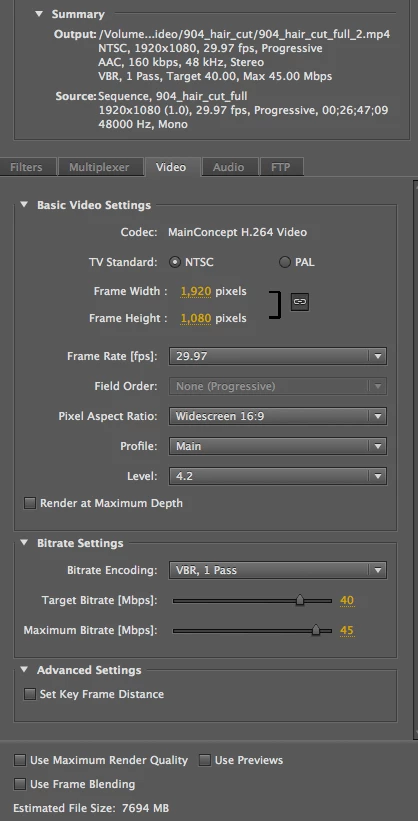
thanks!

This topic has been closed for replies.

2 replies

Legend
January 4, 2012

Colorista and Looks will slow things down considerably.  That's just the nature of those effects.

Kevin-Monahan
Community Manager
Community Manager
January 5, 2012

I would export all the formats you need from Media Encoder with a watch folder set up for each of the desired settings. You do not need an intermediate file on a Mac, for sure. For more explanation of exporting different formats using watch folders in Media Encoder, see this video by Jan Ozer: http://vimeo.com/23697399

More: http://help.adobe.com/en_US/mediaencoder/cs/using/WSb8e30982e628fbec-a5468e9131255217e9-8000.html

Kevin Monahan - Sr. Community and Engagement Strategist – Adobe Pro Video and Audio
mattsphatAuthor
Participant
January 4, 2012

Also, here are my CPU stats

Inspiring
January 4, 2012
So we import native footage from XDCAM and then we export in h.264 to get an MP4 file which we then use as a master copy to compress into different formats such as QT, WMV, F4V, and M4V

You should avoid using a compressed format like .mp4

as a master that you intend to recompress to other formats.

Use an uncompressed or lossless codec instead.

Better yet, simply add the watermark to the timeline and export

to the required formats without using any intermediate file at all.

If you need to archive a master without the watermark,

export it as a separate file in an uncompressed or lossless codec.

mattsphatAuthor
Participant
January 4, 2012

Well the thing is that I work on a MAC and need an intermediate file so I can export to WMV by transferring the file over to the PC and compressing the video there.

If there is a faster just as good looking export as MP4, what would it be and what settings would you recommend?

Exporting the timeline with all the edits and placing the watermark on the video defeats the purpose of what I'm asking from the forums since exporting in any format with all the effects on the video takes more than twice as long than having a master and just re-importing the file.

Unless there is something I am doing wrong?