

Premiere Pro Error When Rendering Clips Using the "Warp Stabilizer" Plugin
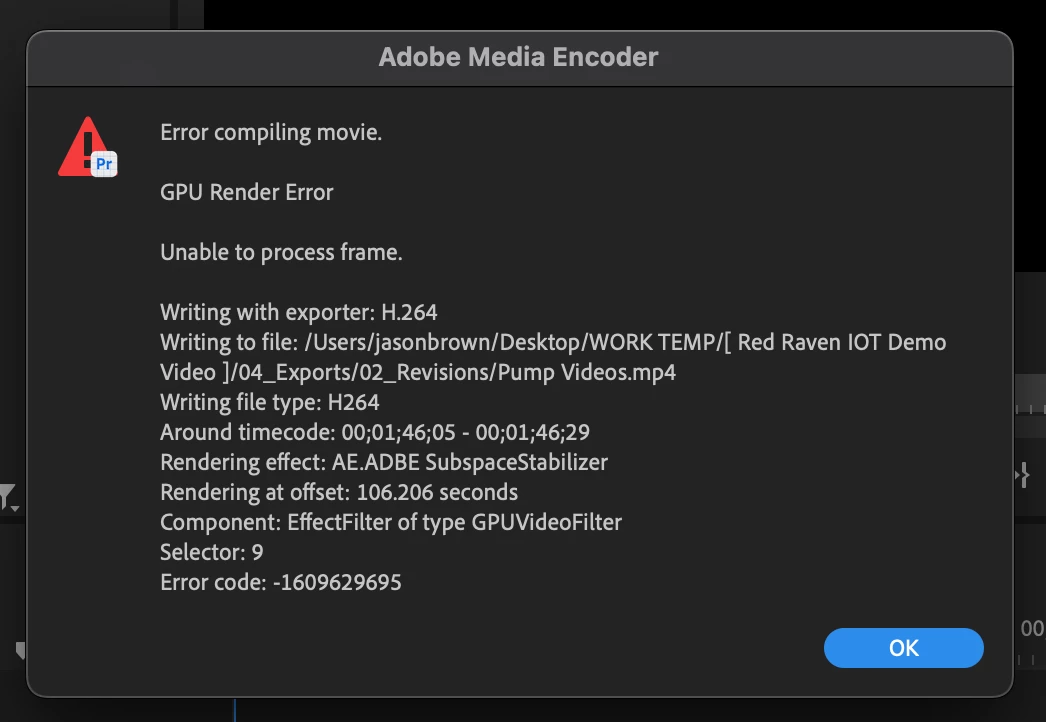
I have had this error on multiples machines Win/Mac on every version of Premiere Pro since 2022 and maybe earlier. I try to renders a sequences with a few short clips that I have had to stabilize using the Warp Stabilizer plugin. If I have just 1 or maybe 2 clips, it works fine. But, if I push it and use more, or if I use a lot of clips, I get this error every time, no matter what version or what machine. I am currently on a MacBook Pro M2 Ultra with 96Gb of Memory, a 2 TB Hard Drive, running Ventura 13.5.2.
The only way I am able to get the sequenced rendered is to export to Media Encoder and change the GPU renderer to "Software Only".
I hope someone can find out why this keeps happening and come up with a fix for it. The last timeline I did would have taken maybe a few minutes, but after I switched it to Media Encoder and Software Only, it took nearly 3 hours to render. It isn't very practical. However, it is a must use, go to Plugin.
-Jason Lanier Brown
 AdChoices