
Participating Frequently
March 30, 2022
Answered

Premiere Pro export light glitch

  • March 30, 2022
  • 4 replies
  • 2173 views

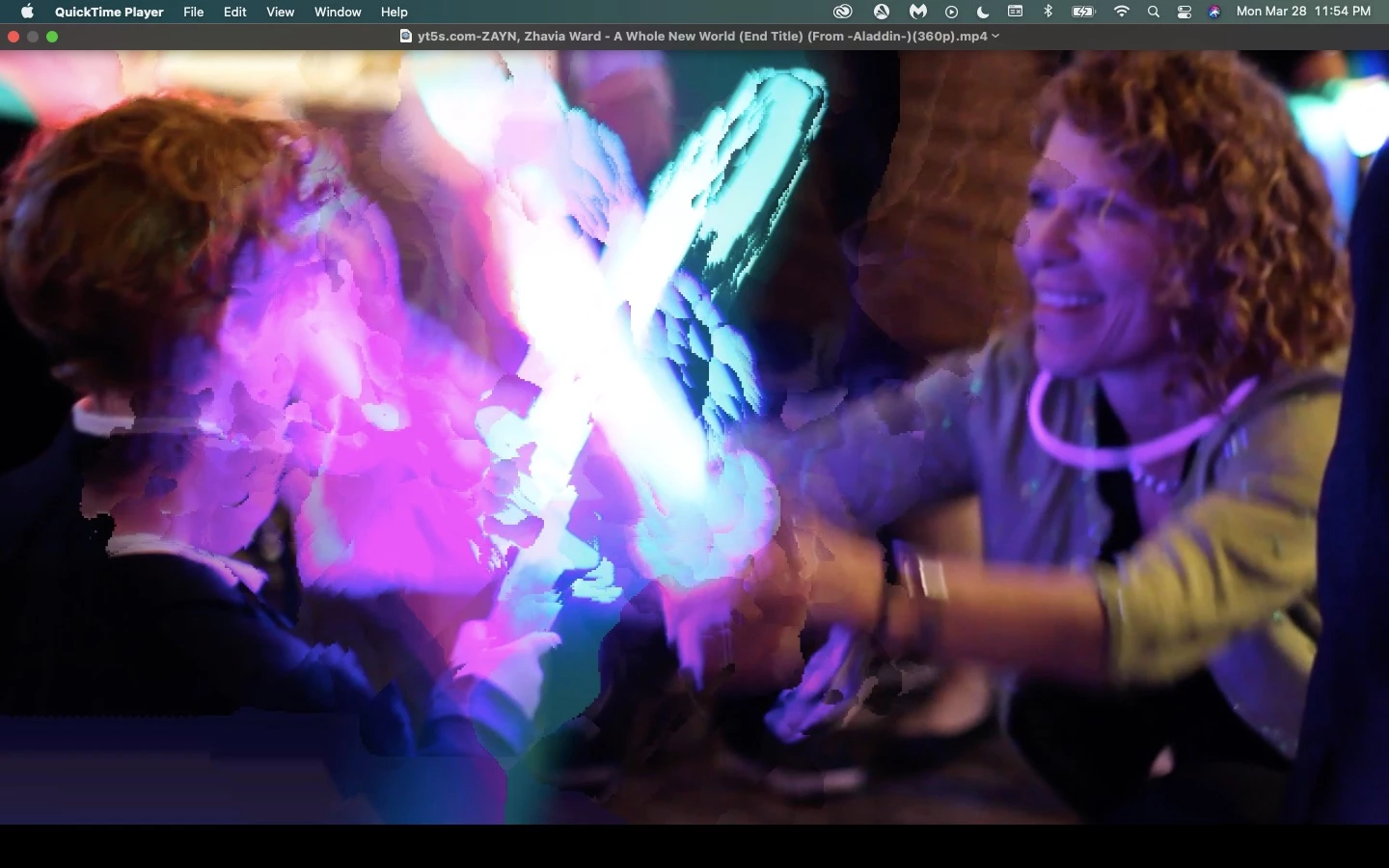
I don’t know why but when I export my video the end result has a bunch of these glitches with light. It’s fine when I edit but once I export its a mess. I’ve tried different formats, different presets, I’ve tried rendering, turned down saturation in lumetri scopes…what’s going on?
This topic has been closed for replies.
Correct answer Steve Griffiths

Have you applied a speed/duration change to this shot? And if so, are you using 'optical flow' as the time interpolation method?

This looks like a classic case of optical flow artifacts, caused by the moving and flashing light ... something that optical flow doe not handle well.

Change the interpolation for this clip to 'frame blending'. It won't have as smooth motion but it also won't have the artifacting.

4 replies

Richard van den Boogaard
Community Expert
Community Expert
March 30, 2022

Can you please confirm whether or not this was indeed an optical flow issue? Otherwise, if you provide us additional information we can try and help you out...


Thanks.

Christian.Z
Community Expert
Community Expert
March 30, 2022

This looks like an optical flow issue

Joost van der Hoeven
Community Expert
Community Expert
March 30, 2022

I too think you have Optical Flow turned on. Switching to on of the other interpolation modes will fix this issue.

Participating Frequently
March 31, 2022

I'm going to try that now thank you. Am I doing this for every clip?

Steve GriffithsCorrect answer
Inspiring
March 30, 2022

Have you applied a speed/duration change to this shot? And if so, are you using 'optical flow' as the time interpolation method?

This looks like a classic case of optical flow artifacts, caused by the moving and flashing light ... something that optical flow doe not handle well.

Change the interpolation for this clip to 'frame blending'. It won't have as smooth motion but it also won't have the artifacting.

Participating Frequently
March 31, 2022

That worked. I literally screamed. Thank you.

Inspiring
March 31, 2022

Yeah I'm noticing that the flow isn't as great. Would that be fixed if I rendered first or is that just the cost of not using optical flow?


Yeah, optical flow is pretty nice when it works.

I've gone to great lengths sometimes to combine optical flow and then switch back to frame blending only on problem shots. i.e. layering up problem shots (layer 1: Optical flow, layer 2: frame blending - and masking out the problem areas and using the flame blending layer.

Or you could even put cuts on your problem shots and switch to frame blending for the few frames where optical flow fails. That can *sometimes* work.

Preview rendering first just means you can then watch the program through and only turn optical flow 'off' when necessary.