
Participant
October 18, 2023
Question

Premiere Pro exporting 25 fps

  • October 18, 2023
  • 2 replies
  • 614 views

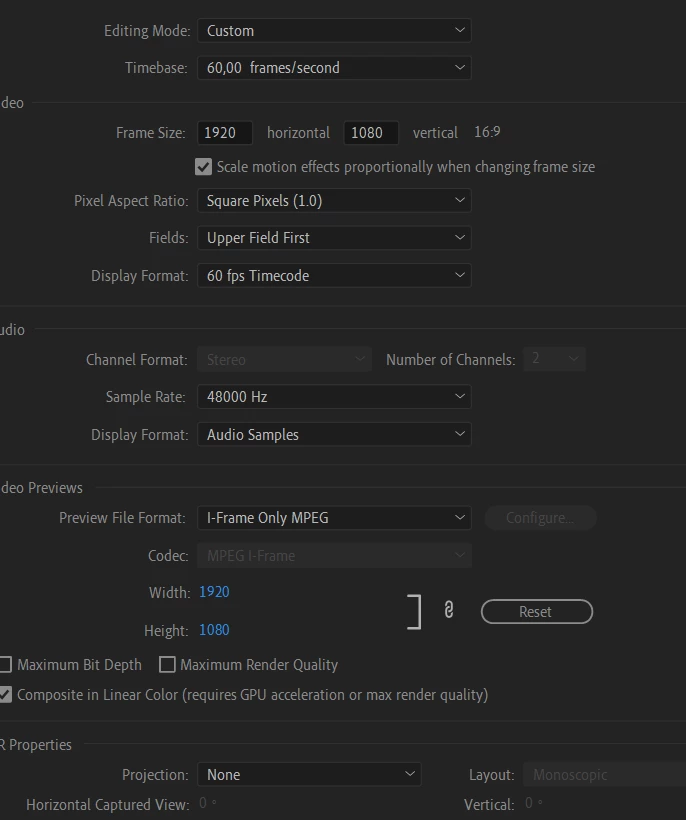
First, hello everyone. I edited a simple 30 seconds video on Premiere Pro 2020 version. I'm trying to export it but it seems low fps. It exports 25 fps everytime. I checked the sequence. It's 60fps. I don't know why. Can you help me? 
 

    This topic has been closed for replies.

    2 replies

    MyerPj
    Community Expert
    Community Expert
    October 18, 2023

    It looks like a somewhat older version of Premiere. Which version are you on, hardware, win, mac? Specs of hardware.


    That looks like the sequence settings. You'll need to set your FPS in the EXPORT settings, which appear to not match in your case.

    UsardaAuthor
    Participant
    October 21, 2023

    I already told that I'm using Premiere Pro 2020 version on the title. I'm using a Windows. I have GTX 1060, i7 th gen, 16GB Ram. And I set fps in export settings.

    MyerPj
    Community Expert
    Community Expert
    October 21, 2023

    So, that's the sequence settings. You have basically a 30fps sequence setting. The clue being 'upper field first' so, that's interlaced video, like from the 60's (70s - 80s), pre-digital. That typically would say 'No Fields (Progressive scan)'. It's either set wrong, or you dropped in an interlaced clip to an empty timeline and it made your sequence like that.

    kglad
    Community Expert
    Community Expert
    October 18, 2023

    in the future, to find the best place to post your message, use the list here, https://community.adobe.com/

    p.s. i don't think the adobe website, and forums in particular, are easy to navigate, so don't spend a lot of time searching that forum list. do your best and we'll move the post (like this one has already been moved) if it helps you get responses.


    <"moved from using the community">