
Participant
November 11, 2017
Answered

Premiere Pro Exporting Issues - Video Listed as 0:00 in Length

  • November 11, 2017
  • 2 replies
  • 4924 views

I am trying to export a 36 minute video that I am planning on uploading to YouTube. The footage was captured with an Elgato in 720p and then imported into PP.

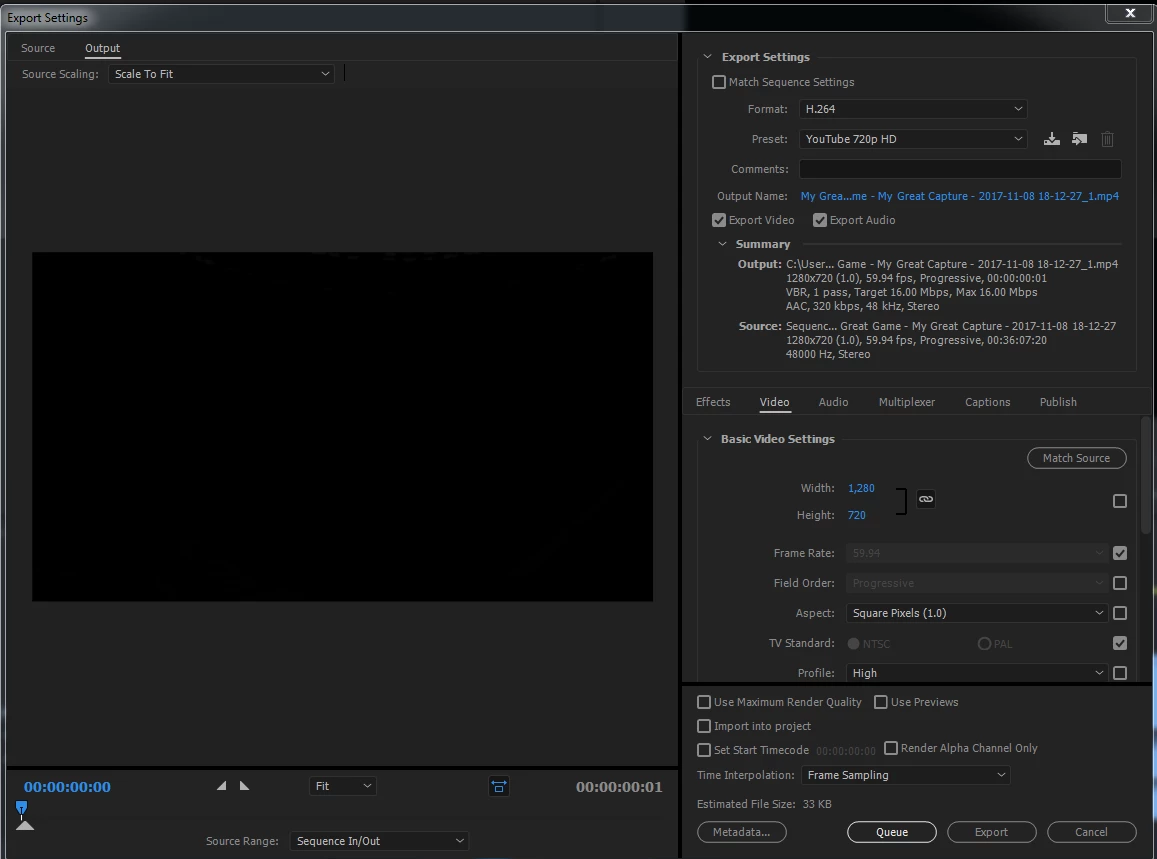
When I attempted to export as a H.264 (which I have seen as the suggested format for YouTube videos) with the YouTube 720p HD preset selected the video produced is listed as 0:00 in length with a minuscule file size. I have tried pressing 'queue' and going through the encoder as well as hitting 'export' for the straight export.

Even now as I look at the 'export settings' page it shows me that the estimated file size is 33 KB which is much too small for a video of this size.

Any advice on what I am doing wrong would be much appreciated. Thanks!
This topic has been closed for replies.
Correct answer Ann Bens

This is my export screen.


If you look at your source range: it is set to 1 frame (left tab bottom)

Set it to Entire Sequence.

2 replies

Averdahl
Community Expert
Community Expert
November 11, 2017

...or go to the Timeline and remove the In and Out point you have there by pressing Ctrl+Shift+A.

Ann Bens
Community Expert
Community Expert
November 11, 2017

Dont you mean ctrl+shift+X.

Averdahl
Community Expert
Community Expert
November 12, 2017

Yes Ctrl+Shift+X is what i meant. I still use the old one since it is universal.

John T Smith
Community Expert
Community Expert
November 11, 2017

What do you have selected as the export area?

Paste a print screen of your export window into your reply so people may see what you are doing

Participant
November 11, 2017

John T Smith
Community Expert
Community Expert
November 11, 2017

That is your edit screen, not your export screen

In your export screen, what do you have selected for export?