
Inspiring
August 24, 2023
Answered

premiere pro green dots glitch after export

  • August 24, 2023
  • 6 replies
  • 1218 views

I'm trying to export a music video iv been working on for a client & when i export the video i get these green dots at some point of the video.
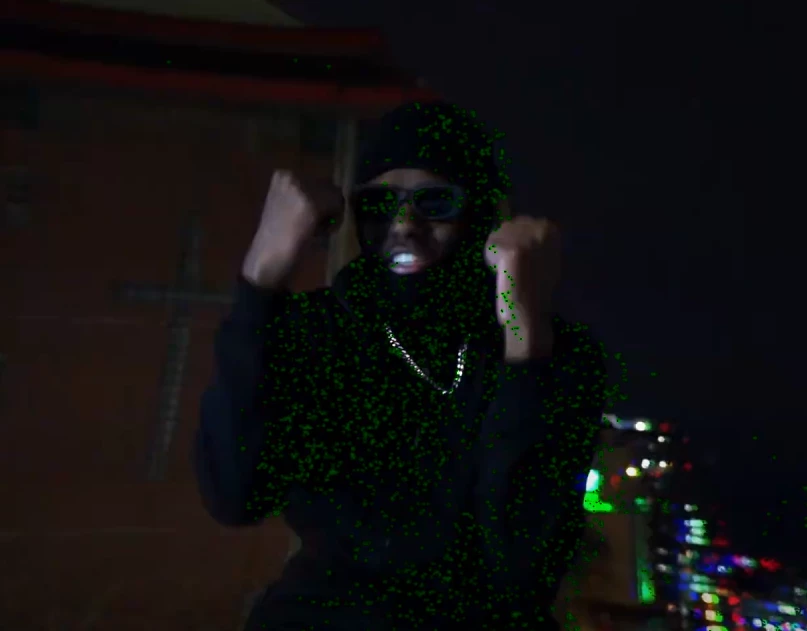


Here are my export settings :
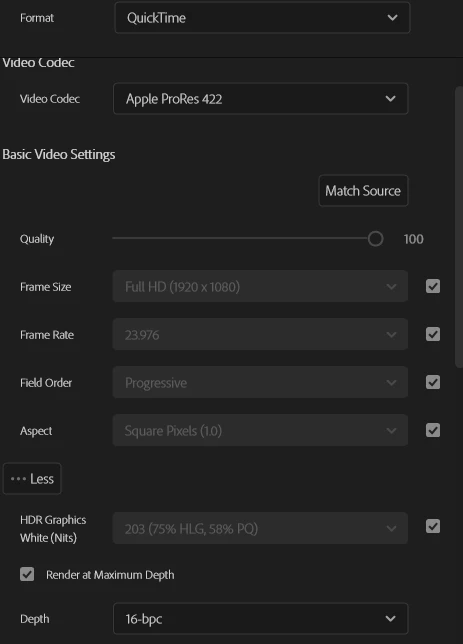


anyone had this issue before?

This topic has been closed for replies.
Correct answer Lewis301428485gcf

I found a solution.. forgot to come back here I just had to export in CBR in premiere. i ussually dont have to but it worked so ye

6 replies

Peru Bob
Community Expert
Community Expert
August 28, 2023

Please use the free MediaInfo and post a screenshot of the properties of your source media in tree view:
https://mediaarea.net/en/MediaInfo

Many users are having issues with VFR. If the file is variable frame rate, use Handbrake to convert to constant frame rate:
https://handbrake.fr/downloads.php
Here is a tutorial:
https://www.youtube.com/watch?time_continue=34&v=xlvxgVREX-Y

Shutter Encoder may also be used to convert to Constant Frame Rate:
https://www.shutterencoder.com/en/

Lewis301428485gcfAuthorCorrect answer
Inspiring
September 6, 2023

I found a solution.. forgot to come back here I just had to export in CBR in premiere. i ussually dont have to but it worked so ye

Peru Bob
Community Expert
Community Expert
August 26, 2023

Have you tried exporting directly from Premiere Pro as well as through Adobe Media Encoder?

Inspiring
August 28, 2023

Yes i tried and none of them work

Peru Bob
Community Expert
Community Expert
August 24, 2023

Try updating or rolling back your graphics driver directly from the video card manufacturer’s site. If NVIDIA, do a clean installation of the latest Studio Driver (NOT the Game Driver).

Inspiring
August 24, 2023

Okay i'll try to roll back since i already checked if there was any updates

Community Manager
August 24, 2023

Hi Lewis301428485gcf,


Sorry to hear about the issue. Please try switching the Renderer to Mercury Playback Engine Software Only & check if it's exporting properly. Also, have you applied any effects to the clips on the timeline?


Thanks,

Sumeet


Note: Moved to Discussions to continue troubleshooting.

Inspiring
August 24, 2023

Hey, I already tried exporting in Mercury Playback Engine Software and it didn't work. Yes i have effects but i have been able to export this project in the past with effects & i can export other projects with effects with no problem

MyerPj
Community Expert
Community Expert
August 24, 2023
quote

i can export other projects with effects with no problem

By @Lewis301428485gcf

You might try creating a NEW project and then IMPORT the problem project into it. If there is some kind of issue with the current project, it might be left out of the import.

Community Expert
August 24, 2023

Do you really need to render at maximum bit depth? make sure the output format supports this..

try to switch renderer to software only from project settings, and yes you might need to consider

updating your graphics card using studio drivers (if applicable)

Inspiring
August 24, 2023

I usually always do maximum bit depth for best quality for my clients and it works. I tried to export with other settings (lower quality) and i get the same thing unfortunately... i also did try switching to software only & im already on studio drivers

MyerPj
Community Expert
Community Expert
August 24, 2023

What's your hardware, it look like your video driver could use updating?

Inspiring
August 24, 2023

i got a AMD Ryzen 9 5900X 12-Core Processor 3.70 GHz

32GB of ram

& a nvidia geforce rtx 3080


I checked for updates multiple times & even the adobe support employer did and there was none