
Participant
June 21, 2024
Answered

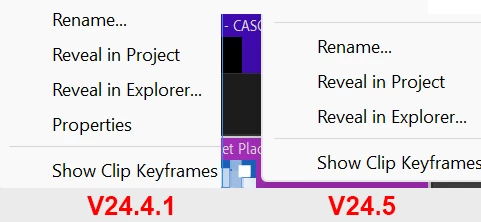
Premiere Pro is not longer show properties in v24.5
  • June 21, 2024
  • 1 reply
  • 466 views


When i tried to see PROPERTIES of a clip/audio/caption/etc. On the timeline in PR in the last version current (24.5) Adobe deleted that option and now you cannot see that option. 


In past versions you can find that option. 


Please fix that. 

Correct answer Kevin J. Monahan Jr.

Hello @Nicolás Coello,

Thanks for the message. This issue is "aa-designed" in the current version. Sorry about that. The reason for removal of the item in the menu is listed here: https://community.adobe.com/t5/premiere-pro-beta-discussions/the-properties-of-the-video-on-the-timeline-are-missing/m-p/14662492#M9395


I hope the info helps.


Thanks,
Kevin

1 reply

Kevin J. Monahan Jr.
Community Manager
Kevin J. Monahan Jr.Community ManagerCorrect answer
Community Manager
June 21, 2024

Hello @Nicolás Coello,

Thanks for the message. This issue is "aa-designed" in the current version. Sorry about that. The reason for removal of the item in the menu is listed here: https://community.adobe.com/t5/premiere-pro-beta-discussions/the-properties-of-the-video-on-the-timeline-are-missing/m-p/14662492#M9395


I hope the info helps.


Thanks,
Kevin

Kevin Monahan - Sr. Community and Engagement Strategist – Adobe Pro Video and Audio
Participant
August 7, 2024

It's incredibly annoying to have to go through extra steps to double check if a clip is 30 fps or 60fps when you're trying to change the speed and it doesn't look how you expect.