

Copy link to clipboard
Copied
Hi, i need your help.
I work on a project and after audio effect, my video timiline just disappeared..
Video work on monitor but i don't have acces to my video timeline.
I try to reset working space and many others option but nothing work.
I don't see any similar post so i try here.
Sorry for my bad english
Thanks.
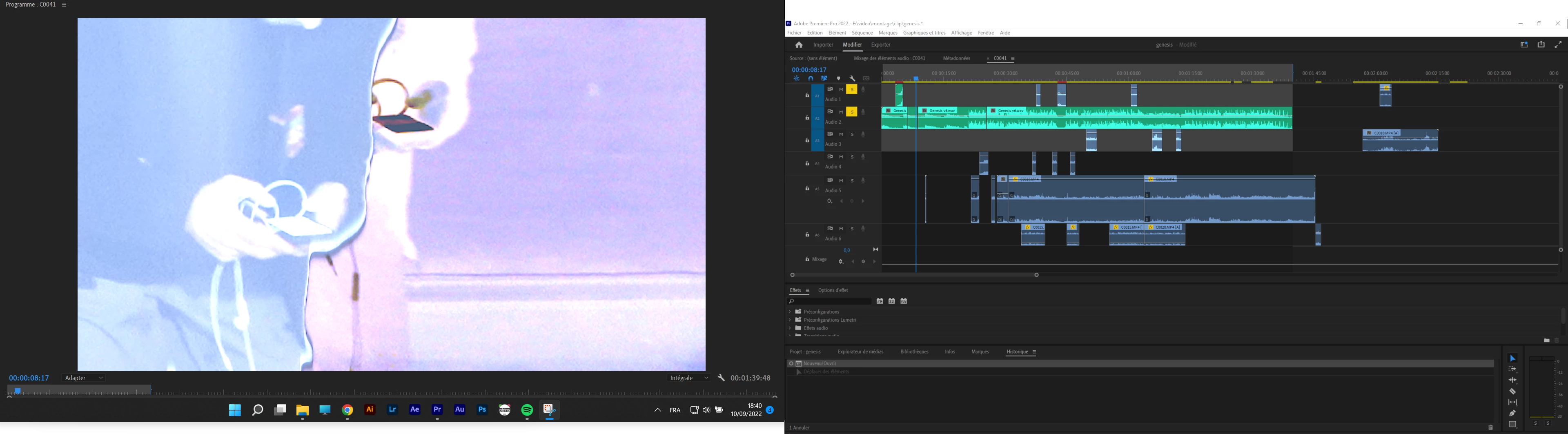
Pull down the devider which is located at the top of the timeline
Copy link to clipboard
Copied
Hi there!
Thanks for writing in. Which audio effect did you use? Could you share a screen recording of the issue for better understanding?
Let us know.
Kartika
Copy link to clipboard
Copied
Pull down the devider which is located at the top of the timeline
Copy link to clipboard
Copied
Or use the sroll bar on the far right side of the timeline
Copy link to clipboard
Copied
Lo que debes hacer es arrastrar la ventana manteniendola sujeta de la parte superior (FOTO 1) (si es que no te funiconó restaurar los ESPACIOS DE TRABAJO; FOTO 2)
Get ready! An upgraded Adobe Community experience is coming in January.
Learn more