mylesb
Participant
February 6, 2020
Answered

Premiere Pro Lumetri Curves Issue

  • February 6, 2020
  • 2 replies
  • 2527 views

Hi there, 


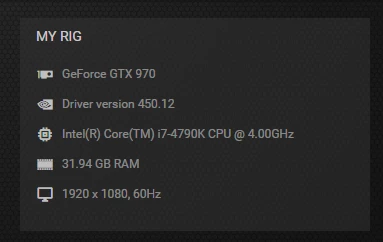
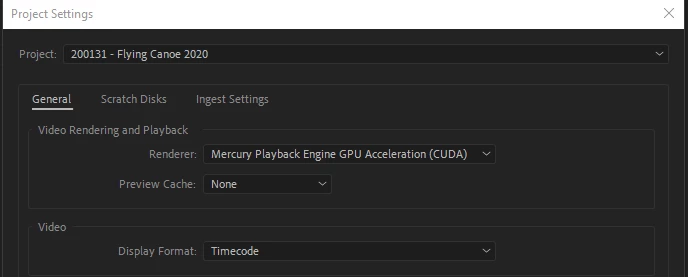
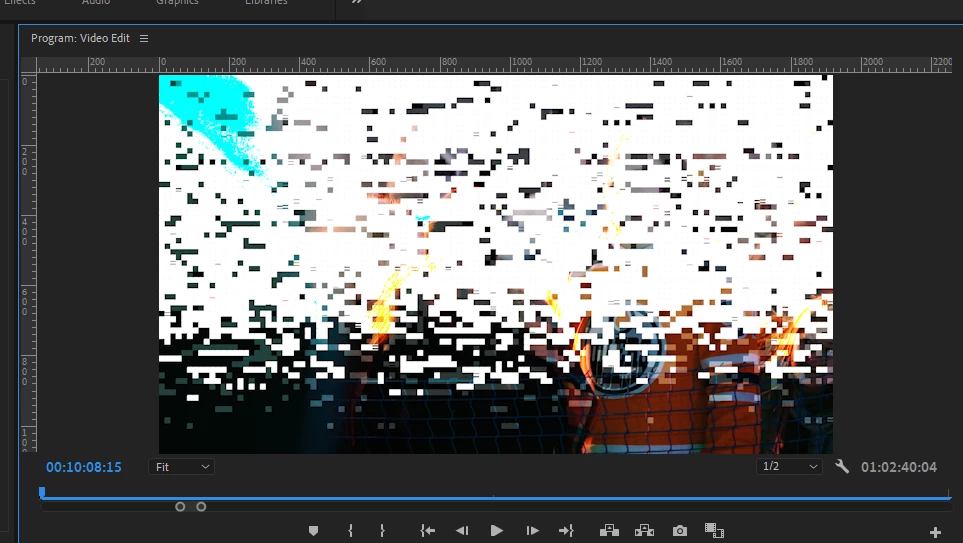
I'm having a problem with Lumetri curves. When I try to apply a colour grade with curves, any adjustment immediately destroys the footage by applying a large white screen with pixilated boxes.  If I undo the changes the problem disappears.  If I turn off CDUA renderer to software only it fixes, but I would like to be able to use my Graphics Card for rendering. I've attached my specs and some images of the bug. 


Any help would be great! 


*Edit - Fixed images and video upload


Correct answer R Neil Haugen

Having downloaded/viewed the three image files, that 970 is on a new driver. I've seen a number of colorists on the LiftGammaGain forum noting that they are having troubles with any Nvidia driver past  431.86 ... so you might try installing that driver.


Neil

2 replies

R Neil Haugen
R Neil HaugenCorrect answer
Legend
February 6, 2020

Having downloaded/viewed the three image files, that 970 is on a new driver. I've seen a number of colorists on the LiftGammaGain forum noting that they are having troubles with any Nvidia driver past  431.86 ... so you might try installing that driver.


Neil

Everyone's mileage always varies ...
mylesb
mylesbAuthor
Participant
February 6, 2020

Ah, thanks for the forum advice Neil.  I felt the same way as I would prefer to link photos then download raw files for the same reason, but couldn't find the way.  Apologies, my first time posting here. 

I will try out a driver roll back and see if that can solve the issue.  Really appreciate the advice Neil. Will report back with results. 

mylesb
mylesbAuthor
Participant
February 6, 2020

Rolled back to driver: 436.30 - WHQL and it has fixed the issue for now. 


Thanks Neil, much appreciated 🙂 

R Neil Haugen
Legend
February 6, 2020

A bit of forum advice, on this rather ... odd ... forum software they are using. Rather than linking images ... it is much better to simply upload the image to the post directly using the picture icon on the reply box formatting bar. For any of us to check your images, we'd have to download three images and a video clip.


Downloading things from "unknown sources" is something many shops simply don't allow, and of course ... requires more work for someone trying to help than being able to see the images within the post as they read.


Neil


Everyone's mileage always varies ...