Spencer_Computers
Participant
March 18, 2018
Question

Premiere Pro MP4 Import Bug

  • March 18, 2018
  • 4 replies
  • 9792 views

Hello,


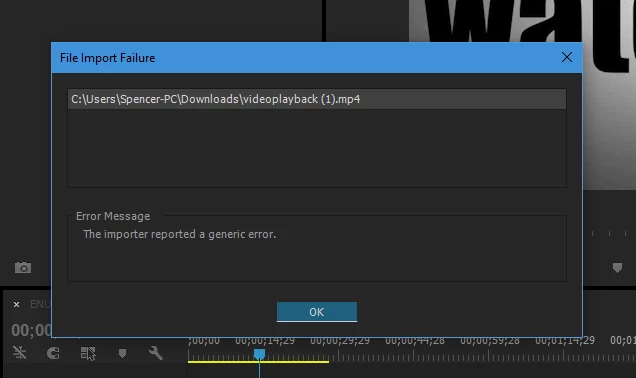
My name is Spencer and I do advanced video editing using Adobe Premiere Pro CC 2015. Recently I have gotten an error I have never faced before that won't let me import anything that is under the MP4 file format or has been changed from the MP4 file format.

Because MP4 is the most common video file format these days, I sort of need to be able to import MP4 files. I have tested other sorts of video file formats (ex, wmv, avi, etc..) and they have worked absolutely fine. I also am not able to export anything as an MP4 and if I open old prproj files with MP4 video files in them, it won't load them and say its "unavailable with this version of premiere" which is odd, because those were edited in premiere too. It's like it can't recognise the MP4 codec at all, my computer plays MP4 files absolutely fine and when I import MP4 files into a lower end video editor  *cough* Camtasia Studio 8*cough*, they seemed to work and render perfectly.

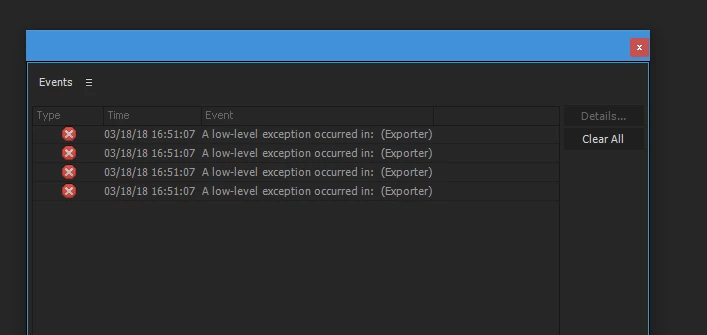
Also, whenever I load up a clean premiere pro project or saved premiere pro project, I get an error labelled "A low level exception occurred in: (Exporter)". I get four of these errors all at the same time. If you are interested in seeing these errors, I have screenshot them below.


Thank you and I hope this error can be resolved,

Spencer
This topic has been closed for replies.

4 replies

Known Participant
June 18, 2018

Same issue for me as well

JamesPik
Participant
May 26, 2018

Same issue here. All Creative Cloud stuff updated. Windows 10.  Happened in the middle of a big project. 

4 yrs of $50 monthly payments to Adobe and I am NOT pleased.

Time to start looking at Adobe alternatives.  :-(

Participating Frequently
April 20, 2018

Have you tried changing to the extension MPG? it works for me

Participating Frequently
April 23, 2018

Am experiencing the same issue after installing the latest Premiere update on the MAC I use at work.

This is a sporadic issue. Some .mp4 files show video while others just show audio. When I try to relink I get an error

message informing me as i quote "The selected file does not contain video media used by clip reference in one or more sequences. These video clip referenced will be deleted an cannot be undone. Do you want to continue?"

This is occurring with both new and old projects. The original files have not been moved since before or after the update and will

not relink at all.

Changing the file name only works when I import the renamed file (from .mp4 to .mov) and replace the original .mp4 in the timeline with the renamed .mov.

One project in particular has half of the files in it experiencing the same issue.

There are 557 files in this project. I would have to rename, reimport and replace over 250 files.

Please note NotForYouFilms this is not a knock on your advice. I see no where in this discussion that Adobe has replied to this issue so I

guess the only response is yours even though you kindly volunteered this advice while Adobe hasn't even bothered I really, really don't

want to have to rename over 250 files before I can begin editing.

I really hope Adobe replies with more than "clean your media cache" or "trash your preferences" or "restart your computer" but since that would mean updating their scripts so maybe it's just wishful thinking on my part.

If it wasn't for the solutions that people like NotForYouFilms contributed to these forums I would have switched over to Lightworks or Media Composer or even Imovie which I understand doesn't have this issue.

File incompatibilities are nothing new to Premiere rollouts. They happen almost every other time when an update goes out.

Don't know if Adobe is listening or not but people still use .mp4's. I know other codecs are out there but come on!

Participant
May 21, 2018

Same thing here.

Latest version CC.

Loads of projects coming up offline.

And same if I try to re-link.

What's going on Premiere?

This is a major bug guys. Please fix it.

Ann Bens
Community Expert
Community Expert
March 18, 2018

Delete all media cache as shown below:

FAQ: How to clean media cache files |Adobe Community

Rename top folder of the footage

Make new project and try again.

Otherwise update to newer version.

Btw what is advanced video editing.

Spencer_Computers
Participant
March 19, 2018

Hi,

I already have tried clearing the media cache already and it just doesn't change anything (apart from of course, the media cache)

I have made many new projects and still get the same error.

As for "advanced video editing", I guess I said it because I think my compositions are big, but compared to other things I have seen, they aren't really

I guess I just have to get a newer version of Premiere Pro but I have tried holding it back as I have a slow internet connection, any other suggestions?

Thanks,

Spencer