

KSaraçgil
Known Participant
September 17, 2021
Answered

Premiere Pro Multichannel Export Issue

  • September 17, 2021
  • 1 reply
  • 1459 views

Hello There


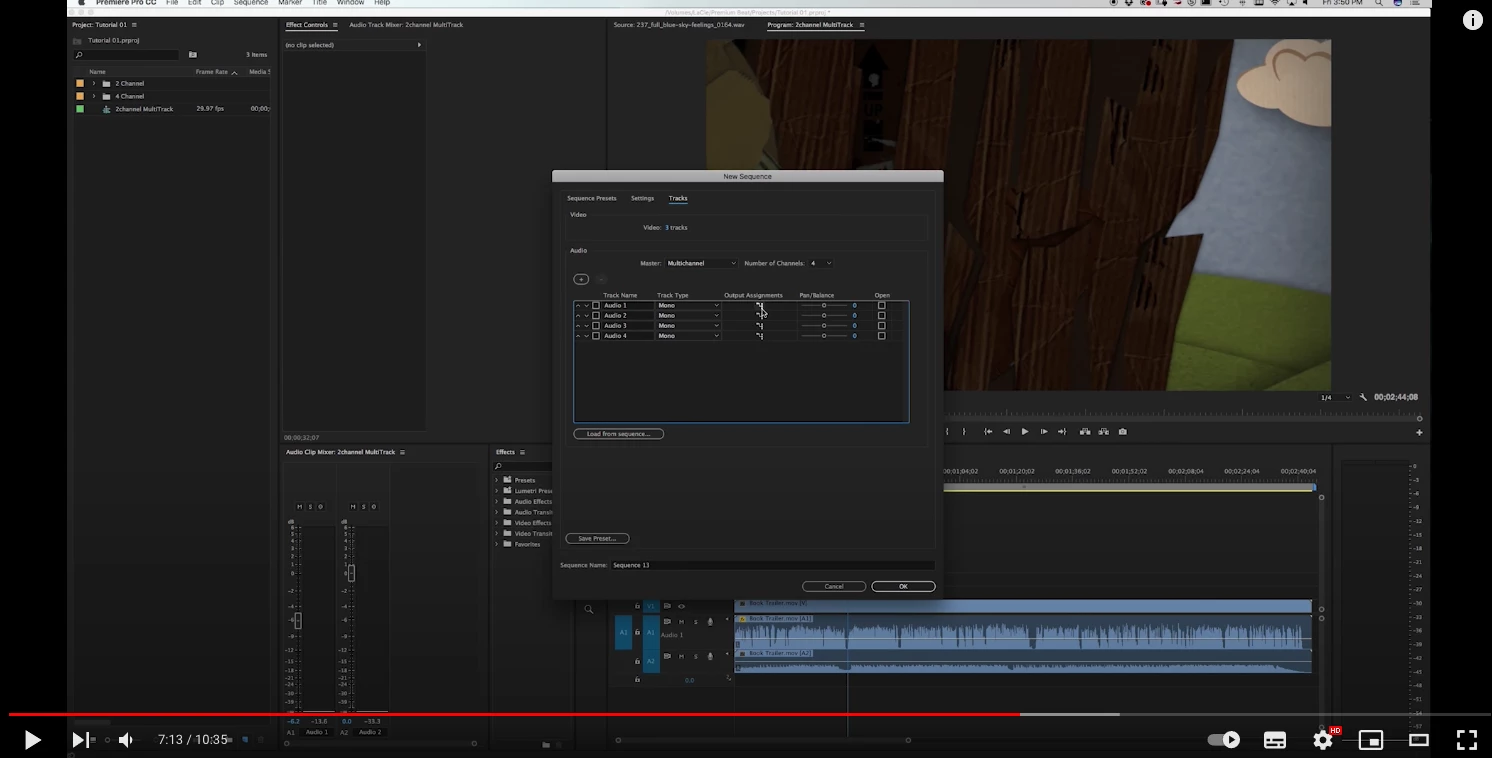
When i try to export multıchannel ı change squence settings.I change Master section with multichannel all track types change with Mono and i change output assisgments 1-2 checked next channels 3-4 checked (Like in a photo).
I ve just 2 channels or 4 in my timeline but when ı wanna export 2 or 4 diffrent audio channel export, ı have to open new squence has 4 channels (for 2 in my timline) or 8 channels(for 4 in my timline) squence.
OK this is not so big problem.Major problem is when i had expored 4 6 or 8 channel export my volume settings is changing
This topic has been closed for replies.
Correct answer Mike Dziennik

Yes ı know this and precisely ı wanna solve this problem.
Discrete dosent working for this problem.


So what should i do for my first channel should been exports first channel and my second channel should been exports second channel

Generally ı solve this problem in this way. I open new squence with 12 audio channells and i delete one each has a same audio channells


If I had a sequence with mono tracks which I was intending to export multichannel, I would alternate my track panning:

A1 > 1&2 and pan Left

A2 > 1&2 and pan Right

A3 > 3&4 and pan Left

A4 > 3&4 and pan Right

etc.

Then if you put a mono clip in the sequence, you put it on both A1 & A2. When you export your multichannel quicktime, the levels will match what you had in your timeline.

There may be other options but this is what I would do...and I'm not an 'audio guy'!

1 reply

Mike Dziennik
Community Expert
Community Expert
September 17, 2021

I'm not quite sure what you are trying to do.

Your sequence has 2 mono tracks, are you trying to export 4 channels? What do you want on the additional channels?

Perhaps you need to alternate panning on the New Sequence dialogue: Audio 1 is set to output to 1&2, if you only want it on channel 1 of your file then pan it fully to the Left. Then pan Audio 2 fully to the Right.

KSaraçgil
Known Participant
September 17, 2021

Hey 

actually no ı dont ve 2 mono tracks,  ı ve 6  diffrent tracks in channels and ı wanna export 6 diffrent channels but premiere mixing channels 1 with 2 and 3 with 4 


ı add a video about my problem and 3 photo about aduıo squence  settings maybe you can understand with these


Thanks in advance..


https://youtu.be/1CDvJmNgr0Q

Mike Dziennik
Community Expert
Community Expert
September 17, 2021

Choose 'discrete' when you export your tracks...does this fix it?

Notice the first clip on your edit is on A1, but when you play it shows on both Channels 1&2 of your meter. This is expected, as you can see in your screenshot: Audio 1 is being sent to 'Mix track channel' 1&2. When you export, your new file now has audio on both A1&A2. When you play this on the same timeline, you are getting a 3db increase. Before, you had only A1 (one channel) split betweenOutput1 andOutput2. Now you have A1 and A2 both going to AudioOutput1 and Audio Output 2 so it's louder.