
annag77574620
Participant
January 8, 2020
Answered

Premiere pro no audio when dragging playhead

  • January 8, 2020
  • 1 reply
  • 4783 views

Very recently (the last couple of projects) the audio has stopped playing back when i drag the playhead and for the life of me i cannot figure out what is causing this. If anyone out there can help me figure out what setting to change I would be very grateful! The audio works just fine in playback, no skips and rendering does not solve, it is only when dragging the playhead and I need this function and being without adds hours to my edits! Please help!
Correct answer bucksommerkamp

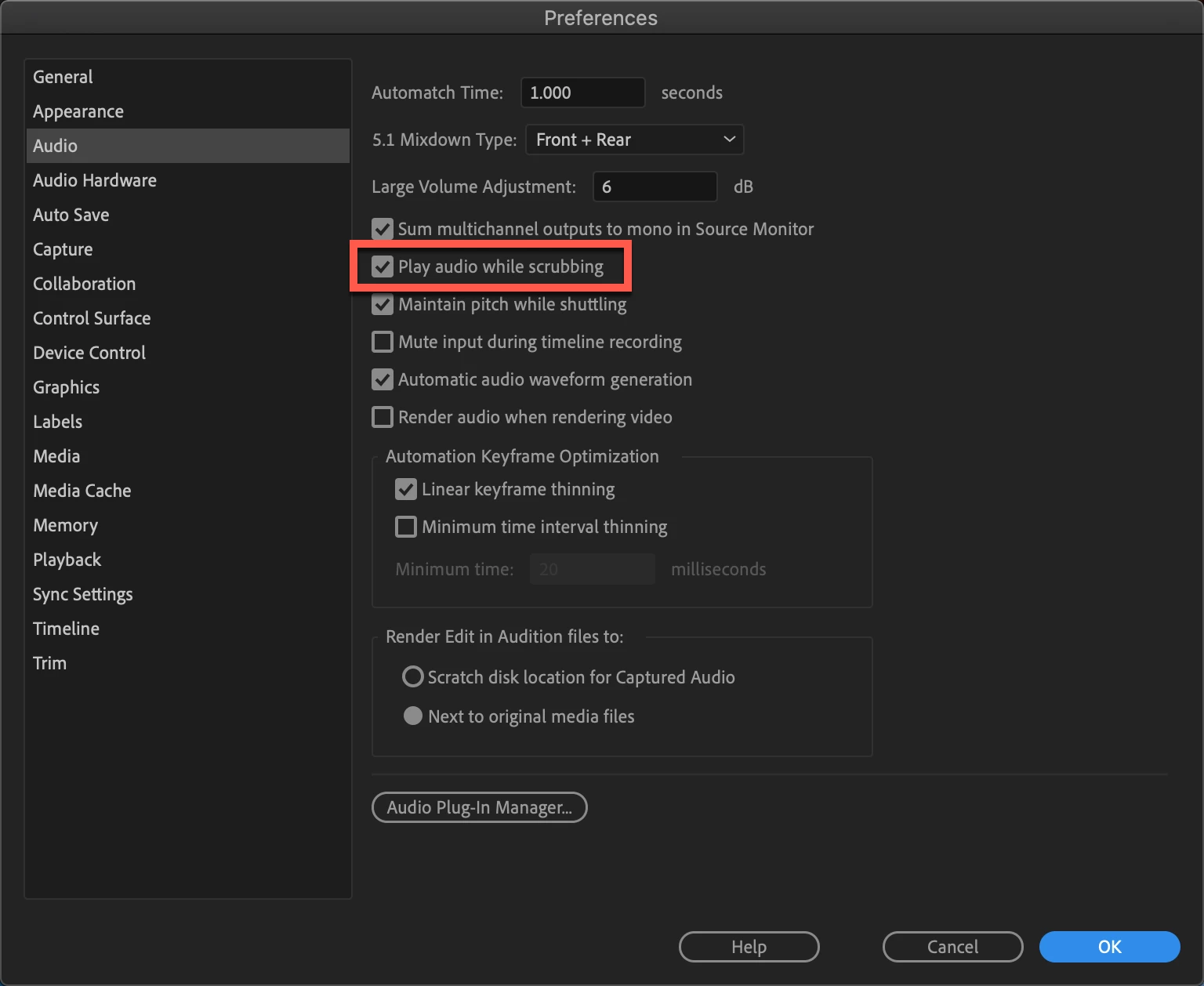
Make sure you go into Preferences > Audio Preferences and enable play audio while scrubbing

1 reply

bucksommerkamp
Community Expert
bucksommerkampCommunity ExpertCorrect answer
Community Expert
January 8, 2020

Make sure you go into Preferences > Audio Preferences and enable play audio while scrubbing

annag77574620
Participant
January 8, 2020

Oh my goodness...That fixed it! Thank you so much. I recently followed a youtube video on their preffered settings and I was in there and must have hit that check mark. As I'm sure is obvious, i'm pretty new to this and trying to figure it all out. Thank you again!!!