
Participant
May 20, 2013
Question

Premiere Pro output/export is blurry

  • May 20, 2013
  • 2 replies
  • 16287 views

Hello, I have never got much luck editing desktop videos with premiere pro. It seems it can only deal with Video Camera shot footage but not computer generated videos
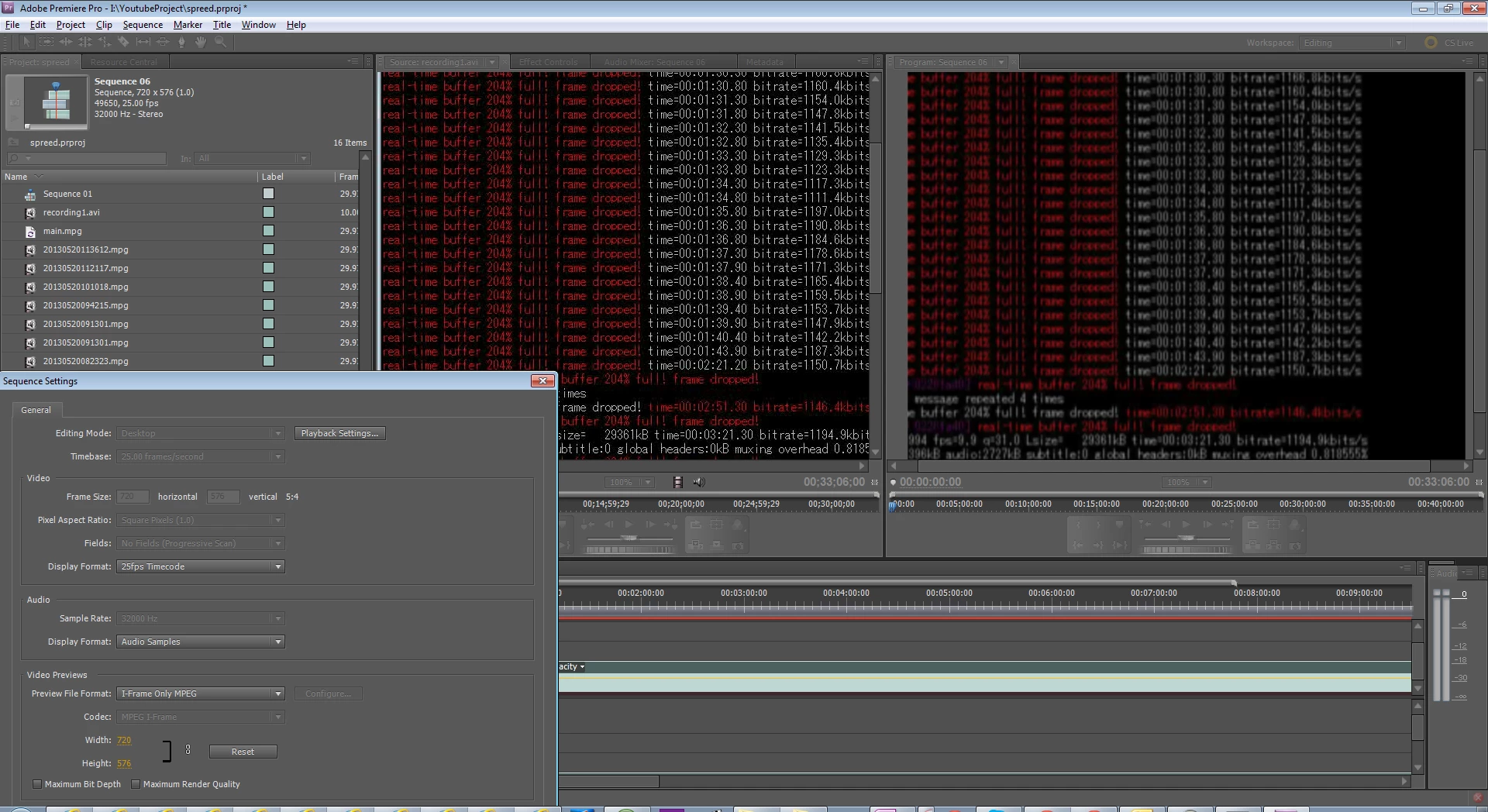
I have captured my computer screen using FFMPEG and imported my footage to premiere pro. Look at the left hand side source monitor, how clear is the image and right hand side program monitor, image is blurry and color is poor. Not only does it happen in playback, in the export, there is no difference.

And by my previous experience, premiere titles tend to get blurry. It doesn't render properly its own elements. When I select "Match Sequence Settings" when I export, the blur seem to have gone away.

My sequence setting is as shown: Editing Mode is Desktop

When i edit it in After Effects, it seems no problem. Have I done anything wrong?

This topic has been closed for replies.

2 replies

Legend
May 21, 2013

It seems it can only deal with Video Camera shot footage but not computer generated

It is designed around standardized camera formats.  Unfortunately, few if any screen capture programs will allow you to record to those formats, so issues do crop up.

Participant
May 21, 2013

Any Adobe Editor will also allow my to edit screen captures?

Participating Frequently
May 21, 2013

It seems it can only deal with Video Camera shot footage but not computer generated

Definitely NOT!

Premiere can handle 4:4:4 uncompressed footage pixel by pixel in 10Bit Colors or more if you need.

Something goes completely wrong with your setup...

1. You have a PAL sequence with 720x576 pixels - I don't think that is the resolution of your computer monitor? --> Set the sequence to the native res. of your screen grabs.

2. I see al lot of MPG Video in your bin - I assume that it's 4:2:0 colr smaples MPEG video - bad idea to encode sharp red computer typeo this way... export to DPX files and see the difference

3. Set your sequence to Maximum Render Quality to get better pixel sampling (use GPU mode to speed up things)

If you take the right settings you won't see any difference to your source footage. More challanging would be to find good export settings for H.264 video - because there you have to deal with the 4:2:0 color smapling again... a dedicated screencast codec could help here...

John T Smith
Community Expert
Community Expert
May 20, 2013

>captured my computer screen using FFMPEG

Screen capture software often/usually creates video that is hard to edit... below are some saved links discussing other software... some of the ideas may help you

Some of these are for Premiere Elements, but may help with PPro

Fraps & Elements http://forums.adobe.com/thread/871095

-and more Elements http://forums.adobe.com/thread/943772

-and yet more Elements http://forums.adobe.com/thread/967201

Camtasia http://forums.adobe.com/thread/836800

-and http://forums.adobe.com/thread/775288

-and http://forums.adobe.com/thread/453044

-and http://forums.adobe.com/message/3202148

Techsmith codec http://forums.adobe.com/message/3692768

-and http://forums.adobe.com/thread/1046914?tstart=0

BB Flashback http://forums.adobe.com/thread/1074014

XSplit recorder http://forums.adobe.com/thread/1160940

Elgato http://forums.adobe.com/thread/1163126 w/picture

Dxtory http://forums.adobe.com/message/5172056

Bandicam read #10 http://forums.adobe.com/thread/954394