
Premiere Pro Preview is Blotchy but Export is OK
It's quite puzzling, as I seem to be experiencing the opposite of what others have encountered while editing my source footage. Specifically, the footage from my DJI Air 2S shot on D-Log and Canon C-log looks bad in the preview window, even after applying the LUT. However, here's the strange part - when I export the video and open it with VLC, it looks significantly better.
I've made sure that all the color management settings in Premiere are turned on, but the issue persists even if I try turning them off. To illustrate the problem, I've provided an example below, where the left side displays the footage in Premiere Pro, looking terrible, and the right side shows the video after export, looking much improved. The shadows, in particular, are affected.
Now, I should mention that I'm using an HDR monitor, and it's calibrated properly. However, I'm attempting to edit the footage in SDR mode. When I turn on HDR in the Windows settings, the Premiere Pro preview looks good again, but unfortunately, the exported video does not retain the same quality after turning off HDR mode.
I'm in need of assistance to resolve this perplexing issue. Any help or advice you can offer would be greatly appreciated!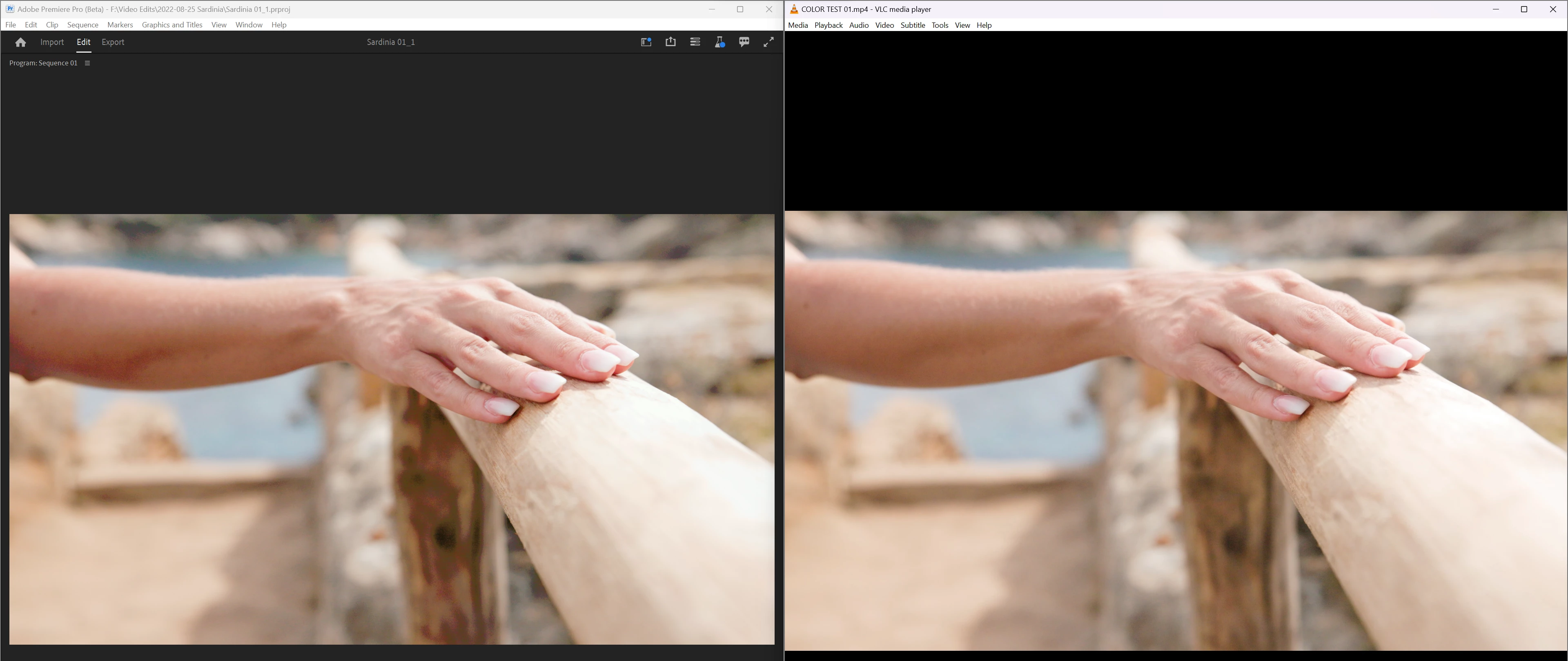
 AdChoices