Inspiring
October 20, 2023
Answered

Premiere Pro problem with graphic card

  • October 20, 2023
  • 9 replies
  • 2200 views

Hello,

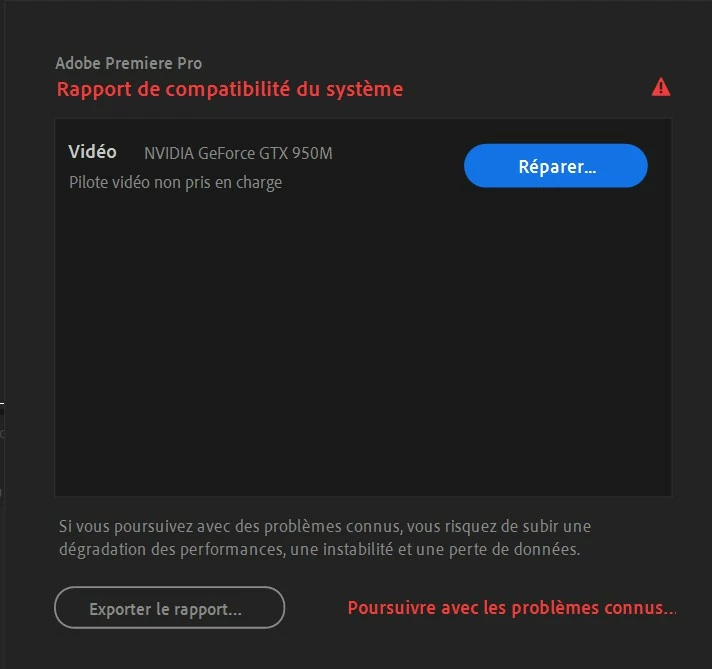
I am on Windows 10, and by opening yesterday Premiere Pro, I had this error window saying me that my NVIDIA GeForce GTX 950M is not supported (compatibility problem) :


That is strange is before yesterday, all was working fine with Premiere Pro and my NVIDIA graphic card (no comptaibility problem, no error window).

And if I go in the settings of Windows 10, I see that all my graphic cards are up to date.

This topic has been closed for replies.
Correct answer RjL190365

A follow up on my previous post, in better detail:


If it's a Windows update as Peru Bob stated, then the automatic driver "update" (which is enabled by default) automatically overwrote any newer Nvidia-direct driver version with what Windows Update thinks it's the best driver - which happened to be more than three years old. This can, and will, occur with absolutely no warning at all whatsoever if the newer driver has been installed using the "clean installation" method. In this instance, the only current fix (without having to disable automatic driver updates via Windows Update) is to completely wipe out all traces of the GPU driver (using a driver cleaner program like DDU), and then after rebooting, let Windows Update download its "preferred" graphics driver for that GPU, and then after another reboot download the latest Game Ready driver directly from Nvidia. Then, after that is done, then install using the default "Express install" option. That way, when Windows Update later tries to update the GPU driver with that ancient and obsolete driver version, it will not overwrite the newer driver.

9 replies

Inspiring
November 4, 2023

Finally, I uninstalled Premiere Pro last version  (24.0) and installed the version 23.6, because I had problems when I played image by image with sound : it is very slow (and I use a lot of times this function). In fact, the version 23.6 is working very well with my graphic card, but not the version 24.0.

Inspiring
October 21, 2023

For the moment, PP is able to work on my computer with no problem, even with this "ancient/prehistoric " (2015) Nvidia graphic card. I think I will wait "Windows update" to update the driver of my graphic card. And in case of problem with PP, I will install an ancient version of PP in the meantime.


Legend
October 21, 2023

If you do that, then you should set Premiere Pro to the software-only decoding, encoding and rendering modes when you create every new project. Otherwise, GPU-accelerated modes will be set by default, which may cause problems.

Inspiring
October 21, 2023

Ok, I understand. 

But why Premiere Pro does not support anymore the Nvidia driver I have actually on my computer : it should support even the ancient Nvidia drivers ? In that case, the other solution would be to install an ancient version of Premiere Pro ?

R Neil Haugen
Legend
October 21, 2023

No complex app like Premiere can support ancient gear. The code is very different, per 'generation' of design, and ... there's few enough of them still running that at some point it's absurd to put the effort in and "bloat" the program with the extra code not hardly used.


Doesn't run on Windows 98 either ... and I remember when that was a hot new OS ... ah well. I also remember shocking my professional peers by getting a computer with a 40 MEG hard drive. NO ONE was ever going to need something that big ... 20 was overkill ... sheesh!

Everyone's mileage always varies ...
RjL190365Correct answer
Legend
October 21, 2023

A follow up on my previous post, in better detail:


If it's a Windows update as Peru Bob stated, then the automatic driver "update" (which is enabled by default) automatically overwrote any newer Nvidia-direct driver version with what Windows Update thinks it's the best driver - which happened to be more than three years old. This can, and will, occur with absolutely no warning at all whatsoever if the newer driver has been installed using the "clean installation" method. In this instance, the only current fix (without having to disable automatic driver updates via Windows Update) is to completely wipe out all traces of the GPU driver (using a driver cleaner program like DDU), and then after rebooting, let Windows Update download its "preferred" graphics driver for that GPU, and then after another reboot download the latest Game Ready driver directly from Nvidia. Then, after that is done, then install using the default "Express install" option. That way, when Windows Update later tries to update the GPU driver with that ancient and obsolete driver version, it will not overwrite the newer driver.

Inspiring
October 21, 2023

@R Tarun  Please move this subject to the "Bug" subjects instead of "Discussions".

I have noticed two things :

1 - By using Premiere Pro, Windows Defender opened a window asking me to "allow" Premiere Pro. So I was obliged to click "allow". This is the first time I have this type of window for Premiere Pro.

2- I have then uninstalled and re-install Premiere Pro and Media encoder. Result : the Premiere Pro icon in the dock is in white color (no Premiere Pro icon), so I was obliged to restart my computer in order to show again the real Premiere Pro icon in the dock.

Inspiring
October 20, 2023

What I noticed is that I can remove this error window in preference panel by unchecking (see red line) "display compatibility problem at the startup". Result : the error window does not show anymore at the startup of Premiere Pro.

And it seems that I can use Premiere Pro with this graphic card with no problem.


But what I don't understand is :

- before yesterday Premiere Pro does not displays this error window.

- yesterday, Premiere Pro  suddenly displays this error window.

And this week there was no new update of Premiere Pro, and no update of Windows 10. So why Premiere Pro suddenly displays this error window ? Could it be a bug of Premiere Pro ?

Peru Bob
Community Expert
Community Expert
October 20, 2023

It could be due to a Windows update.

Participating Frequently
October 20, 2023

Moving it to Discussions

Legend
October 20, 2023

Here's the problem:


Microsoft always insists on installing a driver for that GPU that's more than three years old no matter what (even though much newer drivers than that are available directly from Nvidia). And even if you get the driver directly from Nvidia, you'll find that only the Game Ready drivers are available since Nvidia has never released a Studio driver for any GeForce GPU that's older then the 10 series.

R Neil Haugen
Legend
October 20, 2023

I don't think Premiere 24.x can work with a 900 series card ... but @RjL190365 would be the absolute answer here.

Everyone's mileage always varies ...