Exit
  • Global community
    • Language:
      • Deutsch
      • English
      • Español
      • Français
      • Português
  • 日本語コミュニティ
  • 한국 커뮤니티
0

Premiere Pro Text not Aligning

Explorer ,
Feb 01, 2023 Feb 01, 2023

Hello! 

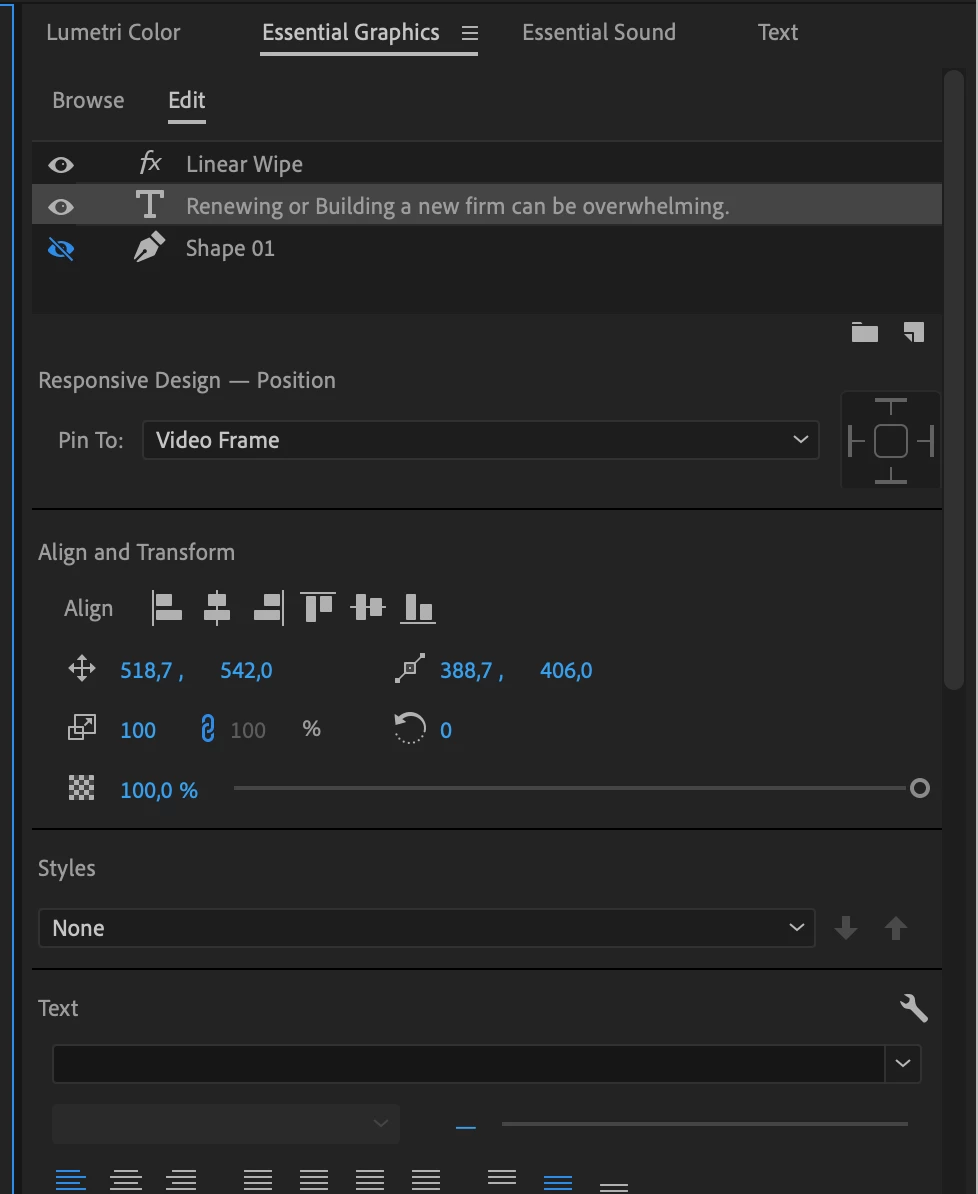
I am using premiere pro, and I am not able to align the text to the canvas (see screenshot)

Where are the alignment icons? Can you see which icons I am missing?

Please help.

Thank you...
 

Screen Shot 2023-02-01 at 12.46.26.pngScreen Shot 2023-02-01 at 12.46.33.png

TOPICS
Effects and Titles
649
Translate
Report
Community guidelines
Be kind and respectful, give credit to the original source of content, and search for duplicates before posting. Learn more
community guidelines

correct answers 1 Correct answer

Community Expert , Feb 01, 2023 Feb 01, 2023

So its not a bug: moved thread to Discussion board.

Translate
Community Expert ,
Feb 01, 2023 Feb 01, 2023

AnnBens_0-1675257456719.png

From left to right:

Left - center Horizontally - Right - Top - center Vertically - bottom.

Translate
Report
Community guidelines
Be kind and respectful, give credit to the original source of content, and search for duplicates before posting. Learn more
community guidelines
Community Expert ,
Feb 01, 2023 Feb 01, 2023

If you want to disttribute you need to select more than one item.

AnnBens_0-1675257567355.png


Translate
Report
Community guidelines
Be kind and respectful, give credit to the original source of content, and search for duplicates before posting. Learn more
community guidelines
Explorer ,
Feb 01, 2023 Feb 01, 2023

Of course, I saw those icons, but I mean like the ones I am attaching on the screenshot. Do you know where I can find these?

How-to-Center-Text-in-Premiere-Pro-FINAL_Moment.jpg

Translate
Report
Community guidelines
Be kind and respectful, give credit to the original source of content, and search for duplicates before posting. Learn more
community guidelines
Community Expert ,
Feb 01, 2023 Feb 01, 2023

They are gone.

Read my first post.

Translate
Report
Community guidelines
Be kind and respectful, give credit to the original source of content, and search for duplicates before posting. Learn more
community guidelines
Explorer ,
Feb 01, 2023 Feb 01, 2023

Thank you so much for your time.

Do you know why they are gone? 

Translate
Report
Community guidelines
Be kind and respectful, give credit to the original source of content, and search for duplicates before posting. Learn more
community guidelines
Community Expert ,
Feb 01, 2023 Feb 01, 2023

Guessing less icons, more clean UI.

Translate
Report
Community guidelines
Be kind and respectful, give credit to the original source of content, and search for duplicates before posting. Learn more
community guidelines
Community Expert ,
Feb 01, 2023 Feb 01, 2023

So its not a bug: moved thread to Discussion board.

Translate
Report
Community guidelines
Be kind and respectful, give credit to the original source of content, and search for duplicates before posting. Learn more
community guidelines
Explorer ,
Feb 01, 2023 Feb 01, 2023
LATEST

Thank you... it's good to know it's not a bug; it has been removed from Adobe. 

Translate
Report
Community guidelines
Be kind and respectful, give credit to the original source of content, and search for duplicates before posting. Learn more
community guidelines