
Editor Pavan Kumar
Known Participant
August 4, 2017
Question

Premiere Pro Time code and full screen playback Problem

  • August 4, 2017
  • 2 replies
  • 1982 views

Hello All... Here I'm facing two problems...

Problem 1:

I have two monitors, one primary and another one is secondary. After working sometimes when I hit show desktop (windows key + D) two monitors going to full screen with image after pressing any key for 30-40seconds its coming to normal why I'm facing this problem in premier pro please give me suggestions

Problem 2:

When I add time code for adjustment layer time code not starting with zero (0) it's starting like 01:00:00:0 and also same problem for frames (normal and 16mm/35mm) how can solve this?

Finally, i need that all to be started with zero (0)  (timcode / frames/frames+feet )

hope you guys help

thanks in advance

****am adding two-time codes for one adjustment layer*****

I have given images for reference 
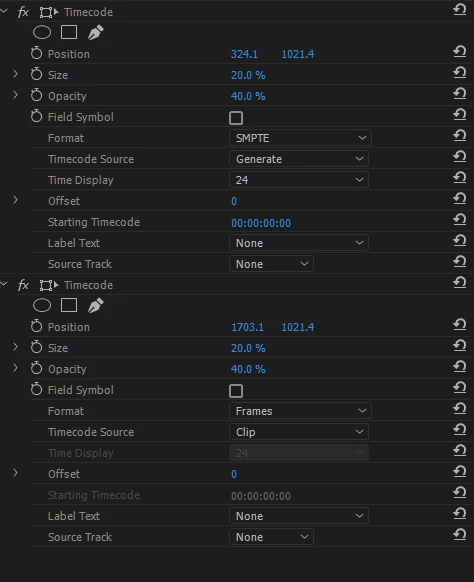
Above image ( third one) is time code with frames+feet ( 35mm)

This topic has been closed for replies.

2 replies

Kevin-Monahan
Community Manager
Community Manager
August 18, 2017

Hi Editor Pavan Kumar,

Sorry for this issue. Did you ever find a solution? Please let us know if you have or if you still need help.

Thanks,

Kevin

Kevin Monahan - Sr. Community and Engagement Strategist – Adobe Pro Video and Audio
Inspiring
August 19, 2017

Your Problem 2 i.e needing the time-code to start at zero, can be solved by generating a transparent caption instead of using the the adjustment layer.  You need to create this with the Legacy Title Tool.  File> New> Legacy Title Tool.  Call it Blank Frame or something similar and close the title tool immediately.  This will create a transparent frame that you place on a video track at the the top of the timeline, for the whole duration of the material.  Place the time-code effect on this caption and you will be able to set the code to zero. 

I hope this helps. 

Legend
August 20, 2017

You can also use a Transparent Video for this. New Item > Transparent Video.

Legend
August 4, 2017

I see the same behavior... the Adjustment layer starts at 1;00;00;00 ... so far I see the possible workarounds...

  • I have used timecode before but I never would have thought to apply it to an adjustment layer... do you have to do that? Can you apply it directly to your clip... or if you have more than one clip, can you nest the clips and apply it to the higher-level nest?
  • If your sequence is less than hour long, you can apply a mask to timecode to only allow the minutes/seconds/frames to be visible. See screenshot at end of post.
  • I notice timecode wraps at 24 hours... so if you set the start to 23;00;00;00 (23 hours), it starts at 0;00;00;00 ... Note, I cannot guarantee this hack will work across releases. See screenshot at end of post.

I'm not sure if this is by design or not... I can't see a good reason for force adjustment layer timecodes at 1 hour... can you file a bug at the following link? Feature Request/Bug Report Form  The team can then review it and process it accordingly.

Other posts relating to this (goes back to 2015)...

Timecode effect wrong: adds an hour 

Documentation seems to say ALs are supported:

Work with timecode in Premiere Pro

"... You can use an adjustment layer instead of transparent video to carry the timecode effect. ..."

I found the above links with a web search: adjustment layer timecode effects premiere 1 hour

screenshot using a mask:

using 23;00;00;00 to force wrap to 0...
