
Participant
June 12, 2019
Answered

Premiere Pro: Tracks on timeline disappear

  • June 12, 2019
  • 2 replies
  • 339 views

Hi everyone,

My timeline contains, say, 5 tracks from top to bottom.

After I had zoomed some tracks, the top tracks were removed from view!  It exists but unseen!

What can be done to make the entire and whole timeline shows up?

Thanks!
This topic has been closed for replies.
Correct answer Ann Bens

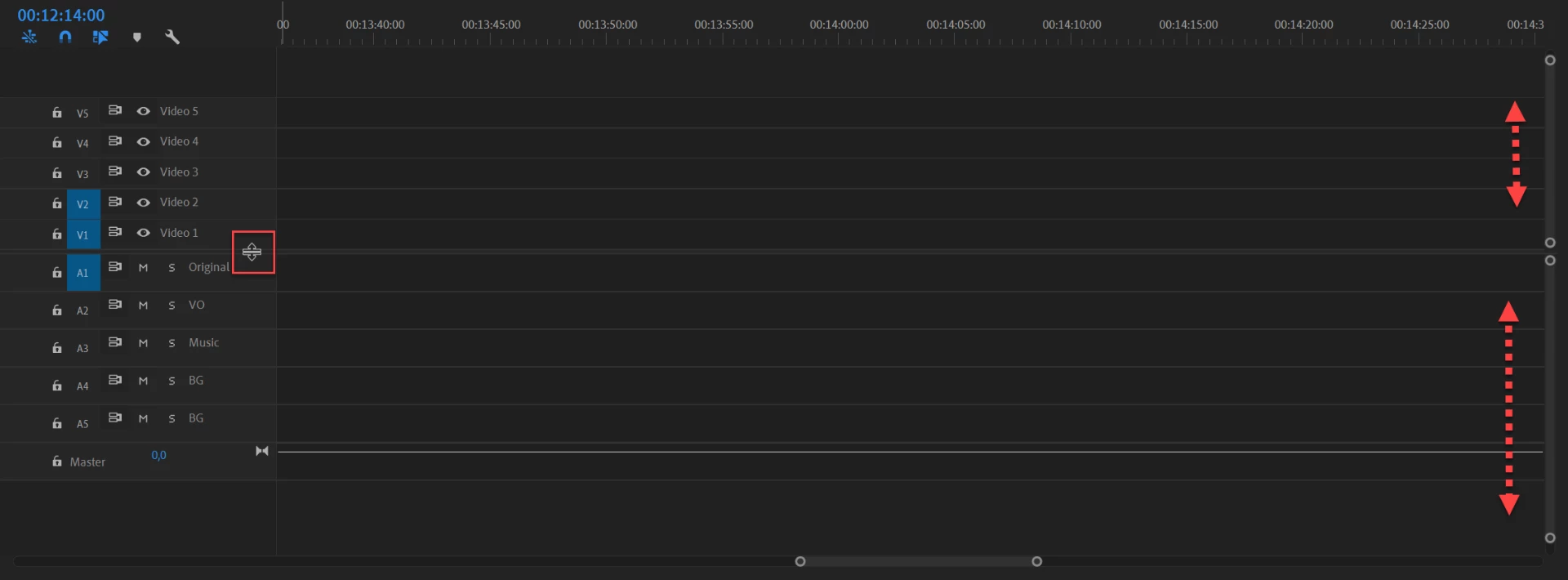
Make sure those scroll bars are expanded from top to bottom.

And the divider between video and audio in the middle of the timeline.

2 replies

psshebaAuthor
Participant
June 12, 2019

Thank you, Richard,

The scroll bar you mentioned only stretches/shrinks the displayed tracks. I still cannot find those that vanished.

Thanks

Ann Bens
Community Expert
Ann BensCommunity ExpertCorrect answer
Community Expert
June 12, 2019

Make sure those scroll bars are expanded from top to bottom.

And the divider between video and audio in the middle of the timeline.

psshebaAuthor
Participant
June 15, 2019

Thanks a lot !

Community Expert
June 12, 2019

There's a scroll bar to the right of the timeline for both audio and video tracks.