Participant
December 29, 2021
Answered

Premiere Pro using my intel card instead my NVIDIA card

  • December 29, 2021
  • 1 reply
  • 1588 views

hey,

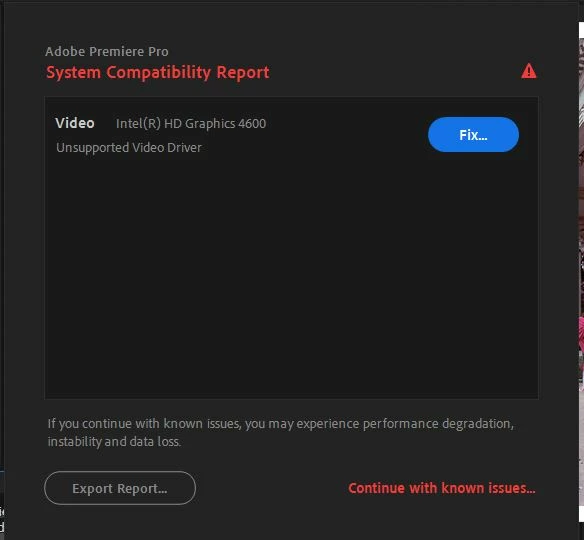
I'm having an issue with my driver - I want to choose my NVIDIA card instead of intel card and it doesnt work. I've added the card on graphic settings and still - premiere do not recognise my NVIDIA drive.

pls advice! 


Chen


This topic has been closed for replies.
Correct answer RjL190365

Sorry, but the GPU selection does not work like you expected it to. That compatibility warning appears only if you have an outdated or otherwise issue-prone GPU driver installed - in this case, the Intel HD Graphics 4600 driver. Unfortunately, there are absolutely no major driver updates to that IGP since late 2015 (when the very first release of Windows 10 came out); only minor bug fixes (until 2018) and critical security fixes have been released in "newer" drivers for it. If you do not see a warning for the Nvidia GPU, it means that the driver version for that GPU is supported.


Worse, Intel had EOSL'd all CPUs older than the 6th-Generation CPUs just recently. The very last driver that was compatible with all 4th- and 5th-Generation CPUs was released this past February - and it, like all other recent driver versions for the 4th- and 5th-Generation GPUs, is merely a security-patched version of a driver that dated way back to 2017.


The only way to get rid of this warning would be to completely disable the Intel GPU in your computer system's BIOS.

1 reply

RjL190365Correct answer
Legend
December 29, 2021

Sorry, but the GPU selection does not work like you expected it to. That compatibility warning appears only if you have an outdated or otherwise issue-prone GPU driver installed - in this case, the Intel HD Graphics 4600 driver. Unfortunately, there are absolutely no major driver updates to that IGP since late 2015 (when the very first release of Windows 10 came out); only minor bug fixes (until 2018) and critical security fixes have been released in "newer" drivers for it. If you do not see a warning for the Nvidia GPU, it means that the driver version for that GPU is supported.


Worse, Intel had EOSL'd all CPUs older than the 6th-Generation CPUs just recently. The very last driver that was compatible with all 4th- and 5th-Generation CPUs was released this past February - and it, like all other recent driver versions for the 4th- and 5th-Generation GPUs, is merely a security-patched version of a driver that dated way back to 2017.


The only way to get rid of this warning would be to completely disable the Intel GPU in your computer system's BIOS.

Participant
December 29, 2021

Thank you! I'll try it