
techiejay
Participant
February 18, 2020
Question

Premiere Pro wants to record my screen? (MAC Catalina)

  • February 18, 2020
  • 6 replies
  • 6728 views

Hi all,

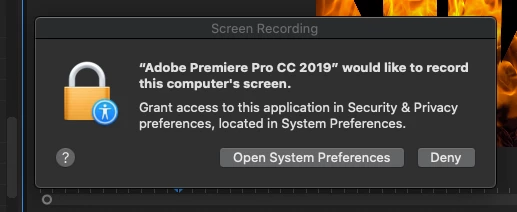
Recently upgraded to macOS Catalina, but today when I added a "Change To Color" effect to a clip, I was greeted with the following pop-up, asking if Premiere Pro could record my screen content, even when not using the app.


Obviously this is a pretty big permission to grant, but Change To Color doesn't seem to be working properly whether I enable or disable the permission.  Any ideas if this could be linked?
 

6 replies

Participating Frequently
June 26, 2023

The official statement about this being needed for the eye dropper tool to work with other apps to get colors sounds even worse when you think about it.


Adobe needs to record audio for you to use the eyedropper tool.  I guess the AI will guess the color I want based on the noise of my cat yowling or some such.


Community Expert
October 18, 2021

On the new Mac operating system you get this. It is asking for access to a screen, drive area etc. Not actually recording a video of it. 

It seems like it could be worded better.

chrisd34843702
Participant
October 18, 2021

I have also gotten this message several times over the last year or so.  Today, again, os big sur 11.6

I have no adobe apps running at the moment, except for creative cloud.  Adobe apps are all updated.


Anyone have an explanation?


thanks.

Peru Bob
Community Expert
Community Expert
October 18, 2021

Maybe the operating system is confusing a request to connect to the internet as a request to capture the screen?

Participant
October 8, 2020

I just got the same alert - as well as in Photoshop the other day. Using latest updates + Catalina

Ann Bens
Community Expert
Community Expert
February 18, 2020

Very strange, Premiere is not even capable to do screenrecording.

techiejay
techiejayAuthor
Participant
February 18, 2020

P.S. as I proof-read this post I noticed that Premiere needs an update - I'm updating now and will remove/close this post if it does fix the issue.

Community Expert
February 18, 2020

It is not necessary that you delete it just let us know how you solved it.

Byron.
Ann Bens
Community Expert
Community Expert
February 18, 2020

You cannot close or remove posts from this forum.