
Known Participant
November 13, 2017
Answered

Premiere Pro will not allow import/adding of video clips....

  • November 13, 2017
  • 2 replies
  • 6871 views

I'm getting a headache....

Got the latest and greatest PPro running on my Mac (also fully updated OS X).  I started a project, imported a previous project, then did a drag and drop of a couple QT files (.MOV) into the sequence.  I edited it all up, closed the gaps between the clips, then went to add my "outro" video and...it won't let me.  Now, I can add the audio portion to one of the audio tracks, but I cannot add the video to either V1 or V2 (where I have the current pieces) nor to V3, which is empty.

Why won't PPro let me add another video into the project...?
    This topic has been closed for replies.
    Correct answer R Neil Haugen

    Probably an issue with the Source & Track targeting controls ...

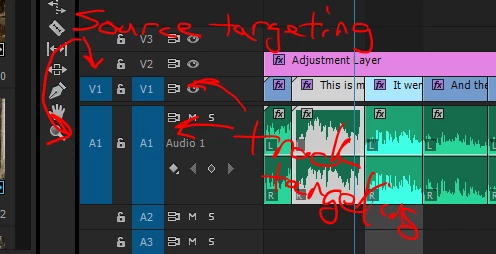
    Those blue blocks in this graphic on the left side of the control block. If those are gray/charcoal, they're not 'targeted'.

    So ... if you're using the Source monitor, and want to do an insert or overwrite action to the open sequence ... if the far left Source targets don't have one each of video & audio tracks toggled 'on' (blue rather than background gray), then you won't have media moving. If say you have an audio track toggled on (blue) but no video track, it will move audio to the sequence but no video.

    For moving things around especially with keyboard shorts & such, you need Track targets toggled on.

    There's several articles and vids on this in the Adobe help stuff, don't have the links to hand at the moment.

    Neil

    2 replies

    Known Participant
    November 13, 2017

    Unbelievable - had to tap the V1 on the left.  I had done that before and it didn't work; naturally, as soon as I get Adobe support on the line it worked.  I swear it's worse than taking your car to the mechanic and it doesn't make the grinding sound that it made while driving....

    R Neil Haugen
    R Neil HaugenCorrect answer
    Legend
    November 13, 2017

    Probably an issue with the Source & Track targeting controls ...

    Those blue blocks in this graphic on the left side of the control block. If those are gray/charcoal, they're not 'targeted'.

    So ... if you're using the Source monitor, and want to do an insert or overwrite action to the open sequence ... if the far left Source targets don't have one each of video & audio tracks toggled 'on' (blue rather than background gray), then you won't have media moving. If say you have an audio track toggled on (blue) but no video track, it will move audio to the sequence but no video.

    For moving things around especially with keyboard shorts & such, you need Track targets toggled on.

    There's several articles and vids on this in the Adobe help stuff, don't have the links to hand at the moment.

    Neil

    Everyone's mileage always varies ...
    Known Participant
    November 13, 2017

    They're active....