ingrids71740315
Participant
October 11, 2018
Answered

Premiere Pro

  • October 11, 2018
  • 2 replies
  • 536 views

Hallo,

ich möchte einzelne Bilder zu einem Video zusammenfügen. Kann ich Länge der einzelnen Sequenzen automatisch einstellen oder muss ich jedes Bild einzeln

bearbeiten.

Danke und Gruß,

Ingrid

    This topic has been closed for replies.
    Correct answer MarekMularczyk

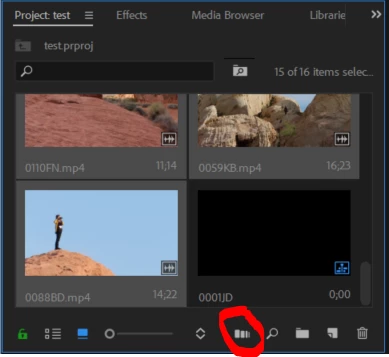
    You can arrange images in your Project panel, select them all and click "Automate to sequence" button in the bottom right corner of your Project panel:
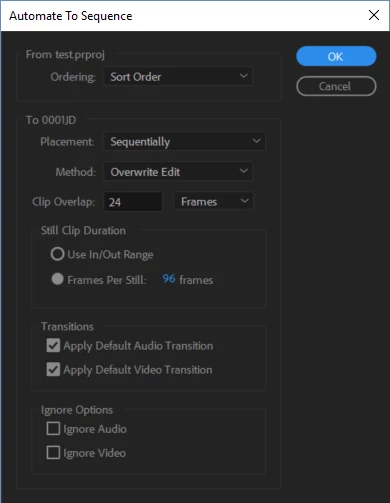
    This will give you a dialogue box with some options like transitions and order in which to add them and it will add your images into your Timeline:
    2 replies

    ingrids71740315
    Participant
    October 11, 2018

    Hi ,

    Great and thanks a lot! Is it possible to do it with effects as well?

    Regards, Ingrid

    MarekMularczyk
    Community Expert
    Community Expert
    October 12, 2018

    What is possible to do with effects? Apply them when you auomate to sequence? No.

    But you can create effects presets in Effect Controls panel and then drop them onto multiple clips. Or you can create adjustment layers in Premiere.

    Adobe Community ExpertAdobe Certified Professional
    ingrids71740315
    Participant
    October 12, 2018

    Oh sorry but yes, I want to ask how can I  add effects onto multiple clips like "Automate to sequence"

    Thank you!

    MarekMularczyk
    Community Expert
    MarekMularczykCommunity ExpertCorrect answer
    Community Expert
    October 11, 2018

    You can arrange images in your Project panel, select them all and click "Automate to sequence" button in the bottom right corner of your Project panel:

    This will give you a dialogue box with some options like transitions and order in which to add them and it will add your images into your Timeline:

    Adobe Community ExpertAdobe Certified Professional