
Participating Frequently
June 9, 2017
Question

Premiere Renderer issue

  • June 9, 2017
  • 5 replies
  • 1540 views

Hi, so ive recently been having this problem
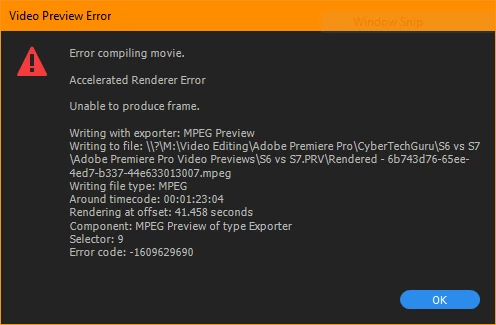
Im not sure why its happening.. it comes when i try to render sequence in to out or any other of those render options...

specs are

4670k

750 ti

16gb ram

windows 10 64bit

Latest version of premiere cc 2017

can anyone help?

Thanks

Gershy13

    This topic has been closed for replies.

    5 replies

    June 12, 2017

    Neil I only had the option "reply to original question" so I think the mods are feeling we're veering a bit off-topic here?...but just one more thing!

    For years I processed Super8 at a local lab - this was reversal/camera original so you only got one chance to get it through the processor. Just a little bit of stress there. Anyway I have my mechanical fixes for whatever goes wrong here - spliced some good leader to the head of those tricky reels I mentioned, increase pressure on/replace the wetgate pads to eliminate beading etc....but I do like a good whine now and then.

    On topic, PP update is performing well so far. A couple of times I got a message "the clip is busy and cannot upload" after capture. Cleared the notification box, closed the program and checked the clip in the folder - was there intact. Onward and upward!

    Mitch

    R Neil Haugen
    Legend
    June 12, 2017

    The new release is working great for me also ...

    Neil

    Everyone's mileage always varies ...
    June 9, 2017

    Just so you know - we run a transfer facility digitizing 16mm 8mm and Super8mm film to drive. We have encountered this issue on and off since using adobe pp, right from the beginning years ago. Sometimes it works, sometimes it doesn't. I just sailed through exporting an entire 8-reel job [200' to 400' reels] with only one error message, then up to reel 8 on the next job - took all day, from 9am to now just to export. Note reels 1 - 7 exported without issue. These two jobs are SD - we usually do HD with the exact same hit-and-miss performance from pp. Sometimes it fails at 12% complete, sometimes at 75% or even 97%. There are no fancy formats on the timeline, just .avi or for HD MP4. There are no 3rd party effects on the timeline. There is no logic. There is no fix. This program cannot reliably, consistently export media.

    Gershy14Author
    Participating Frequently
    June 9, 2017

    Yeah I agree it's really random. Sometimes I restart the program and it works fine...

    R Neil Haugen
    Legend
    June 12, 2017

    Haha yep! Problem this time was, client was coming to pick up Saturday [yesterday], and the job was 27 reels. So it's very lucky [!] that reel 9 at least exported before the colour-correct tweak [as it happened I sent the tweaked reel to him google-drive once I'd updated PP and exported].

    The other problem for me with walking away is I don't want to. I know it's a good idea but I get in this head-strong place where I don't want these machines to "win" lol. Now let me tell you about the old reg. 8 leader with the curled profile that jams in the film path of the auto-load projector, until you coax it through and begin capture whereupon a hair immediately takes up lodging the gate, so you halt capture and reverse direction so the leader can break off from the film, after which you get going so the isopropyl from the wet-gate can start beading on the emulsion.....I do not need computer hassles.

    Today I exported 14 reels in record time, but they were only 50 footers so the jury's still out. The lag has not been as bad today.

    Mitch


    We have had our portrait studio for now 40 years. For many years, we shot 120/220 roll film in Mamiya RB67 Pro-S cameras. We were demanding enough about how our work looked that most of the professional portrait labs found us ... not a good fit. So we built our own lab, and also printed for other picky sot photogs so we could pay for the employees to run it & keep enough through-put year-round to keep the chemistry in good shape.

    All those years of testing chemistry 2/3 times a day ... running plots with the densitometers ... keeping the off-easel analyzing system in tight alignment with each printing station or enlarger ... and the maintenance on the processors for clean prints and film, and correcting 'feed' problems   ... I get real frustrated with the computers at times, but compared to the occasional issue back then ... I calm right down.

    And oh my ... feeding projectors ... yowza. My sympathies!

    Neil

    Everyone's mileage always varies ...
    емр36727606
    Participating Frequently
    June 9, 2017

    Export error Error compiling the movie. Rendering error using GPU The frame can not be processed. Recording using the export tool: H.264 Write to file: \\? \ D: \ WORK \ MARAFON \ OUT \ TEST \ 1_1.mp4 Record file type: H264 By time code: 00: 39: 36: 22 - 00: 39: 37: 06 Effect rendering: AE.ADBE Lumetri Rendering with offset: 1191,200 sec. Component: EffectFilter type GPUVideoFilter Selection tool: 9 Error code: -1609629695

    Win 10

    6700 k

    GTX 980

    32gb ram

    Latest version of premiere cc 2017

    Gershy14Author
    Participating Frequently
    June 9, 2017

    Yup that's the issue I got too.

    Peru Bob
    Community Expert
    Community Expert
    June 9, 2017

    Try updating your graphics driver directly from the video card manufacturer's site.

    Gershy14Author
    Participating Frequently
    June 9, 2017

    It's on the latest driver. It updated using geforce experience, which is the client that gives me drivers.

    Peru Bob
    Community Expert
    Community Expert
    June 9, 2017

    Try rolling back the video driver.

    Gershy14Author
    Participating Frequently
    June 9, 2017

    This is the issue i usually get....

    R Neil Haugen
    Legend
    June 9, 2017

    Past Peru Bob's comment, the stopping point of both is within a few frames. So is there something or effect you have right there that could be an issue?

    Have you tried manually clearing the media cache and cache database?

    And of course, does this happen in other projects also?

    Neil

    Everyone's mileage always varies ...
    Gershy14Author
    Participating Frequently
    June 9, 2017

    Yes it does happen in other projects... I can try and clear media cache... What temporarily fixed it, is clicking the eye on the adjustment layer track... That fixed it... But then my lumetri isn't shown.