
Premiere Sequences inside of other Sequences do not always play audio
UPDATE: As I google this issue, I see "nested sequences". Should I specifically be using Nested sequences to do this -- and if so, will this solve my audio problem. Or am I in fact already using nested sequences by using the below workflow: ..... Thanks, Rowby
Hi Everyone.
I'm using the latest version of Adobe Premiere CC 2017 0.2
I have a Master sequence and a number of additional sequences for all of my scenes.
My Master sequence only consists of the Additional Sequences, one after another. So far so good. This keeps me organized and lets me rearrange my "additional sequences" if necessary.
In my additional sequences I have music and sound effects
However, when I am playing my Master sequence in the time line I often (usually) don't hear any of the sound effects and music that are in the "additional" sequence"
So what is the proper way to handle this? Is there a setting that I must activate to hear the music and sfx when I am playing my additional sequences in my Master Sequences.
Thanks
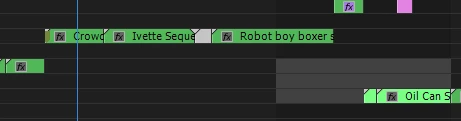
Below is an example of the sequences that are displayed when I select my Master sequence. But any audio in those sequences do no play when I am playing my master. I am "forced" to add any audio within the master sequence, which doesn't seem right 
Rowby
 AdChoices