Participant
March 9, 2021
Answered

Presets folder

  • March 9, 2021
  • 1 reply
  • 2812 views

Where is the presets folder in Premiere Pro CC 2020? Every folder named "Presets" is empty. I use windows 10 Home. I have got folder with presets to import.

This topic has been closed for replies.
Correct answer gerikp

Generally, I import presets in the Effects Panel.
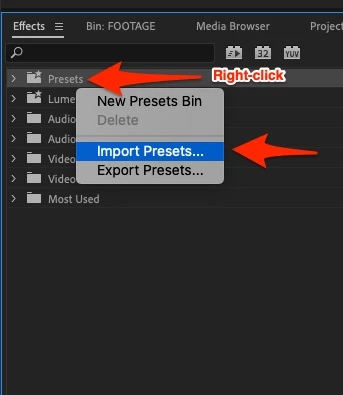
 

1 reply

gerikp
Community Expert
Community Expert
March 11, 2021

For Windows users, I believe it's.....

C:\Users\[user name]\Documents\Adobe\Premiere Pro\14.0\Profile-[user name]\Settings\Custom

Filip5C28Author
Participant
March 11, 2021

I have just imported these presets manually, but i want to learn other ways. I can't see any custom folder (image)


Kevin-Monahan
Community Manager
Community Manager
December 17, 2024

Hi, Is there any way to install presets in bulk? Because doing it one by one from the effects panel is a bit tedious


Hi @CrisGraphicCorner,

Please try installing them at the Finder and Explorer level. See this response: https://adobe.ly/49DLre5. I hope that helps you.


Thanks,
Kevin


Kevin Monahan - Sr. Community and Engagement Strategist – Adobe Pro Video and Audio