
Participant
November 4, 2017
Question

Preview monitor showing up over a split screen

  • November 4, 2017
  • 3 replies
  • 6029 views

Hi guys,

Out of no where i am having this issue with my preview monitor. Never had an issue before but what is happening is that instead of my preview monitor opening up full screen on my second screen it opens up half the size and sits right in the middle of both screens!

So far i have tried...
- Re-launching Premiere Pro cc (latest update)
- Disabling and re enabling the reference monitor in preferences/playback
- System restart
- Double checked my monitors configuration in windows Display Settings.

Nothing seems to work...

I'm running the latest cc 2018 version of premiere.

My monitor set up is as follows.
1.  HP Z32x - Main monitor, used for most of the premiere interface.
2. HP Z32x - Used as my preview monitor.
3. LG HD monitor i use just to see the contents of my project (clips, audio files etc..)

My computer:

- HP Z840 Workstation
- Processor: Intel Xeon CPU E5-2620 v4 @ 2.10GHz, 2.10GHz (2 processors)
- 32GB RAM
- Quadro M4000 (My 4k HP's run directly from displayport to displayport in to the GFX card, the LG runs from it also via a displayport adapter)
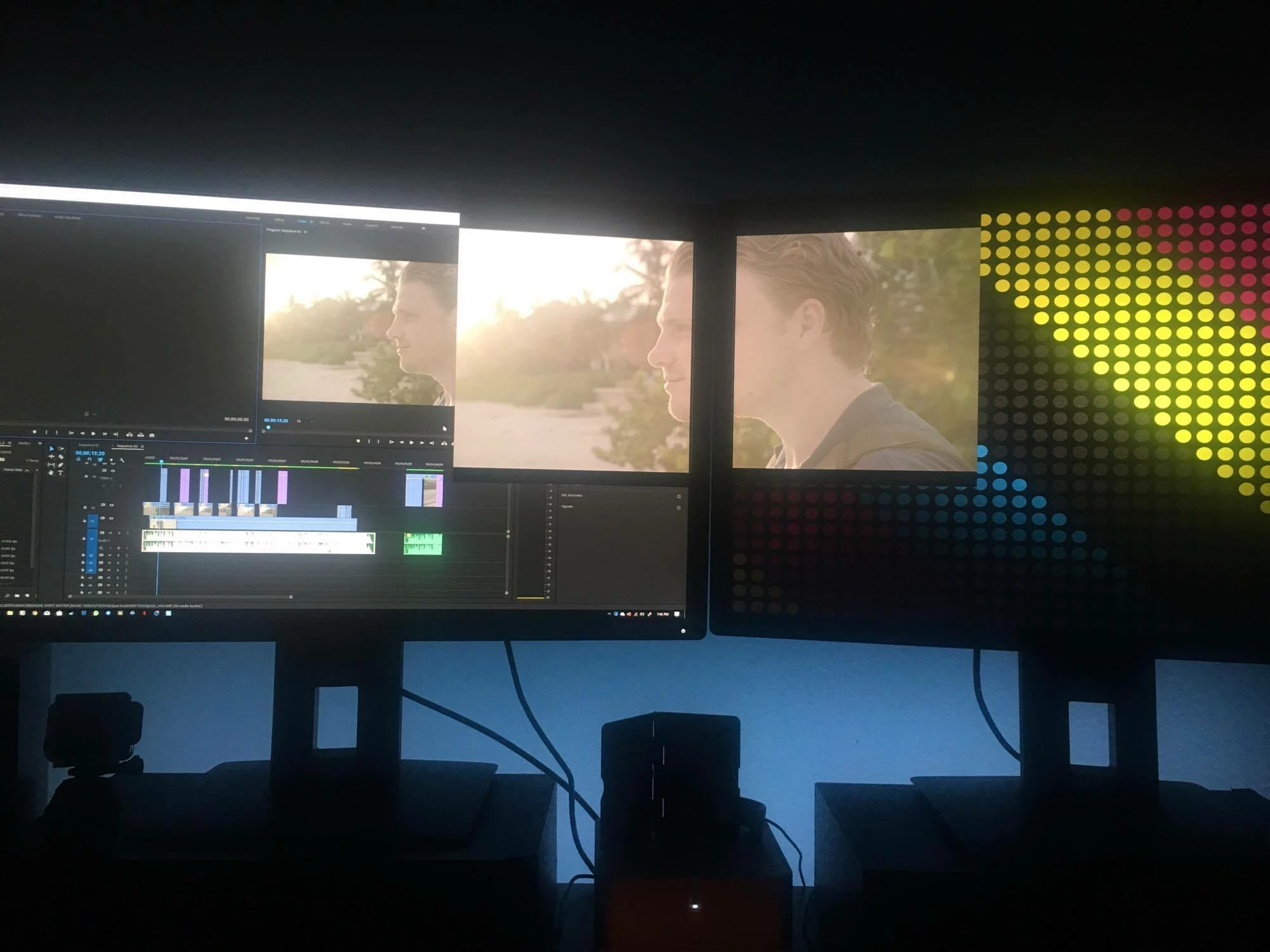
any help here would be greatly appreciated!

Many thanks,

Rob T

3 replies

Participant
January 25, 2018

Hi Guys, i guess i found the solution for this problem.

After try many directions I simplyed change my text scale from "150%" to "100%" in second monitor at the vídeo configuration.

Bellow you can find a print screen. My options are in portuguese because I'm from Brazil, but i think you can understand what I mean.

It fixed the problem for me. I hope can help you to! :-)

Moisesns
Participating Frequently
August 7, 2020

This fix the problem! Thank you!

rtyler87Author
Participant
November 5, 2017

*UPDATE*

So I have not resolved this at all and my frustration is mounting!

I believe this issue has something to do with the fact that im using three monitors and one of them has a different resolution to the other two. If i disconnect the HD monitor and then reconnect it it temporarily fixes this issue. The does not last long though and is not a real fix

Im hoping an update fixes this.

Participating Frequently
November 6, 2017

Did you try to go to preferences and unclick playback, cause that worked for me. Thanks to rtyler87​. I also use 3 monitors(well 2 monitors and a 40" TV), I just had to unclick all of the playback options

Participating Frequently
November 4, 2017

Mine is worse, whatever is in my source monitor shows up full screen on my 1st monitor. I've had to just move the whole program to the left to cover it. NEED HELP TOO

Participating Frequently
November 4, 2017

I don't know if it is Nvidia(I have a GTX) or the new Premiere update. I am gonna try uninstalling the latest driver. They both updated about the same time. In device drivers, you can roll back driver, maybe that will help.

rtyler87Author
Participant
November 4, 2017

yeah i tried going back to cc 2017 but then realized i cant open the project i'm half way through -_-