Participant
October 25, 2023
Answered

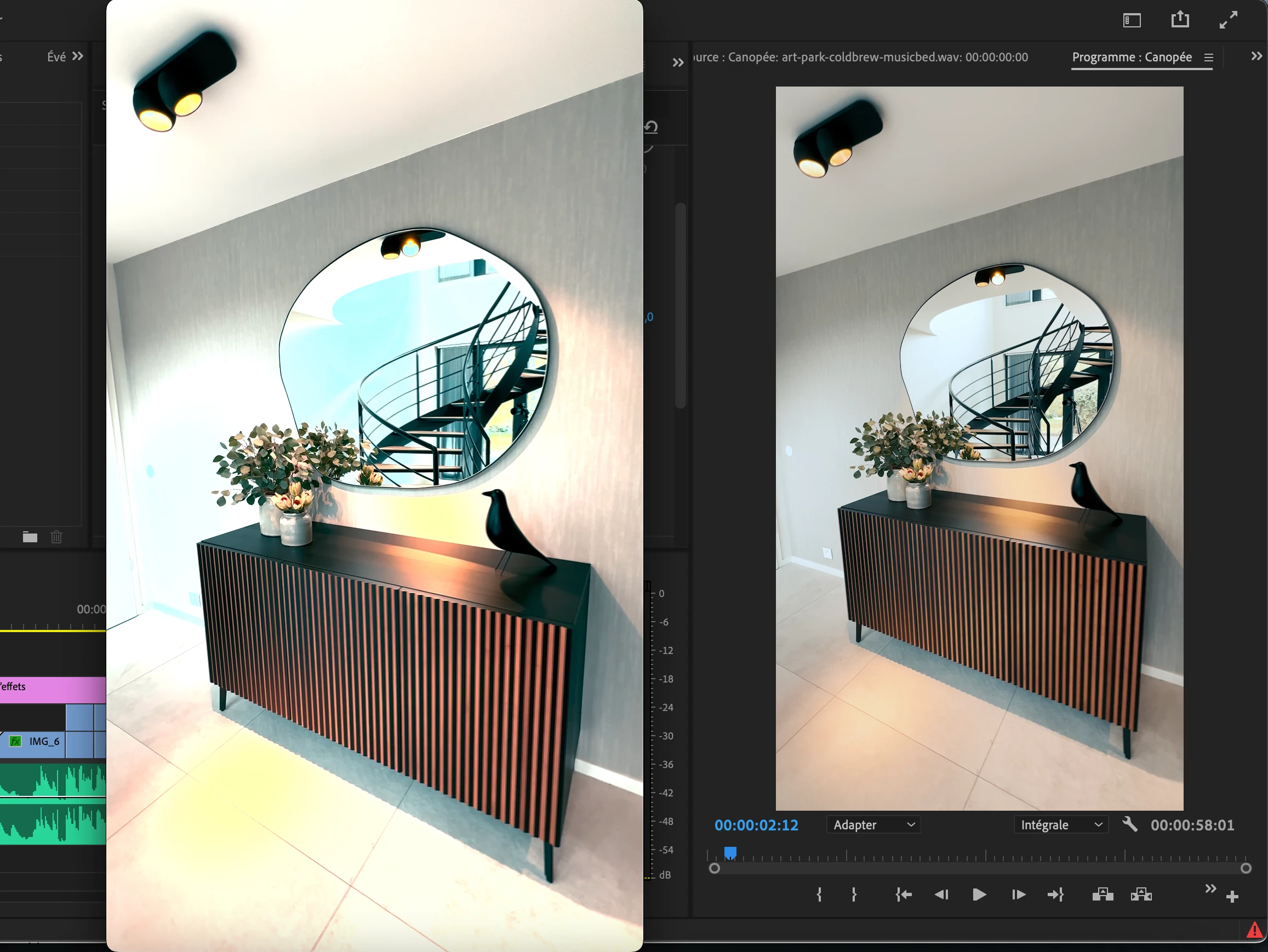
Problème d'export : lumière forte et couleurs modifiées / saturées

  • October 25, 2023
  • 2 replies
  • 1070 views

Bonjour,


Lorsque je prévisualise mon projet sous PP, il est parfait. Lorsque je l'exporte la lumière est modifiée, devient trop forte et les couleurs sont saturées :


Je travaille sous mac avec la version 22.5 de PP. Les vidéos sont issues d'un iPhone 14 Pro Max : 4K - 2160 x 3840 - HDR - ProRes. J'exporte au format H.264.


Je suis perdu, pouvez vous m'aider ??


Merci, Nicolas

This topic has been closed for replies.
Correct answer R Neil Haugen

You need to do some basic color management. And it might be a bit different depending on which OS you're on, Mac or PC. And in the new 24.x series, this is SO much simpler!


FOR THE 24.X AND FORWARD PREMIERE PRO COLOR MANAGEMENT


Go to the Color workspace, Lumetri panel, Settings tab. You'll go through some of the sub-tabs to set these up.


Make sure that the Display Color Management option is 'on', for all Macs and PCs if you haven't done a full-on broadcast style calibration & profile of the monitor. And if you don't know the difference between a calibration and a profile, you haven't.


For Macs, probably set the Extended Dynamic Range option to on. I don't think this is used on PCs.


Make sure the Project level auto-log detection is On.


Make sure the sequencs level auto-tonemapping is On.


Do the above settings setup. Then just use SDR/Rec.709 standard presets for exports, it all should be fine.


FOR 22.X PREMIERE COLOR MANAGEMENT


I'm going to be doing this from memory, as I'm not at my computer right now. And of course, between my current main and old backup, I have back to the 2015 series available ... just 'cause, right?


1) Go to the Project panel, select all the HDR phone clips in a bin.

2) Right-click/Modify/Interpret Footage.

3) Set the Override-To option to Rec.709.


 I think those are the steps needed ... now make a new sequence, dragging the clip/s onto it, and it should do ok. Use presets that do not have HLG or PQ in the preset name.

2 replies

Participant
October 26, 2023

Bonjour


J'ai exactement le même probléme, avez vous trouvez une solution ? 


R Neil Haugen
Legend
October 26, 2023

Read the steps listed. above. It's covered thoroughly.


And being on a Mac is part of the struggle for some, as Macs now use a different display gamma for SDR/Rec.709 video files than the rest of the world. So there's a difference between displays on Macs and elsewhere that there really is no "solution" for. 

Everyone's mileage always varies ...
R Neil Haugen
R Neil HaugenCorrect answer
Legend
October 25, 2023

You need to do some basic color management. And it might be a bit different depending on which OS you're on, Mac or PC. And in the new 24.x series, this is SO much simpler!


FOR THE 24.X AND FORWARD PREMIERE PRO COLOR MANAGEMENT


Go to the Color workspace, Lumetri panel, Settings tab. You'll go through some of the sub-tabs to set these up.


Make sure that the Display Color Management option is 'on', for all Macs and PCs if you haven't done a full-on broadcast style calibration & profile of the monitor. And if you don't know the difference between a calibration and a profile, you haven't.


For Macs, probably set the Extended Dynamic Range option to on. I don't think this is used on PCs.


Make sure the Project level auto-log detection is On.


Make sure the sequencs level auto-tonemapping is On.


Do the above settings setup. Then just use SDR/Rec.709 standard presets for exports, it all should be fine.


FOR 22.X PREMIERE COLOR MANAGEMENT


I'm going to be doing this from memory, as I'm not at my computer right now. And of course, between my current main and old backup, I have back to the 2015 series available ... just 'cause, right?


1) Go to the Project panel, select all the HDR phone clips in a bin.

2) Right-click/Modify/Interpret Footage.

3) Set the Override-To option to Rec.709.


 I think those are the steps needed ... now make a new sequence, dragging the clip/s onto it, and it should do ok. Use presets that do not have HLG or PQ in the preset name.
Everyone's mileage always varies ...