Participant
August 2, 2022
Question

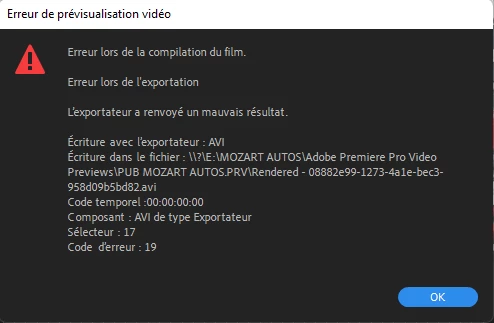
Problème de rendu sur tous mes projets

  • August 2, 2022
  • 1 reply
  • 196 views

Bonjour, il m'est impossible d'effectuer des rendus sur l'ensemble de tous mes projets, j'ai réinstallé première, rien n'y fait. je deviens chèvre avec ce logiciel



This topic has been closed for replies.

1 reply

Kartika Rawat
Community Manager
Community Manager
August 2, 2022

Hi there!

Sorry about Error compiling movie. Could you try changing the preview format to I-Frame only MPEG or Quicktime? 


Let us know how it goes.

Thanks,

Kartika

Participant
August 2, 2022

how ?


Kevin-Monahan
Community Manager
Community Manager
August 3, 2022

Hello, coffee,

Great question. I don't think we have a FAQ for this yet. I'll make one. 


Changing the Codec for Video Preview Files

When rendering video effects in the Timeline, are you getting an Error Compiling Movie warning dialog box concerning AVI files? If so, you need to change the codec for video preview files. This render error is a known issue for some editors on Windows computers. 


Here's how to change the codec.


  1. Go to the User Guide and scroll down to the section "Changing Sequence Settings." This guide provides step-by-step instructions, as well.
  2. Choose Sequence > Sequence Settings. The Sequence Settings dialog box launches.
  3. Set the Editing Mode (top of the dialog box) to Custom (scroll up the menu, it's at the top). The settings for video previews are then "unlocked."
  4. Choose QuickTime in the Sequence Settings dialog box under Video Previews > Preview File Format.
  5. I recommend ProRes LT for the codec, which will provide smooth playback and an option for faster rendering, called "smart rendering."
  6. Click OK. The box closes, and you can render effects in the new codec. 
  7. After the export, don't forget to choose Sequence > Delete Render files to restore drive space. You won't need the files anymore.

I hope the advice helps.


Thanks,
Kevin

Kevin Monahan - Sr. Community and Engagement Strategist – Adobe Pro Video and Audio