



Exit
  • Global community
    • Language:
      • Deutsch
      • English
      • Español
      • Français
      • Português
  • 日本語コミュニティ
  • 한국 커뮤니티
0

Problem Importing video to Premiere

Community Beginner ,
Aug 07, 2018 Aug 07, 2018

Sorry to open a new thread, but I am not sure how to describe the problem. If you see an attached screen grab from Premiere, the videos are the mp4 format, and they are excellent playback. But when I view in Premiere, this happens.
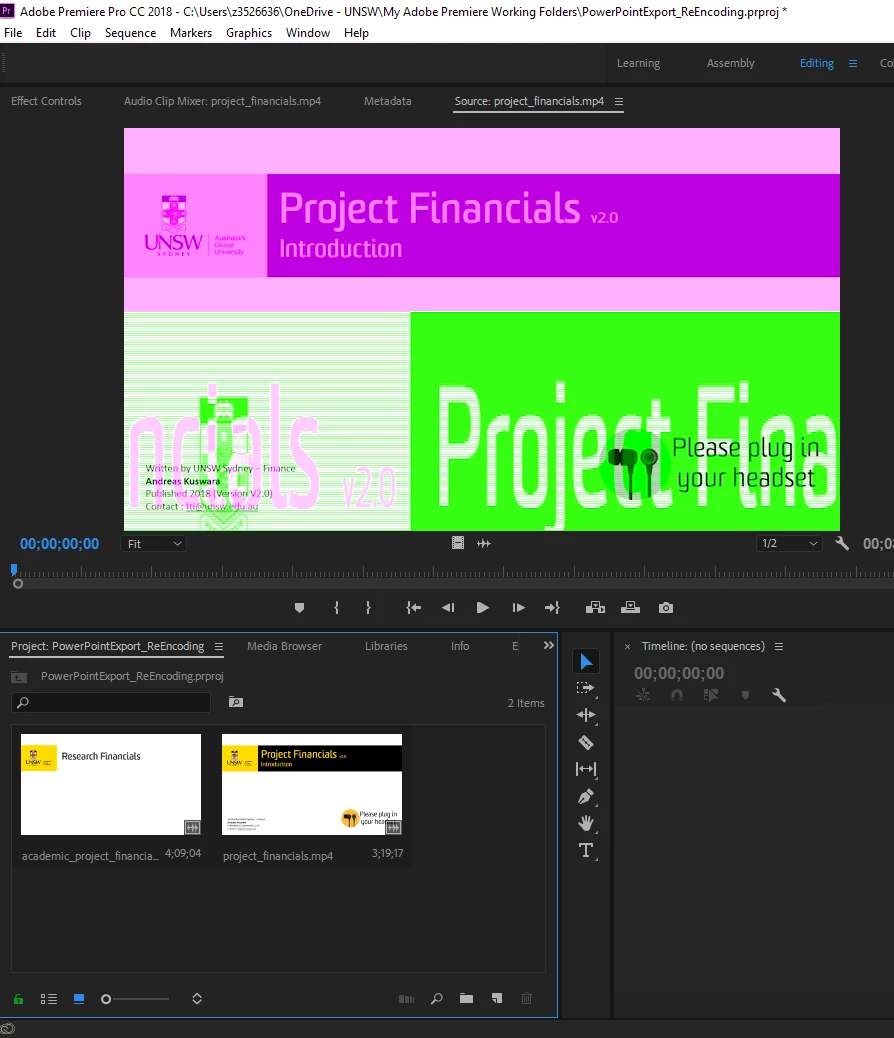
problem.png

What is that? The colour wrong and it like repeating the top half of the video on the bottom half. The audio track is playing correctly, but the video is messed up.

Anyone can have any suggestion for me where to look?

The video comes from an HD video export out from PowerPoint.

I'm running Premiere Pro CC on Windows 10 machine.

295
Translate
Report
Community guidelines
Be kind and respectful, give credit to the original source of content, and search for duplicates before posting. Learn more
community guidelines
Adobe Employee ,
Aug 07, 2018 Aug 07, 2018

Hi Andreas Kuswara,

Sorry for the playback issue. It seems like a compatibility issue with GPU drivers.

Try the steps recommended in this thread: Green and Pink Video in Premiere Pro 12.0.1 (Build 69)

Please let us know the status.

Thanks,

Vidya

Translate
Report
Community guidelines
Be kind and respectful, give credit to the original source of content, and search for duplicates before posting. Learn more
community guidelines
Community Beginner ,
Oct 14, 2018 Oct 14, 2018
LATEST

Hi, I just came around back to this, the link you refer to is for Intel® HD Graphics 530, while mine is 520; not sure if they are equivalent or not, are they?

And secondly, the URL you sent (Adobe community post) has a correct answer which refers to Intel's website, but that Intel website has no list of older drivers as mentioned in the community post. Intel must have updated it or something.

So it's still unresolved.

Translate
Report
Community guidelines
Be kind and respectful, give credit to the original source of content, and search for duplicates before posting. Learn more
community guidelines