
Exit
  • Global community
    • Language:
      • Deutsch
      • English
      • Español
      • Français
      • Português
  • 日本語コミュニティ
  • 한국 커뮤니티
0

Problem with jpegs in Premiere Pro

New Here ,
May 13, 2020 May 13, 2020

When I add jpegs into premiere pro, most of them look like the photo below.  The video is ok...it's just the photos.  They look normal in any other program.  They even look normal while viewing in the Media Browser.  Occasionally, they look also look ok while creating the project, but then look like the photo below once it's been exported.

Any ideas??


Thanks,

Mark
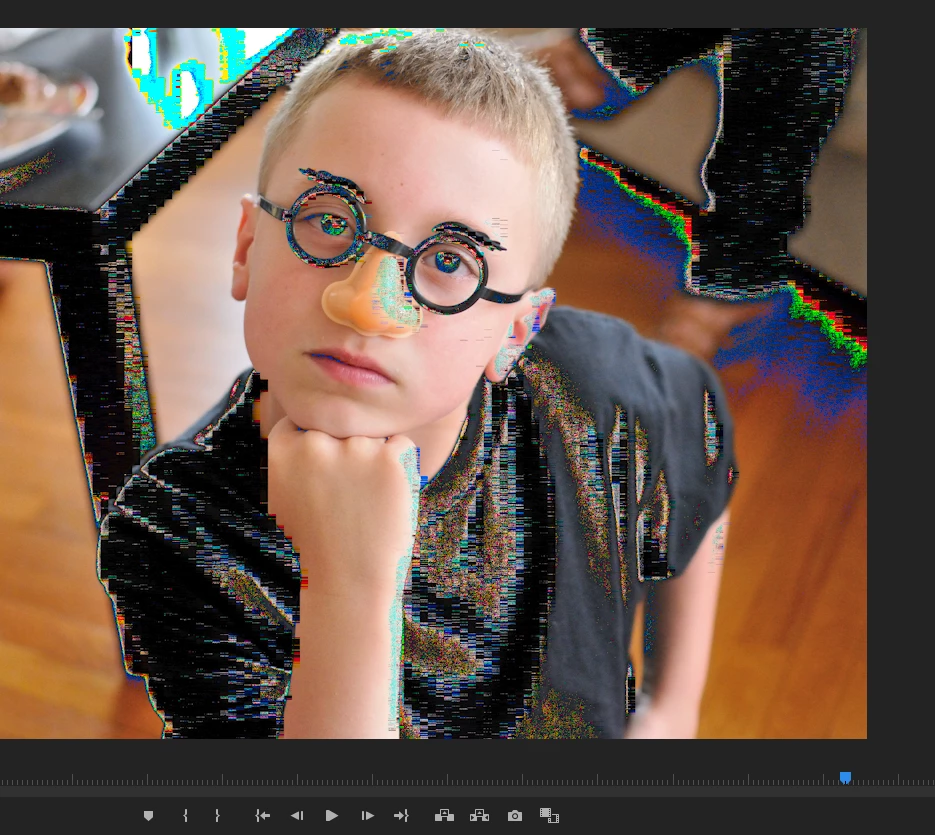


Annotation 2020-05-13 202154.png

TOPICS
Error or problem
567
Translate
Report
Community guidelines
Be kind and respectful, give credit to the original source of content, and search for duplicates before posting. Learn more
community guidelines
LEGEND ,
May 13, 2020 May 13, 2020

Probably a wrong color space on the image. Premiere needs sRGB ... no 'straight' RGB, ProPhoto or other color space will normally work correctly. A standard suggestion is to open the image in Photoshop, set the image 'space' to sRGB, and export.


Neil

Translate
Report
Community guidelines
Be kind and respectful, give credit to the original source of content, and search for duplicates before posting. Learn more
community guidelines
New Here ,
May 21, 2020 May 21, 2020

Thanks for the reply. I checked these photos and they are all sRGB already. 


Any other ideas?


Thanks. 

Translate
Report
Community guidelines
Be kind and respectful, give credit to the original source of content, and search for duplicates before posting. Learn more
community guidelines
Community Expert ,
May 21, 2020 May 21, 2020
LATEST

Open the photos in Photoshop and save them as .psd.


If you have many photos you can in Photoshop batch convert many files in one go by going to File > Scripts > Image Processor.

Translate
Report
Community guidelines
Be kind and respectful, give credit to the original source of content, and search for duplicates before posting. Learn more
community guidelines