

name is already taken
Known Participant
September 18, 2020
Question

Problems with position keyframes

  • September 18, 2020
  • 3 replies
  • 1491 views

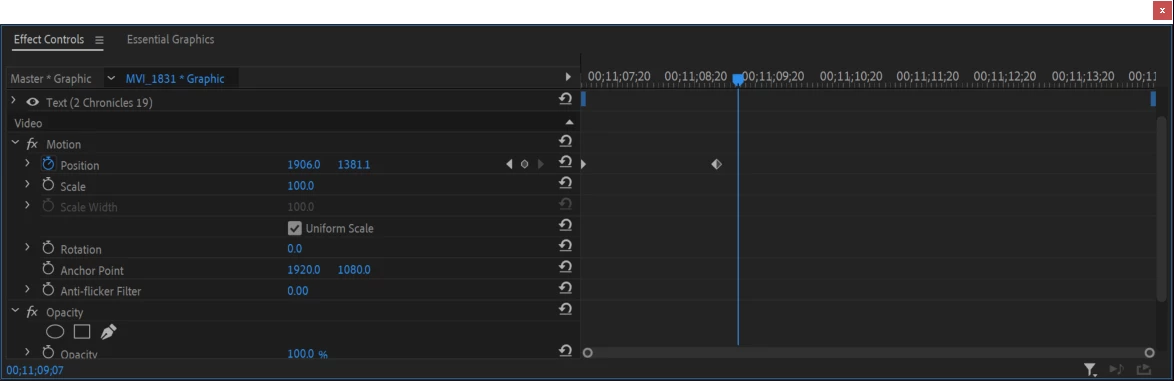
I am moving text in my video, when I start off-screen and move the text in everything works fine. As soon as I add a third keyframe to anchor the text so I can start moving it off the whole thing breaks and the text disappears. Timeline picture included
This topic has been closed for replies.

3 replies

Community Expert
September 19, 2020

do not keyframe text from Motion properties, better animate text using Text Transform Properties(position,scale etc..)

then use Vector Motion if you need to add additional seamless animation keyframes

name is already taken
Known Participant
September 19, 2020

AYYY! not quite the answer I was looking for but it gave me a better understanding of where to look!


After looking at my vector graphics coordinates and the video motion coordinates while moving the text I realized:


I was trying to keyframe the movement of the actual text box NOT the text object itself!


Thanks Carlos! 🙂


Community Expert
September 20, 2020

good that your issue was solved!!

Ann Bens
Community Expert
Community Expert
September 19, 2020

There are two ways to move a text.

Under Vector Motion and Motion which is under Video.

Might have those confused.


name is already taken
Known Participant
September 19, 2020

Not that simple below I have included a screenshot with keyframes that should move my text. If I just the first one that's where the text stays, ie off my screen, and if I change the second one the text just shows up there immediately. Ie POP it just appears without sliding on screen. These are the only keyframes I have in the text. I am not manipulating both.

name is already taken
Known Participant
September 19, 2020

For some reason, changing the actual "coordinates" number in the position attribute will work but moving the text in the project window breaks things.


I seem to be experiencing bugs with the position attribute of objects in premiere as also posted here:


https://community.adobe.com/t5/premiere-pro/scale-effect-starts-before-keyframe/m-p/11430099?page=1


if someone could help I would appreciate it, this is now happening on more then one project and it is fine 90+% of the time but just starts breaking other times.


It is hurting my productivity and limiting my options if someone could help I would appreciate it.