
drrcj
Participating Frequently
October 27, 2022
해결됨

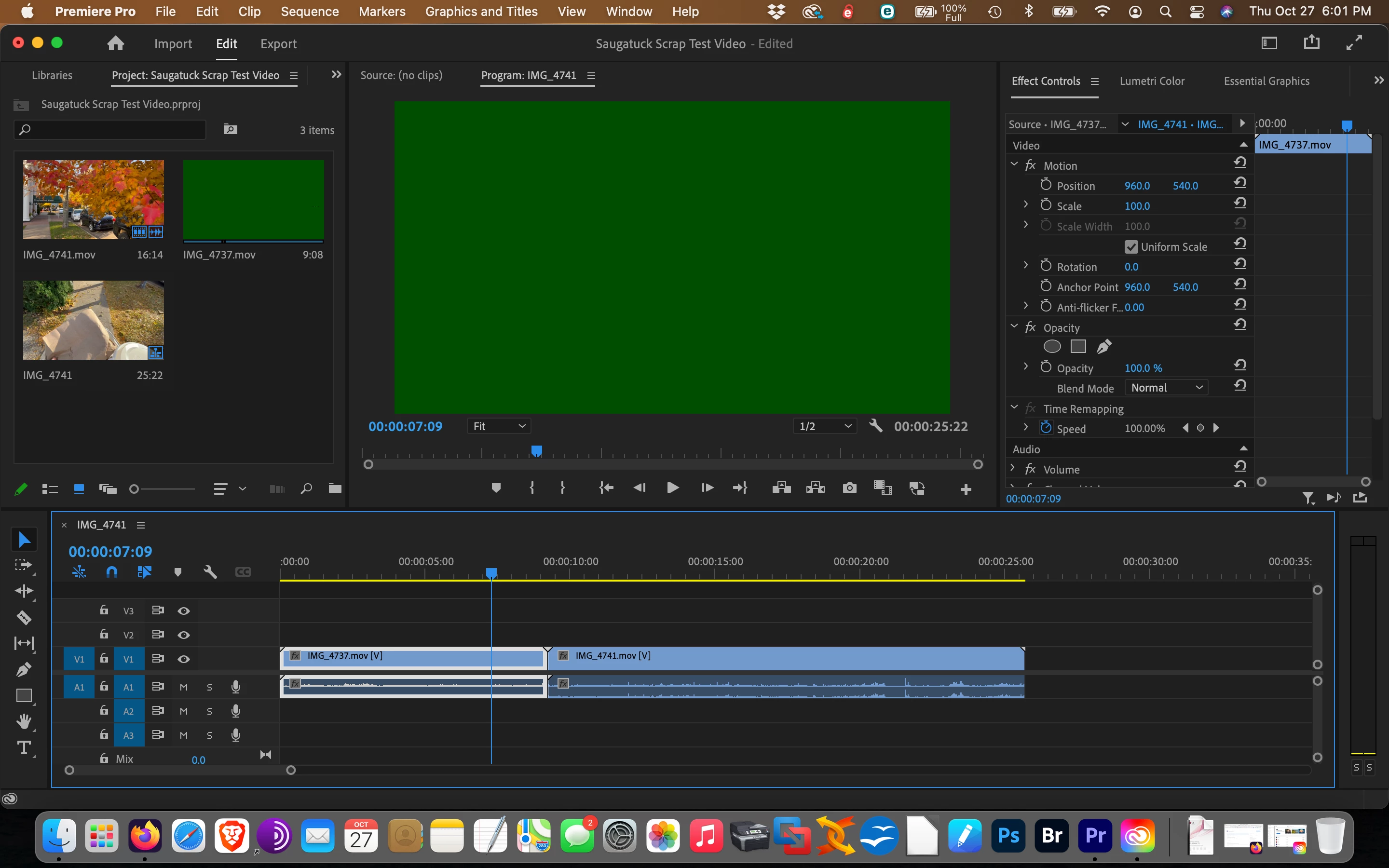
Project media icons, source monitor and program monitor solid green

  • October 27, 2022
  • 3 답변들
  • 1113 조회

Using a late 2013 Macbook Pro Retina, 16Gb ram, with the optional NVIDIA GeForce GT750M 2Gb, Big Sur 11.7.1 and Premier Pro version 23.0.0 (build 63). Premiere defaults to opening with File>Project Settings>General>Mercury Playback Engine-GPU Acceleration (Metal)-Recommended. Apple System Information states "Supported, Metal GPUFamily macOS 1".


With that recommended GPU acceleration selected, the clips in icon view display fine until you mouse over them, then they turn green. The Source and Program monitors are always green. Scrubbing the timeline or  clip icon will produce additional streaks of color, but they always start off as green. System Compatibilty Report shows No Conflicts To Report. When I select File>Project Settings>General>Mercury Playback Engine Software Only, the problem goes away.


Everything appears up to date as far as I can tell. I have also tried the Shift+Alt startup as well (mostly to clear stuttering problems but it doesn't cure the green screeens).


Anybody having this issue or have any thoughts? Here's a screenshot:
 

이 주제는 답변이 닫혔습니다.
최고의 답변: RjL190365

There are no updates any more (outside of critical security fixes for the most recent version of macOS that that MacBook Pro officially supports) for that model MacBook Pro. Apple had officially placed all late-2013 and early-2014 MacBook Pros into "Obsolete" support status a few months ago.


Same story with Windows (in the case of both the Haswell CPUs and the Kepler mobile GPUs): Intel had completely ended all support outside of archived drivers for its Haswell (4th-Gen) CPUs in June of last year, while Nvidia had also done the exact same thing in April of 2020.


In other words, you're (officially) out of luck with that nine-year-old MacBook Pro.


So, instead of continuing to struggle with that now-obsolete quad-core CPU that puts out too much heat for the feeble (by current standards) performance, I'd strongly recommend replacing it with a new 14" MacBook Pro with the M1 Pro CPU.

3 답변

RjL190365답변
Legend
October 29, 2022

There are no updates any more (outside of critical security fixes for the most recent version of macOS that that MacBook Pro officially supports) for that model MacBook Pro. Apple had officially placed all late-2013 and early-2014 MacBook Pros into "Obsolete" support status a few months ago.


Same story with Windows (in the case of both the Haswell CPUs and the Kepler mobile GPUs): Intel had completely ended all support outside of archived drivers for its Haswell (4th-Gen) CPUs in June of last year, while Nvidia had also done the exact same thing in April of 2020.


In other words, you're (officially) out of luck with that nine-year-old MacBook Pro.


So, instead of continuing to struggle with that now-obsolete quad-core CPU that puts out too much heat for the feeble (by current standards) performance, I'd strongly recommend replacing it with a new 14" MacBook Pro with the M1 Pro CPU.

drrcj
drrcj작성자
Participating Frequently
October 29, 2022

Thanks Rjl - I had checked earlier in the year and my Macbook was still barely on the "supported" list but I missed the NVIDIA stuff. Also still running an HP420 Xeon with GPU issues. Guess I need to collect my nickels and dimes soon ;-). Thanks again to all of you for your help.

Kevin-Monahan
Community Manager
Community Manager
October 31, 2022

Glad to have you aboard the community drrcj. I had the same machine and experienced the same things you are going through now.  I can relate to your frustration. The only cure is a new computer. At least, it was for me.


Cheers,
Kevin

Kevin Monahan - Sr. Community & Engagement Strategist – Pro Video and Audio
Peru Bob
Community Expert
Community Expert
October 27, 2022

Delete the Media Cache and Media Cache files:
https://community.adobe.com/t5/premiere-pro/faq-how-to-clear-your-media-cache-in-30-seconds-in-premiere-pro-2020/m-p/11017257/thread-id/260446?page=1

If that doesn't work, try resetting the preferences:
https://community.adobe.com/t5/premiere-pro/faq-how-to-reset-trash-preferences-in-premiere-pro/td-p/8236158?page=1

If that doesn't work, try resetting the Workspaces:
Reset a workspace
Reset the current workspace to return to its original, saved layout of panels.
1. Do one of the following:
• Click the Workspace menu icon and select Reset to Saved Layout.
• Choose Window > Workspace > Reset to Saved Layout.
from here:
https://helpx.adobe.com/premiere-pro/using/workspaces.html

If that doesn't work, try Preferences > Audio Hardware and set Input to None.


If that doesn't work, try creating a new project and import the old one into it.

drrcj
drrcj작성자
Participating Frequently
October 28, 2022

Thank you Peru Bob for the quick response, yet I'm still at square one. Had already tried everything except your suggestion to Import into New Project and that Audio Input trick (THAT would've been interesting if it worked). Driver info is really unclear except that the NVIDIA driver updates are supposed to be bundled into the normal Mac System Updates. Going to NVIDIA's website only allows driver downloads for WIN 7~11, Linux and FreeBSD for that specific card. No MacOS. Since I'm current on the updates (11.7.1) I guess I'll have to live with the "software only" renderer. Still hoping to hear from anyone experiencng the same issue or verifying the driver issue and, if that, a solution to locate and download the update.

Kevin-Monahan
Community Manager
Community Manager
October 28, 2022

Hello drrcj,

Sorry but I don't think your system meets system requirements any longer. You have an Intel Gen 4 processor; you need a Gen 6 for minimum requirements. Your GPU meets minimum requirements, but macOS no longer supports NVIDIA GPUs. Is it possible to roll back to an earlier version of Premiere Pro or continue using Software Only? Is it possible to treat yourself to a new Mac? I hope so! 


Thanks,
Kevin

Kevin Monahan - Sr. Community & Engagement Strategist – Pro Video and Audio
Peru Bob
Community Expert
Community Expert
October 27, 2022

That is usually a graphics driver issue.

You may have to update your operating system.