
Participant
November 7, 2024
Answered

Properties panel not displaying options

  • November 7, 2024
  • 4 replies
  • 4387 views

Hello,


Hoping someone can help me. I'm trying to caption my project in Premiere Pro 2025 (Windows 11), I've watched multiple 'how to' videos about the new Properties panel and tried some of the other work arounds in related conversations (like closing and opening PP while holding the shift key and removing preferences, closing and reopening the Properties panel) but not having much luck. I don't seem to be getting the same features I used to in Essential Graphics. I can do some things but can't change the size of the font, the depth of opacity for the background that sort of thing. When I click on the three dots with a caption (or all captions selected), I only get one option 'Add or edit captions'...if I click on that nothing happens.


Any ideas or advice would be greatly appreciated, thanks!
Correct answer MyerPj

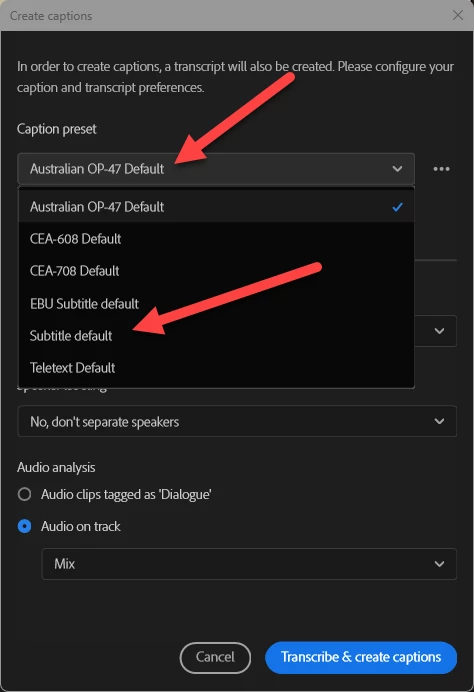
It's your Caption Preset, which you selected. I don't know the details, but that option doesn't seem to allow for the font adjustments you are expecting. Stick to 'Subtitle default' and you'll see the other options.


4 replies

Participant
February 7, 2025

I tried this only by accident. I had the same frustration of the Caption/Graphics workspace just not showing up and I tried all the suggestions (except) asking Adobe support) until I saw "Import Workspace from Projects" at the bottom of the menu. I opened a project that I'd previous captioned and it worked.


MyerPj
Community Expert
Community Expert
February 7, 2025

I always leave (or set) that off.

MyerPj
Community Expert
Community Expert
November 7, 2024

Let's see if @Stan Jones is around.

MyerPj
Community Expert
MyerPjCommunity ExpertCorrect answer
Community Expert
November 7, 2024

It's your Caption Preset, which you selected. I don't know the details, but that option doesn't seem to allow for the font adjustments you are expecting. Stick to 'Subtitle default' and you'll see the other options.


Participant
November 11, 2024

HI there guys, I just did what you said in this post that it suppose to solve the problem but I'm still getting an empty propertie panel options. Do anyone has another way to solve this anoying problem? I would really appreciate your help since I'm running out deadlines. Thanks in advance!

MyerPj
Community Expert
Community Expert
November 11, 2024

I just finally find the solution for my case, I followed the tips you brought in this thread but also - in my case - I had to close the properties panel from its hamburguer menu and then open it again from menu/window/properties panel. Hope this will be helpful for someone else. 


Maybe it's a workspace issue? If you have time, reset the workspace to default and see if the problem returns.

R Neil Haugen
Legend
November 7, 2024

That's because it's "context aware" ... and you haven't actually selected the text itself, in the Program monitor ... do so, and the full controls will be back in that Properties panel.


And ... to create a new graphic, you need to have nothing selected, as then, the Properties panel will have a small bubble icon in the far lower left corner, WAY away from everything else, that says "Create Graphic".

Everyone's mileage always varies ...
Participant
November 7, 2024

Thanks for getting back to me so quickly Neil, did you mean to select the caption text as per my attached screenshot? I still don't seem to have the full controls with that selected, in either the Captions and Graphics or Editing workspaces. Sorry, am I missing something else? Thanks!