
spotpost
Inspiring
July 19, 2022
Question

ProRes output is limited to 8-bit on Mac

  • July 19, 2022
  • 1 reply
  • 1067 views

Hi, we're failing to export broadcast-quality ProRes files from Premiere for grading (See spec below). We've done extensive testing & permutations (in native and Rosetta mode, systematically toggling settings etc etc) and both Premiere and After Effects will simply not export ProRes at anything beyond 8-bit - pretty useless for grading! Quicktime YUV 10-bit works (but files are obviously huge). DNxHR HQX 10-bit works, but ProRes is the go-to format for all the non-Avid studios and agencies we work with. So this is throwing up huge problems, not just for us but for countless studios that rely on a ProRes workflow. This is exacerbated by the fact that Premiere's failure doesn't get noticed until the encoded footage arrives in the grading suite, which is embarrassing and expensive... I've attached a picture showing a Premiere ProRes 4444 export vs a Resolve ProRes 4444 export, and the original 16-bit MXF (Shot on a Sony F55) looks identical to the Resolve export. Please advise!
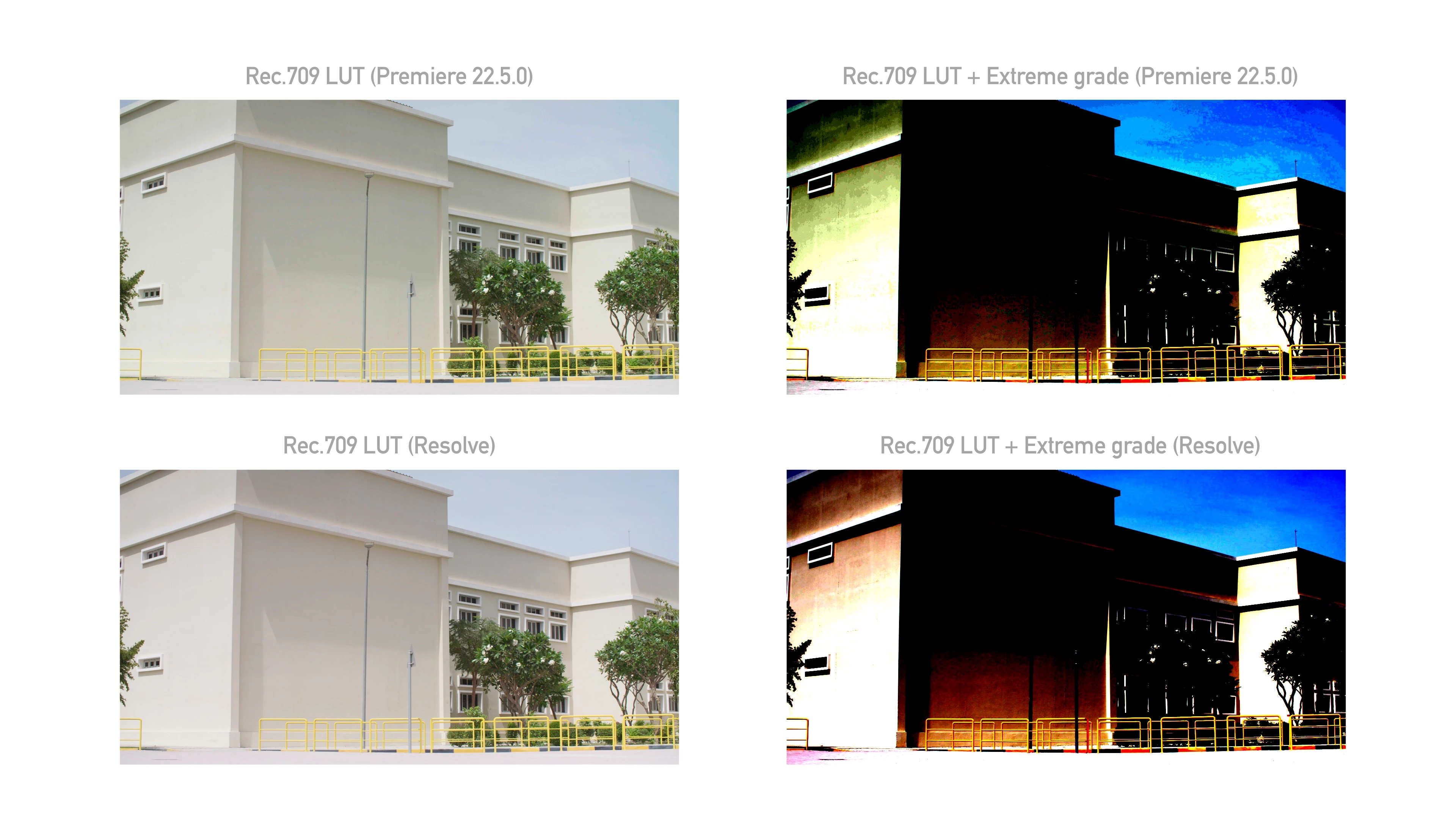
Spec: Mac Studio (2022), Monterrey 12.3.1, running Premiere Pro 22.5.0 (Build 62)


Yan.

This topic has been closed for replies.

1 reply

Inspiring
July 19, 2022

When exporting your ProRes file, are you making sure to choose 16-bpc in the "Depth" section of "Export Settings > Video"? If not, then 8-bpc is the default, and that's what you'll get. Checking 16-bpc will produce your 10-bit ProRes file.

Take a look at this article from https://blog.frame.io/2021/06/07/premiere-pro-max-render-quality-max-bit-depth/

Scroll down to section 8, then keep going a bit further to the section called "The often-overlooked Depth choice in Export Settings." Hopefully this will do the trick for you.

spotpost
spotpostAuthor
Inspiring
July 19, 2022

Thanks for the advice but Yes of course: Max bits in the sequence settings, max bits in the output settings, Quicktime set to trillions of colours, the confusingly named "Max bits" set in the Export settings as well, etc etc etc.  Still capped at 8-bit, and that's in Rosetta mode, in M1 mode, with hardware acceleration on and off... I'm pretty experienced at isolating bugs in post-production workflows, and I'm pretty confident it's a bug. As I said in the post, changing nothing except the export settings from "Quicktime ProRess 4444" to "Quicktime YUV 10-bit uncompressed" does give a 10-bit file (a rather large one of course!)

Inspiring
July 19, 2022

I just heard back from Adobe - Woohoo! It turns out it's actually a bug in the hardware decoding (not the en-coding at all!) on the new M1 mac studios. So the files are 10-bit, but they get decoded as 8-bit unless I turn off "hardware accelerated decoding". Just sharing here in case it helps anyone else.


That's great to hear! For now, it's a bit of a performance hit to disable that option, but it's certainly better than not being able to work at all.