Participant
December 11, 2021
Answered

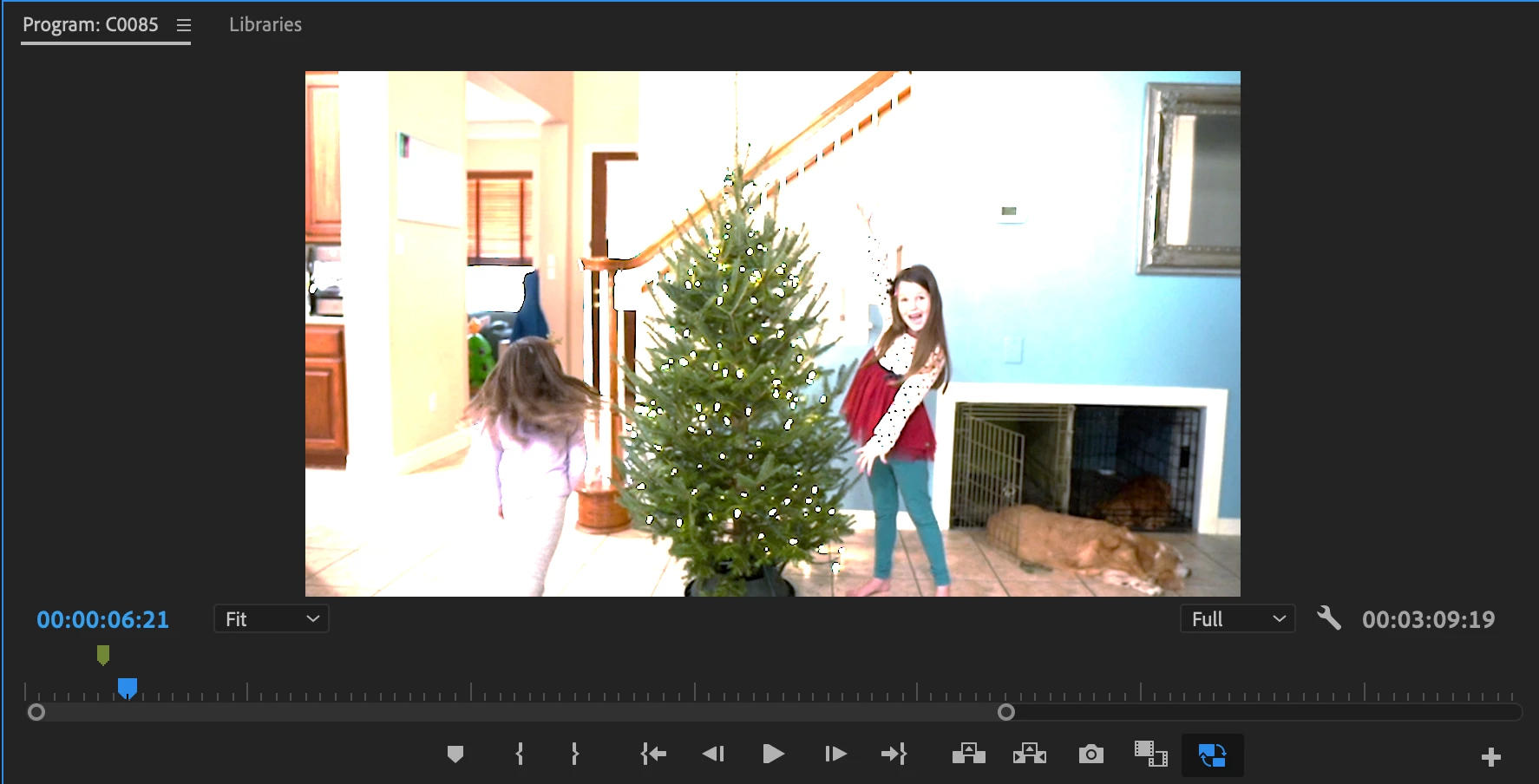
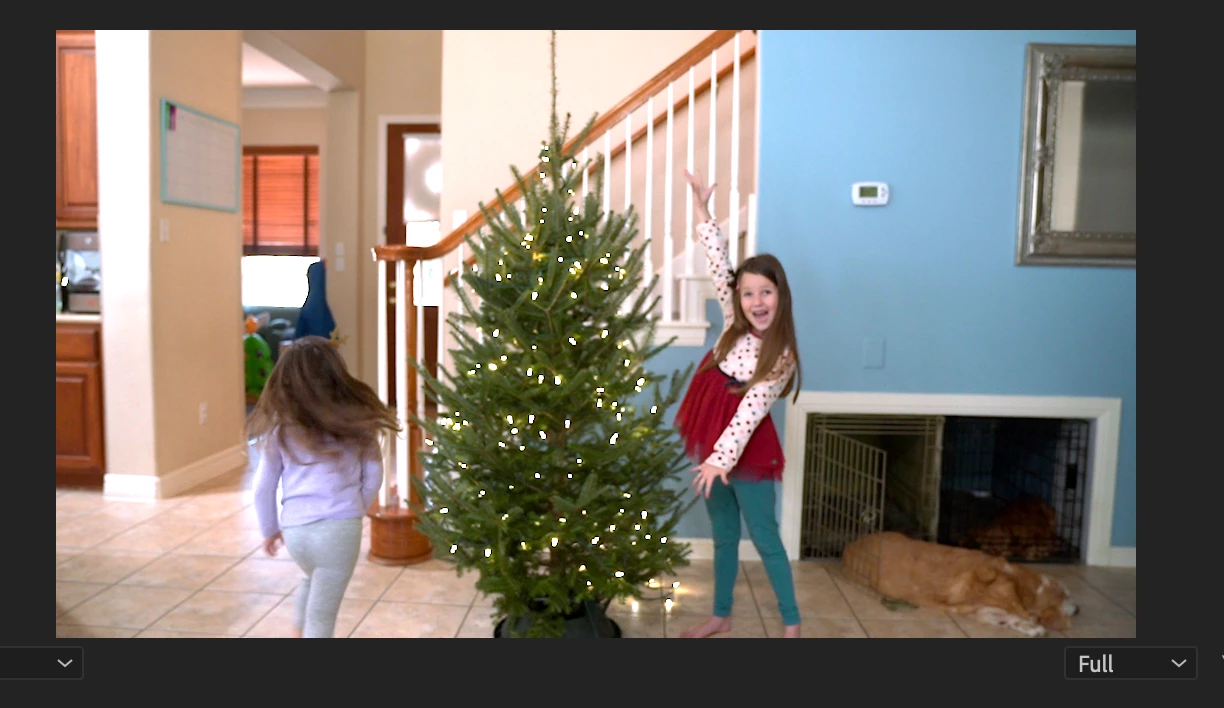
Proxies blown out in but footage looks fine

  • December 11, 2021
  • 4 replies
  • 3282 views

I have never tried making proxies before, but am taking a video class where the instructor asked us to.  I am shooting on a Sony A7III. Media Encoder and Premiere Pro are up to date. When I toggle to the proxy, the entire thing is blown out.  I have tried all the different format for proxies and the same thing is happening.  When I toggle back, my footage still looks fine.  Does anyone know why the proxies looking so blown out?  

This topic has been closed for replies.
Correct answer Kevin J. Monahan Jr.

Hi Katharineann,

Sorry about that. It looks as though you may have shot the footage in HDR/HLG, and automatic interpretation of the footage kicked in - which is a new feature of v.22. This feature caught a lot of Sony and iPhone users unaware.

Are clips shot in HLG/HDR? If so, you may want to interpret them as Rec709 in the Modify > Interpret Footage dialog box. You may also need to create a new preset for proxies so that they match your color managed clips.


If this is all too much to deal with right now, you can always move back to the previous version of Premiere Pro and work with that until you have worked out all the details of a SDR vs. HDR workflow.


As a Sony user, you should take heed of this new feature - which you may wish to use or avoid (most casual users were fine with the previous workflow). Either way, you have to make a choice moving forward to embrace HDR or to move back to a Rec709 workflow. 

Hope the advice helps but come back with any questions.


Thanks,
Kevin

4 replies

Participant
March 13, 2022
chrisw44157881
Inspiring
March 14, 2022

that doesn't reference the proxy issue. unless there's a way to change color management of just proxies, i'm all ears.

R Neil Haugen
Legend
April 5, 2022

That sounds good. Thank you for the feedback.


My reasoning for choosing HDR was because it captures more usable image data in low lighting settings. However, I'm not sure how much of this is translated through once the image data is "interpereted" to rec 709 during editing. My guess was that, as you grade, you can bring up details that wouldn't normally be found by recording in regular 709. For example, details normally lost in the shadows on rec 709 would still be available in HDR footage and, when making adjustments to the image in the 709 workspace, the image data is still there to bring up into the working 709 spectrum.


I'm not sure if that makes complete sense but.. I guess its the reason why I am justifying trying this difficult path.


Would love to hear if I'm incorrect! haha.


Besides "hanging here" and my own work, I'm a "contibuting author" over at MixingLight.com, the big colorist's pro teaching site. The founders there were the ones that Dolby Labs hired to do the in-house demos for colorists on how to work with DolbyVision in Resolve & Baselight. So I've been around a ton of discussions & work with both SDR and HDR.


In some ways, you're kinda right ... but not really. Mostly so?  lol


There are two big things in learning to work with HDR ... the absolute biggest gain isn't dynamic range black-to-white, it's the massively increased color volume available in HDR work. And the second, is it's the shadows that benefit more from the dynamic range than the highlights. (This is where you're sorta right.)


The first, the larger color volume is easy enough to understand. The second, the increased shadow range, is at first odd. But given that realistically you only take the 'paper white' or "graphics white" to around 200-210 nits, that's about doubling the total tonal range for "detailed" objects. Everything above around 210 is simply bright color data. Speculars.


So it means you have more details in the shadows you can work with, more subtlety you can massage. And that for the colorists I know, the increased shadow subtlety is about as addictive as the bigger color Crayola box. Yea, going from the 16 color box of crayons to the 128 color box is awesome. But so is getting to do really cool shading and tinting of all those deep shadows.


There's a problem there though ... after you finish the HDR grade, when you scrunch things down for the SDR deliverable, both gains go away. One of the colorists says the biggest thing he's learned in working the few actual paid HDR gigs he's delivered is that it's easier to grade, really. You aren't always shoving 13 stops into a 7-8 stop 'screen'. Poking and jabbing here & there to make it fit. Grading HDR is in many ways more 'natural' to quite a few colorists once they get a handle on it.


But ... and its a big one ... SDR doesn't have all those tones down there, and fitting things in is bloody hard, even more so when you start out with a tone more tones. It really takes the software being able to give a pretty good transform between color spaces/range.


At the moment, it's really easier to do SDR from SDR media. It ... fits ... easier. Especially in Premiere at this time in its color managment development. Maybe in a few months they'll have transforms for this. Right now, they've a new S-log3.cine transform available for that media that's pretty awesome, I think the best color management too they've made yet.


But most other media ... their transforms and color tools work mostly. You can get by with them. So yea, you can stuff it in, but why would you want to? It's more work, and really doesn't get better results. Although ... in another year, if you're going to rework the project, it might be nice to have the extra DR and color.


So it's a user choice thing of course ... though I'm still mostly shooting SDR. Although the BRAW from my BMPCC4K can of course be normalized to Rec.709 or go directly to a P3 or Rec.2100 space. My second cam, the old beloved GH3 ... strictly SDR. So it's gonna need a replacement over the next year.


I figure at NAB in a couple weeks, I'll be looking over what's out. See if BlackMagic has any news for their cams. Or others, though probably at this point I'll go with a BM cam. Might pick up another 4k, or perhaps a 6k. Unless something else pops up.


Neil

Everyone's mileage always varies ...
R Neil Haugen
Legend
December 11, 2021

There is a problem with the current CM for proxies. I've been in touch with a couple devs, who after testing what I sent them, noted there is clearly a problem.


Premiere seems to make proxies from the original media without linking them to the CM applied to the original clip. Depending on what you or Premiere does to transform or not to either Rec.709 or HLG, you get different issues.


That top image looks like a Rec.709 image. So have you used the Override to Rec.709 option and then used the original clips on a Rec.709 sequence?


If not, did Premiere create a Rec.709 sequence and auto-transform the file to that color space?


What I'm expecting ... is that the original is being shown as Rec.709, but the proxies are still HLG, and therefore being shown as if on an HDR timeline.


Neil

Everyone's mileage always varies ...
Participant
December 11, 2021

I dd not Override.  From what I can tell, Premiere created a Rec.709 sequence and auto-transformed the file.  The original is being shown as Rec.709.  I was able to create a ingest profile for media encoder that takes care of the blown out issue but haven't been able to get the colors to match.  Still playing around with it a bit but may just go back to older version of PP for tonight to get this project done for my class before I spend more time fussing with it.

R Neil Haugen
Legend
December 11, 2021

Yes, I would totally concur with going back to the older version for this project.


Proxies ... seem to be blown right now for some media, and even I haven't figured out a way around that. If anyone DOES come up with a way to create a proxy preset that works with CM -overriden clips, PLEASE post it here!


Neil

Everyone's mileage always varies ...
R Neil Haugen
Legend
December 11, 2021

There's a problem with the 2022 version with proxies and some Log and HLG original media.


Is your original media a log or HLG format? Have you checked the clip properties, or used the Modify/Interpret Footage CM section to change the use of this from something to something? What is your sequence color management (CM) set to, also?


Neil

Everyone's mileage always varies ...
Participant
December 11, 2021

My original media is in a custom picture profile that does use HLG.  Thank you!

Kevin J. Monahan Jr.
Community Manager
Kevin J. Monahan Jr.Community ManagerCorrect answer
Community Manager
December 11, 2021

Hi Katharineann,

Sorry about that. It looks as though you may have shot the footage in HDR/HLG, and automatic interpretation of the footage kicked in - which is a new feature of v.22. This feature caught a lot of Sony and iPhone users unaware.

Are clips shot in HLG/HDR? If so, you may want to interpret them as Rec709 in the Modify > Interpret Footage dialog box. You may also need to create a new preset for proxies so that they match your color managed clips.


If this is all too much to deal with right now, you can always move back to the previous version of Premiere Pro and work with that until you have worked out all the details of a SDR vs. HDR workflow.


As a Sony user, you should take heed of this new feature - which you may wish to use or avoid (most casual users were fine with the previous workflow). Either way, you have to make a choice moving forward to embrace HDR or to move back to a Rec709 workflow. 

Hope the advice helps but come back with any questions.


Thanks,
Kevin
Kevin Monahan - Sr. Community and Engagement Strategist – Adobe Pro Video and Audio
Participant
December 11, 2021

My media was shot in a custom picture profile using HLG3.  Can you tell me please if this aspect of this new feature is something permanent moving forward?