
Pim Feijen
Participant
January 17, 2020
Answered

Proxies with Alpha

  • January 17, 2020
  • 2 replies
  • 9677 views

Hi

- I recorded footage with Green Screen (4K)

- I removed the Green Screen in After Effects and exported the footage as Apple ProRess 444 with Alpha

- I imported the keyed footage into Premiere Pro

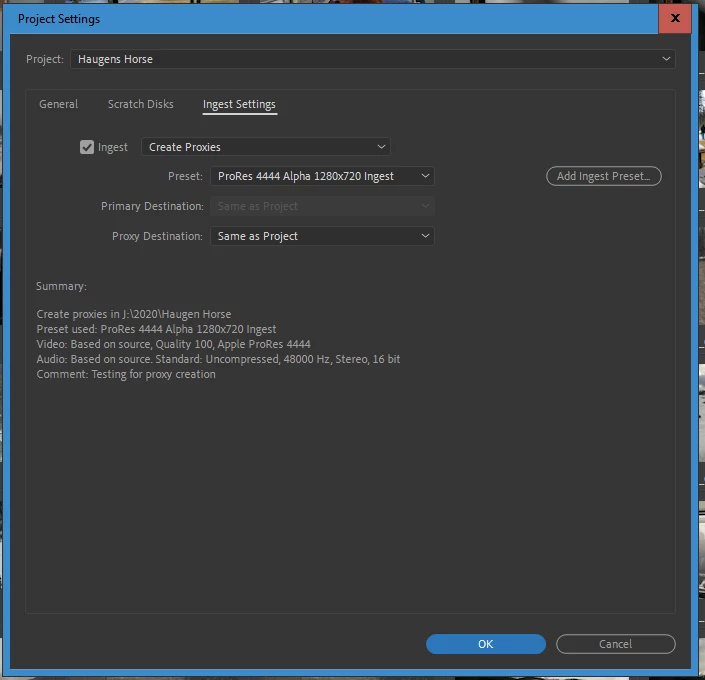
- I tried to create a proxy preset (smaller resolution) WITH ALPHA through Media Encoder, but you can not set a lower resolution in the Media Encoder: Preset > Create Ingest Preset.


Does anyone have any idea how to create a Ingest Preset with alpha (!) - resolution 1280 x 720 ?

Thanks a million


This topic has been closed for replies.
Correct answer R Neil Haugen

First create an encoding preset for ProRes 4444/alpha, and set the specific frame size.


Then create an Ingest preset say setting it to "Transcode" ... and using the encoding preset you used above.


Then go into the Premiere Media Browser, click on the wrench icon near the top, and then Ingest tab ... and navigate to the Users/<yourusername>/Documents/Adobe/AdobeMediaEncoder/14.0/Presets folder and select that ingest preset add set things similar to this one ...


Neil


2 replies

R Neil Haugen
Legend
January 17, 2020

The whole create a proxy preset process is so engineer's style, isn't it? If you know all the steps, well, it's darn obvious, right! Um ... well, what about the poor user just wanting to get stuff out the door for the nice people what pays our bills?


And I know a number of the engineers from several years of NAB/Vegas and Adobe MAX. They're all very nice people, editors in their own free time, and passionate about talking editing and the processes involved besides the background structure of the app. But most are so used to approaching things from how it's been structured to work and fit together ... that they may have trouble seeing how to blend that into something that's much clearer for the user to puzzle through.


Neil

Everyone's mileage always varies ...
Pim Feijen
Participant
January 17, 2020

Totally agree

If there weren´t guys like Neil out there, we´d be lost.

The Adobe guys are without any doubt nice guys. But they have not very often given me the answer that I was looking for.

Which is a sad thing...

Don´t know how, but half of the money should go to the community

R Neil Haugen
R Neil HaugenCorrect answer
Legend
January 17, 2020

First create an encoding preset for ProRes 4444/alpha, and set the specific frame size.


Then create an Ingest preset say setting it to "Transcode" ... and using the encoding preset you used above.


Then go into the Premiere Media Browser, click on the wrench icon near the top, and then Ingest tab ... and navigate to the Users/<yourusername>/Documents/Adobe/AdobeMediaEncoder/14.0/Presets folder and select that ingest preset add set things similar to this one ...


Neil


Everyone's mileage always varies ...
Pim Feijen
Participant
January 17, 2020

That is just pefect Neil; I missed the encoding preset

That works!

You saved my deadline: Thank you very much:-)