

Filmus
Known Participant
December 30, 2022
Answered

Proxy Files for whole project

  • December 30, 2022
  • 2 replies
  • 1927 views

Hi, they gave me a project where several terabytes of sources are used (SD/4K, .mov, .mp4, .mpeg,...). Everything is laid out in dozens of folders, thousands of clips in different formats. The sequence for an 2 hours is terribly slowing down. How do I create a proxy for everything that is in the project in a couple of clicks? I do not have time to walk on all folders, and select clips. Thanks.
This topic has been closed for replies.
Correct answer Ann Bens

How do you think I can see a list of all components laid out in hundreds of folders? The fact is that you probably do not take into account the structure of the project. Most users work with a bunch of source materials sent in the project window as oranges after an accident on the road. This is another case. Thanks for your attempt, but she does not save.


You hold down ALT and click on the triangle of a folder.

All will open. Then sort.

2 replies

Ann Bens
Community Expert
Community Expert
December 30, 2022

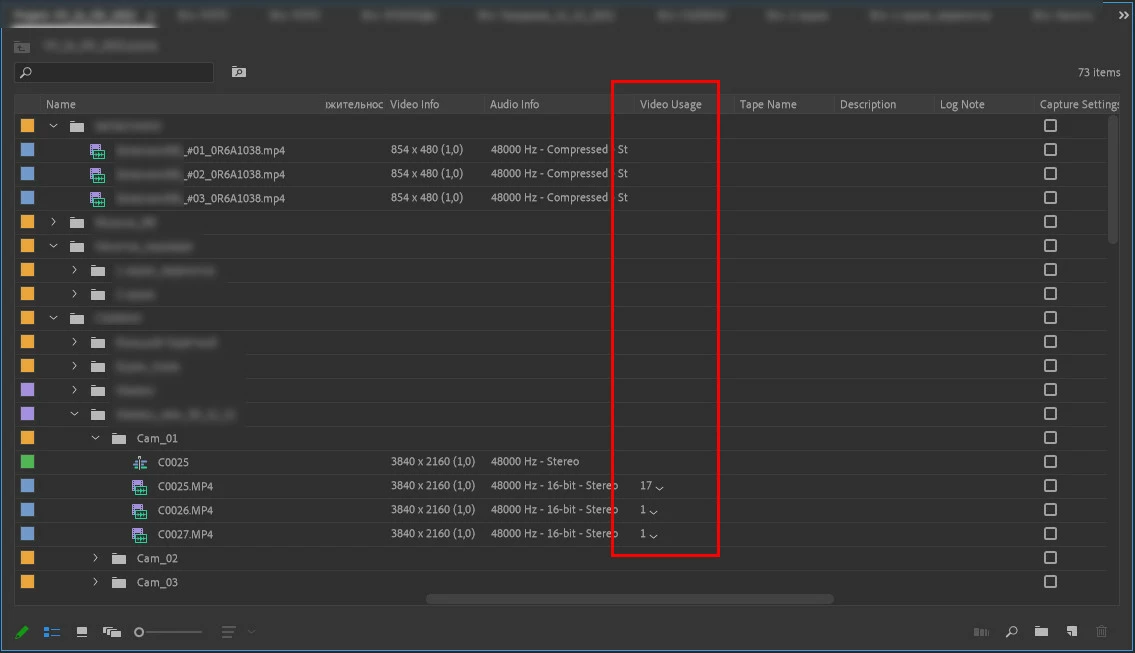
Use the metadata in the Project window.

Make Video Usage active and sort on that.

Filmus
FilmusAuthor
Known Participant
December 30, 2022

How can this help at all, could you take a screenshot for an example, please?

Ann Bens
Community Expert
Community Expert
December 30, 2022

Peru Bob
Community Expert
Community Expert
December 30, 2022

Go here:

https://blog.frame.io/2017/03/20/using-premiere-pro-proxy-workflows/


and scroll down to:

Creating Proxies from the Project Panel

Filmus
FilmusAuthor
Known Participant
December 30, 2022

I know how to create a proxy, the question is how to avoid huge routine.