


- Home
- Premiere Pro
- Discussions
- Re: Proxy multichannel audio doesn't include all a...
- Re: Proxy multichannel audio doesn't include all a...

Copy link to clipboard
Copied
Premiere Pro 15.0
macOS 10.15.6
I created a custom ingest preset for my Sony FX6 - 8 channels mapped to 8 mono tracks - but this is not working as it should:
1) As you can see from the waveforms; the master files various audio channels have not been transfered to the proxy file. Not that you can trust the waveform, because the waveform indicates that all 8 proxy-channels have been filled with channel 1 from the master file, but in reality...
2) ... I only have sound on the first proxy-channel - the seven remaing channels are, despite the lovely waveform, mute.
???



 1 Correct answer


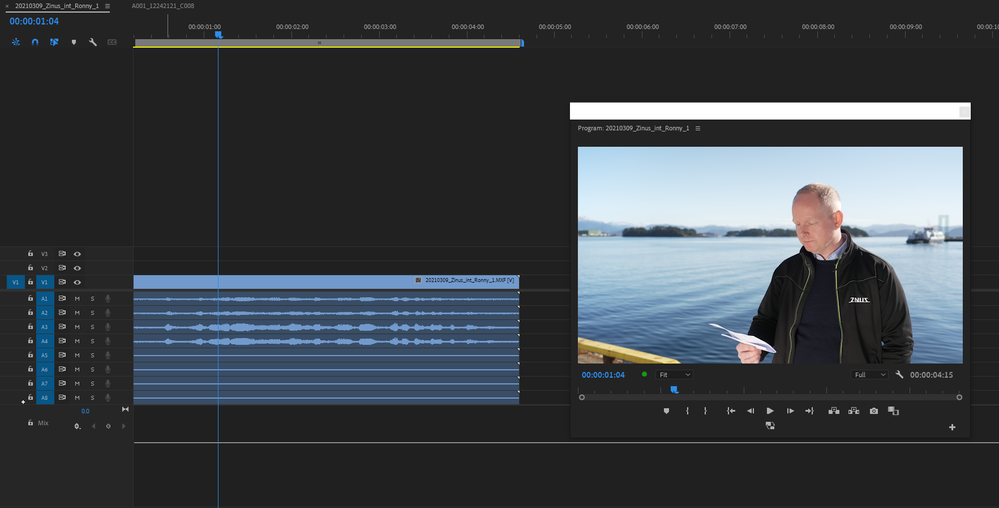
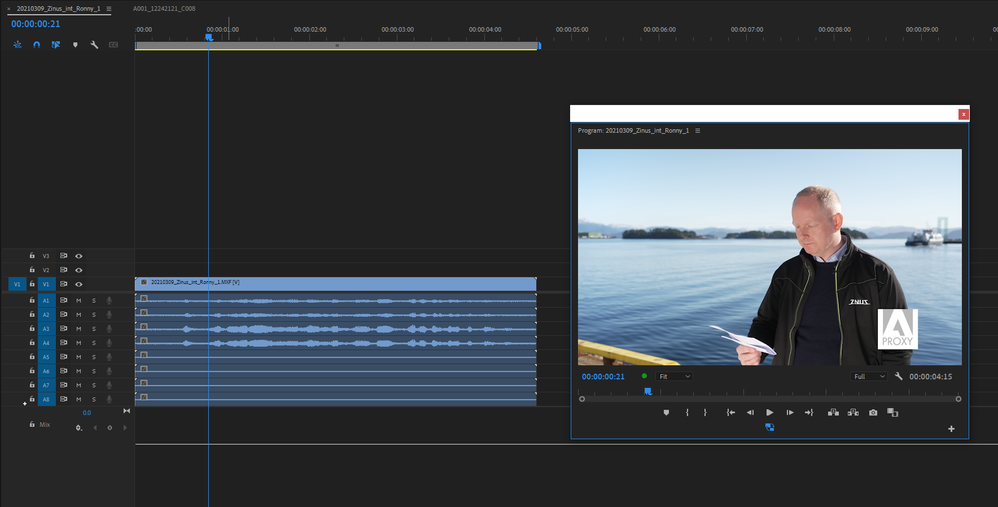
Sorry for the delay in replying, I have never used the Proxy workflow and I needed a couple of days to see how it works. Making new ingest presets is not the easiest, it should be more straight forward. Having said that I created a Prores proxy with 8 audio channels and I had the same problem as you, the audio was not mapped correctly. This was with the ProRes 422 Proxy. I then had a look at other codec options and I found this one seemed to work:


Your original footage
Proxy version

 14
Replies
14
14
Replies
14


Copy link to clipboard
Copied
You don't give us any details about your project, it's sequence setup, your audio hardware & how everything is set up & mapped in your system so I have to ask - is this a question about something, please, or a point, or a bug report or what?
Copy link to clipboard
Copied
For me the three question marks kinda give away the fact that I don't understand what's going on, but based on your tone I'm guessing you’re tired of people not understanding their own issues? In that case I'm sorry, because at the moment I don't know if this is a bug report or not. But I'd prefer it to be lack of knowledge on my part, because then I can find out what's wrong and fix it. With your kind help, of course 🙂
The reason I didn't include any setup information was I didn't think my problem related to that kind of information beyond what I already wrote regarding the audio channels. Again, sorry.
MXF wrapper: H264 MPEG-4 XAVC-I 3840x2160 25fps, with 8-channels of audio.
The sequence in Premiere was created using new sequence from clip, so that shouldn't be a problem. But maybe it is?
My audio hardware is a Universal Audio Apollo Twin interface.
How everything is set up and mapped beyond me choosing my interface as my default input/output I don’t know - I don’t speak tech, hence this post.
As mentioned the Sony FX6 has 8 audio channels, so my previous proxy ingests don't work (I got the famous “matching audio channels” error). I created a new Apple ProRes Proxy ingest; 8 mono channels with the various source channels set up:
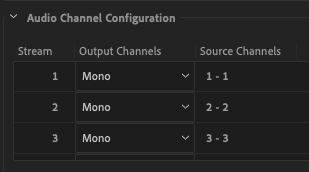
And there you have it. The result is as described above;
Only channel 1 from the source files is transfered to the proxy files while cannels 2-8 are discarded. The waveform however indicates that all 8 proxy-channels have audio (but only from channel 1), but they are in fact dead quiet.
So – is this a bug? Is it me?
Any help is appreciated! 🙂
Copy link to clipboard
Copied
I'm still trying to understand the project so please bear with me.
Are the 8 tracks on the source separate source material - along the lines of Dialogue, M&E, SFX etc, or are they final mixes configured in a similar way to the old-style DTRS tapes - Left, Right, Centre, LFE, Left Rear, Right Rear, M&E Left, M&E Right (or sometimes Stereo left/right for channels 7/8).
So are we talking a project that needs the audio to still be mixed, or a set of completed mixes already in sync?
Also, what is the project's purpose - it's end result? Do you need stereo or surround? I suspect I am probably reading too much into the 8-channel audio here simply because it sounds so similar to DTRS whereas it may well be that what you have on the source is not necessarily containing 8 separate audio mmixes - I have seen transfers sent to me that supposedly have 4 channels of audio but closer examination revealed one mix printed twice, for some reason. Is there any documentation with the source material, and what's your brief for the project?
I ask because this will have a definite bearing on how to set up an Audio template you will later be able to recall and adapt for other content.
Copy link to clipboard
Copied
The project isn't a video project per se, but an "I-want-to-understand-what's-going-on" project.
My only goal at the moment is to create proxy files that mirror the source files!
Sony FX6 camera:
Channel 1&2 are XLR 1&2 on the camera.
Channel 3&4 are low-quality built-in mic's (in the camera body).
Channel 5-8 are... well as far as I can tell they don't exist. Are they perhaps just a part of the MXF wrapper, because the camera itself only has four audio channels...?
Sometimes I'll want to use only one of the channels (like in the example in the original post - channel 2 is the lapel mic), sometimes I'll want to use both channels 1&2, and sometimes I'll remove the camera's top handle and require channels 3&4 for sound.
All I want is to create proxy files that reflect my source files!
The current bug/user fault only gives me sound from channel 1, so I can't work with my proxy files and hear the lapel mic, it's either heavy video with good audio, or light video but no audio...
One of the source files; https://www.dropbox.com/s/5b03hgtwebwo04w/20210309_Zinus_int_Ronny_1.MXF?dl=0
Copy link to clipboard
Copied
Would it be possible for you to Dropbox a short sample of the 8 track original?
Copy link to clipboard
Copied
As it so happens I have an amazing 4 second clip perfect for this situation 🙂
https://www.dropbox.com/s/5b03hgtwebwo04w/20210309_Zinus_int_Ronny_1.MXF?dl=0
A shotgun mic is connected to channel 1, a lapel mic to channel 2, and channels 3&4 are the internal mics.
And the language in question is Norwegian.
Copy link to clipboard
Copied
Sorry for the delay in replying, I have never used the Proxy workflow and I needed a couple of days to see how it works. Making new ingest presets is not the easiest, it should be more straight forward. Having said that I created a Prores proxy with 8 audio channels and I had the same problem as you, the audio was not mapped correctly. This was with the ProRes 422 Proxy. I then had a look at other codec options and I found this one seemed to work:
Your original footage
Proxy version

Copy link to clipboard
Copied
Interesting, Richard. The audio between t-code or proxy processes can be painful to sort out.
Neil

Copy link to clipboard
Copied
I have never been able to create functioning proxies with sony fx7 material and this sounds like the problem you're experiencing. Seems to be an issue with the way the 8 channels of audio are configured, but I did figure out a workaround. Create the proxies but rather than use them as proxies, select your camera original in premiere and "make offline" and the connect them to the proxies. Then when you're ready to output, make the clips offline in premiere and reconnect to the camera original. works just fine although not as elegant as the full proxy workflow.
Richard, thanks for the solution. Next time I'm presented with this sort of camera original, I'll give it a shot.
Copy link to clipboard
Copied
Thank you so much Richard - it worked perfectly!
I still don't understand why the mapping didn't work in ProRes as it should be able to use 8ch audio, but hey - as long as this solution does the trick I'm happy 🙂
Again - thank you for taking the time to help me with this!

Copy link to clipboard
Copied
Gonna jump in here 2 years later.
Got a new FX6 and am having trouble with 8 channel audio, when the camera is only recording 4 channels. The extra 4 channels are empty. That made editing a nightmare. So I experimented with proxy recording on the camera, and when proxy is enabled it only records two channels on the proxy MP4 (you can choose which two), but it then records 4 channels on the primary MXF. Then I switched off proxy, and the camera now records MXF with only 4 channels. Will that stick? Time will tell.

Copy link to clipboard
Copied
I just brought an FX6 v.3 after years of working on RED. Loved the idea of in camera proxy recording however, I'm hitting that nightmare message "“matching audio channels” error in Adobe Premier Pro when trying to connect the proxies. Does anyone know a way to attach in camera proxies in Adobe? is this a bug that can't be fixed? It seems to be something with the proxy stereo recording of CH1/2 whilst the camera is recording 8 channels in mono. Why can't we just attach the picture an ignore the audio! why even have in camera proxy recording if it doesn't work!
Copy link to clipboard
Copied
I was curious about this so I shot some footage with proxy and tried to bring it into Premier. I see the problem: The MFX file gives 8 mono audio channels (or 4 if you're lucky.) The MP4 proxy from the camera gives ONE stereo channel. No wonder there's an audio mismatch. I fear this audio channel multiplication is going to be a real serious problem.
Copy link to clipboard
Copied
Yea, that's gonna be an issue. Many of us have been pushing for the devs to give us the option to "ignore audio channel count mismatch" ... not successfully so far, clearly.
But we'd like the ability to tell Pr to use the blame proxy we tell it to.
Neil


Find more inspiration, events, and resources on the new Adobe Community
Explore Now
 AdChoices