
Participating Frequently
May 4, 2017
Question

PrPro CC17 Stuck on "Open Project" screen when opening project from another computer

  • May 4, 2017
  • 12 replies
  • 6615 views

My team and I have been having this problem for a while, before CC17 but it is persisting even in the newest update 17.0.2. When someone opens a project that was started on another workstation premiere will get stuck partially through opening it. It doesn't time out or show an error. It just never moves from this screen:
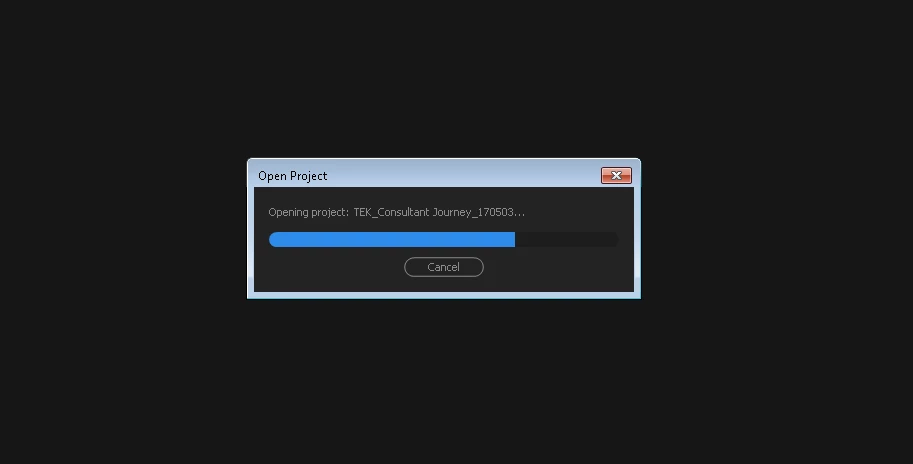
We work on a shared storage device (Promax Studio) and everyone has their own IP address to connect to it. We've had some issues with media being offline because of the different IP addresses but this is different. Premiere just stops on this screen no matter how long we leave it (I've left it as much as 8 hours but more than 5-110 mins is enough of a problem). I can't find any thread of a similar issue.

Any thoughts or solution ideas? Thanks!

This topic has been closed for replies.

12 replies

iStormIt
Participating Frequently
July 14, 2020
Hey! I have a potential solution/workaround! If anything of what I've written below works for you, then please reply so we can let others know.


Just spent 3 days fixing this problem whilst being in the middle of editing a feature film. First I was convinced it was our NAS that had some kind of internal indexing problem jumbodumbo. Then I thought it was something with my workstations hardware. I tried changing almost all components, graphics card, RAM, network card etc. I tried changing the all settings for the 10gbe networkcard. I basically tried everything. However non of that was the problem, this seem to be an issue with premiere by itslef.

Before you begin with my workaround below, doublecheck you've already tried these 4 things:

1. Does the computer you want to open the project on have all of the necessary plug-ins that was used on the previous computer. Don't forget about small plugins like the .braw plugin from Black Magic. If you don't have this installed but you have .braw files in the project, this could be the reason why premiere cannot open the project.
2. Figure out the exact version of premiere that the project file was saved in and install it on the workstation where you want to open the project. Unfortunately, at the moment im writing this, there still isn't a way to see what version of premiere the file was saved in by looking at the file alone (at least not a way I know of). Instead you have to start premiere on the computer where the file was saved and check that way. If that computer is no longer accessable you will unfortunately have to try a few different versions until you find the right one.
3. Try moving your project file to another drive and open it from there.
4. See if there is a very recent autosave and try opening that one instead.

If non of the above works for you, here is my workaround! To sum up what you are about to read, you basically need to offline everything manually, create a new project, and then import parts of your old project into the new one whilst it's offline. But please read through the steps one by one.

1. Begin by copying your project file onto the NAS if it's not stored there already. Do not open it, just copy it over through finder/explorer. If it's already on the NAS, just make a new copy of it beside the original and use that copy for this workaround.

2. Now boot any of the computers on which the file CAN be opened. Usually the computer where the file was last saved. - This is very random but Mac-computers tend to be able to open the files when they get stuck on opening like this. So if non of your PC workstations can do it, just install premiere on a Macbook if you or a college have one and try opening it on that. However if you have tried opening the file on several different computers but nothing works, then I would recommend re-checking the first 4 things at the top of this post.


3. Connect to the NAS and open the project via the computer that can open the project.

4. When the project is open, make sure to offline everything. If premiere wants you to locate media, just press offline all.

5. Save and close the project.

6. Re-open the same project.

7. Upon re-opening the project premiere might want you to locate files again even though you already made them offline. In that case, press "offline all" and then save and close again. You might have to repeat this process several times. I had to do it 6 times before everything in the file was truly offline.

8. Now we have a project file that wont attempt to locate any media what so ever.

9. While the project is open. Go to File and start a New Project. Save this new project next to the one you're currently in (It has to be somewhere on the NAS in accordance with step 1).

10. Now, whilst both projects are open. Drag the offline media and your sequences to the new empty project file you just created. Even though everything is offline, premiere might for some reason find this hard and crash if you do it all at once. So do it in parts. Start with the media and end with the sequences.

11. Save the NEW file and close everything.

12. Now we're getting close! Go back to the computer that you wish to work on and connect it to the NAS.

13. Open the new project file that you just saved.

14. At this point, the project file should open successfully but with all the media offline.

15. Now, "Save as" and put it where you actually want it. For example on a local NVMe. If you want it on the NAS where it already is, perform a "Save as" anyways and save a new version on the same location.

16. Close everything.

17. Open the file you just saved.

18. In the project window. Select a few files at a time, right click, and press "link media". Do this with a maximum of 600 files at a time to avoid premiere crashing on you. Now help premiere locate a bit of your media and the rest will link automatically like usual.

19. When all media is linked. Save your project and you will be back in business!

Took me 3 full days to figure out...
A suggestion to Adobe is that premiere should show the user some kind of information about what it's doing during the "opening project" progression. That would make it much easier to troubleshoot problems like these.


I hope this helps someone.

Inspiring
July 1, 2019

All of my projects are on a network drive (Synology NAS). Some are on 1Gb connections and some are on 10Gb connections. Anytime I try and switch between a comp on a 1 to a 10 it takes FOREVER to load. Everything has the same permissions. There is just a loophole somehow when looking for media or something. 

JaimeGomez78
Known Participant
July 1, 2019

july 1 2019. Last Premiere update. Can´t open a project that i stores in a network drive. Great Adobe.

R Neil Haugen
Legend
July 1, 2019

And no way any of us "here" can help as you provided so little information.

What version was the project created in?

How did you try to open it, of the several possible methods?

Neil

Everyone's mileage always varies ...
JaimeGomez78
Known Participant
July 1, 2019

The project was created in this last version. I try every form of open the project. A minute ago i found a work around: Create a local new project and import the project of the network drive on it. This way works, but...sucks.

cliffclof
Inspiring
June 15, 2019

I just had this exact issue.   It dawned on me that I wasn't logged into a network drive where my project was originally stored.    As soon as I logged into the network share location the project loaded right up.

Seems as though premiere will spin wheels and not let the user know if it runs into a network password request on project load.

I submitted a bug report.

danielm34227540
Participant
May 21, 2019

DaVinci Resolve looks better and better everyday....

Inspiring
May 21, 2019

Come on adobe!! this a joke. All you have to do is put a timeout on the search for media phase so the pop-up to reconnect media comes up sooner.

alexanderb57786470
Participant
January 15, 2019

Did anyone ever fix this? We have the exact same problem. I even tried to recreate the exact same projet files on several different computers. Making the exact same steps (load footage, save, check. Make timeline, save, check. Add effects, save check. Create proxies, save, check)...


All computers can open the projects instantly but then suddenly BOOM, one of the projects can ONLY be opened on the computer where it was created. Okay, they can be opened, but it goes from 5 seconds to at least 30 minutes... When it finally opens on the second computer you instantly resave it and bam... all computers can open it instantly.

- While opening no resources are really being used. Data over ethernet is low - same with CPU and RAM-usage.

- I have tried several versions of PP.

- If I copy the "bad" project file locally to a computer and opens it the problem is still there. But if I disconnect the computer from the network it will open instantly and say "media offline".

I believe the problem is that Premiere is trying to locate the footage when opening it and it takes forever for it to do so... Is it trying to index everything from local drives to network folders etc.??

I need a fix for this!!! It makes working together several editors such a pain in the ass.

jordand55927225
Participant
December 18, 2018

Just had the same issue, and let me say it's frustrating that no solution has been found for this. Come on Adobe, no excuse for a ticket like this to be open for well over a year.

I also work in a 10GbE network pipeline with 4 PC workstations and 1 iMac sharing projects. Same at my last job, we had over 10 workstations sharing projects and never had this issue in 5 years of working there. The project that presented the issue is a rather large one containing 3 days of footage from 3 cameras. It has been shared between mac/pc and all of our workstations for well over a year without any problems. Then all of a sudden I went to open it yesterday and the "opening project" dialogue box would get stuck in the same spot and never progress further, even if we left it for 12+ hours. I tried everything I could think of including trashing all my cache files, opening autosaves, and disconnecting from the server to force the footage offline. Nothing worked. Then looking at the project files properties I could see it was last edited on a MBP that isn't part of our 10GbE pipeline, it connects over 1GbE.

So as a last ditch effort I opened the project on that computer, it opened right away! I immediately saved a new version of the project and opened it on our 10GbE workstations and it opened without any issue. I still can't pinpoint the source of what caused this, we are all on the same 12.1.2 version of Pr. 

Team projects doesn't work for us either, so I would love some answers.

danielm34227540
Participant
November 28, 2018

Hey Ben,

I am on the Promax system as well, we work in a studio and have this exact same issue. I have never been able to get to the bottom of this myself. Updating Premiere does this no matter what version we have, it seems to be completely random in terms of projects.

Did you ever come to a solution?

skeletonproductions
Participant
September 12, 2018

Hello,

I am having the same issue.

I copied a project from one machine to another and run into the same issues as described in the original post. From the screenshot, it looks like my project hangs around the same place on opening too. I can't open the Auto-saves either.

Was there ever a solution to this?

Cheers,

Ollie

Participating Frequently
September 27, 2018

Hi Ollie,

I never got an answer to this problem so we just had to avoid sharing project files on the machines that were having this problem. I guess they figured we were lost causes.

Sorry, and good luck!