
Inspiring
June 6, 2024
Answered

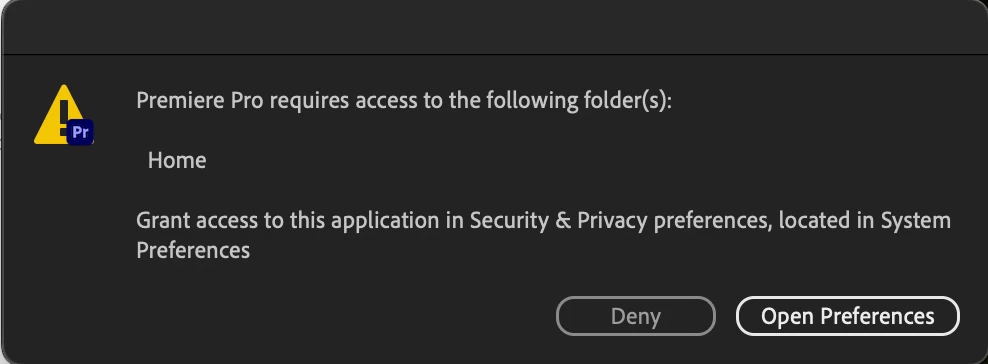
PrPro won't open because it needs access to 'Home' folder, but it has full disk access?

  • June 6, 2024
  • 9 replies
  • 1381 views

Currently using:

PrPro 24.4.1

Mac M1 Mas, Sonoma 14.5


When I try to open Premiere Pro, I get this message: 
 

When I open preferences, I see this:
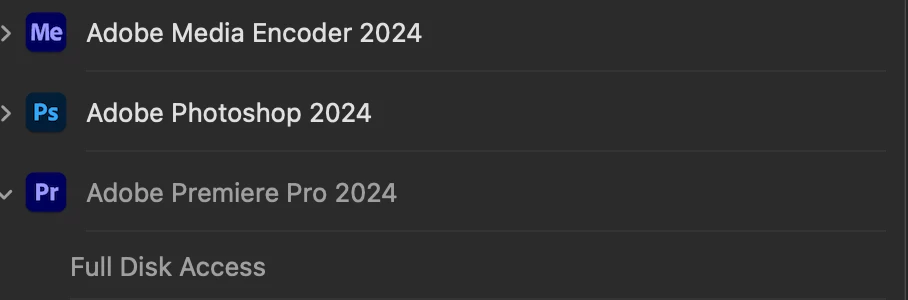
 

This fix for this in the past has been to uninstall the current version, and reinstall the previous version. That is no longer working. 


The program will not open without the access it "needs," despite having full access. 

Correct answer Taylor42

I finally got it! Somehow my read/write permissions for my home folder had been changed to "read-only." PrPro works properly. 

9 replies

Bruce Bullis
Legend
June 6, 2024

Nice troubleshooting!

Taylor42AuthorCorrect answer
Inspiring
June 6, 2024

I finally got it! Somehow my read/write permissions for my home folder had been changed to "read-only." PrPro works properly. 

Participant
June 11, 2025

Where is the home folder?

Taylor42Author
Inspiring
June 6, 2024

Same results post CC-cleaner and reinstall. Still getting the message needing access, and still running into the same process. 

Bruce Bullis
Legend
June 6, 2024

The fact that you still see 'ghost apps' in MacOS prefs, after running PPro's uninstaller, makes me recommend running Adobe's Cleaner tool.

https://helpx.adobe.com/creative-cloud/kb/cc-cleaner-tool-installation-problems.html

Taylor42Author
Inspiring
June 6, 2024

I have tried that indeed. When I uninstall PrPro, it will still show as a program with full disk access until I remove it. (I can add/remove in the disk access section, but not the files and folders section.)

Bruce Bullis
Legend
June 6, 2024

Ahh, you're a step ahead then. I would have recommended the de-/re-install approach, but you've already tried that...?

It'd be interesting to know what, if anything, still appears in the Privacy & Security prefs, once you've removed PPro. 

Taylor42Author
Inspiring
June 6, 2024

I should add, when I turn full disk access off, PrPro is no longer listed in the "Files and Folders" section, and I cannot add it. 

Taylor42Author
Inspiring
June 6, 2024

Hey Bruce,


That screenshot is actually from the "Files and Folders" section. When that carrot is clicked, I'm only able to see "Full Disk Access," which is also greyed out. Other Adobe applications are able to be selected and manipulated, but PrPro is not. 

Bruce Bullis
Legend
June 6, 2024

Above the "Full disk access" section of MacOS's Privacy and Security prefs, is the "Files and Folders" section, which is where PPro needs to be enabled.

[MacOS supports non-local User directories, so 'Full Disk Access' won't necessarily give PPro what it needs.]