
Participant
September 3, 2020
Answered

Prproj files

  • September 3, 2020
  • 1 reply
  • 3083 views

I have not had Premiere Pro for about a year. When I saved a file before it would save with Premiere Pro icon. Now it saves as an internet explorer icon and only opens if I right-click open with or open directly from Adobe Premiere Pro. If I try to open with the explorer icon it wants to download and save. Is there a way to fix this where the project file is shown as a Premiere Pro icon?
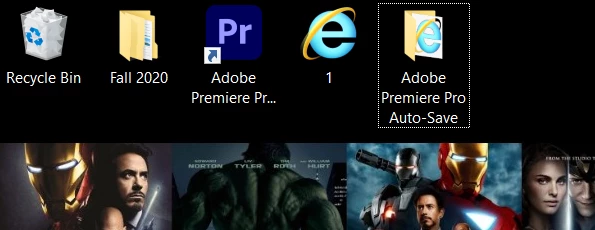
 

This topic has been closed for replies.
Correct answer Averdahl

Right click on the Internet Explorer file and choose Open With. Now, select Premiere Pro if it is on the list or choose More Apps if it is not. Before clicking OK, make sure to check "Always use this app to open .prproj files".


This should fix it.

1 reply

Averdahl
Community Expert
AverdahlCommunity ExpertCorrect answer
Community Expert
September 3, 2020

Right click on the Internet Explorer file and choose Open With. Now, select Premiere Pro if it is on the list or choose More Apps if it is not. Before clicking OK, make sure to check "Always use this app to open .prproj files".


This should fix it.

Jose5F91Author
Participant
September 4, 2020

Thanks so much.