
Participant
November 27, 2022
Question

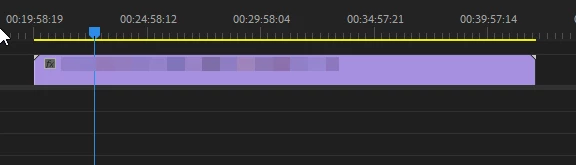
Purple video with no audio when importing copied mkv to mp4 video - Premiere Pro 2023

  • November 27, 2022
  • 3 replies
  • 2116 views

When importing videos who were copied from mkv to mp4 they become purple and with no audio. I don't want to convert the videos because it changes the videos. I have tried different softwares to copy the video and I am left with the same results.
This topic has been closed for replies.

3 replies

Kevin J. Monahan Jr.
Community Manager
Community Manager
November 27, 2022
Hi, Lucas,
I am so sorry that mkv is not currently a supported format, so I don't think the team will consider this issue for a bug fix. I will move this post to the general discussion board. I hope we can help you with troubleshooting.
 
I can recommend you create a feature request for mkv support.
 
Thanks,
Kevin
Kevin Monahan - Sr. Community and Engagement Strategist – Adobe Pro Video and Audio
Ann Bens
Community Expert
Community Expert
November 27, 2022

Most likely an codec that is not supported.

Post mediainfo of clip in treeview here on forum.

MediaInfo

Participant
November 27, 2022

Ann Bens
Community Expert
Community Expert
November 27, 2022

1st audio is DTS (not supported) which is not supported, second is ac3.

Dont think those two mix very well.

What is the origin of the file?

R Neil Haugen
Legend
November 27, 2022

Transcoding through several generations is a long-established professional tool in most major workflows. You think Hollywood movies are produced always from the original files? Not ... hardly.


All the vfx plates typically go through several generations. And this is on things designed to be seen on a 20 foot tall 50 foot wide screen, not just on a computer monitor or TV ... or phone screen.


I work with/for/teach a lot of colorists. Most of whom have MASSIVE machines, but they hate grading long-GOP (H.264/5) media with a purple passion. So ANY long-GOP media that comes in for a grade typically gets t-coded to whatever format/codec they prefer working with before it's brought into Resolve or Baselight for the grade.


If you're working in Avid, long the "big dog" of Hollywood workflows, all media brought in has typically been t-coded to a single format/codec for the entire process.


So ... what is so special about your media that it can't take a proper t-code process, but all the big folks in long-form can go through several generations at need? I doubt ... there would ever be a problem.


What's the framesize & bitrate of that mkv? Use a ProRes, DNx, or Cineform that is at the same framesize and same or a bit higher bitrate. You will never be able to find a difference.


Neil

Everyone's mileage always varies ...
Participant
November 27, 2022

I tried transcoding but it changed the clip, I probably did something wrong