
Answered
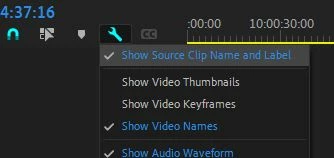
"Display the project item name and label color for all instances" not working in Premiere 22.1.2
- January 4, 2022
- 2 replies
- 1393 views
When I open a new project, at the project settings - I ticked the box marked "Display the project item name and label color for all instances". But when I am in the project and color coding my rushes that function doesn't work. When ever I change the color in my browser it doesnt automatically change the exact same rushes in my time line. In fact when I go back in to my project that particular function has dissapeared!
Ive tried creating new projects and its the same problem - The option is there when you start a new project but inside said new project it doesnt work... Is there anyway of goin around this. I am working on a truck loads of rushes spanning 3 years and its gonna be really painful to do this manually!!!
 AdChoices